Class AboutDialog
- All Implemented Interfaces:
Accessible,Buildable,ConstraintTarget,ShortcutManager,Proxy
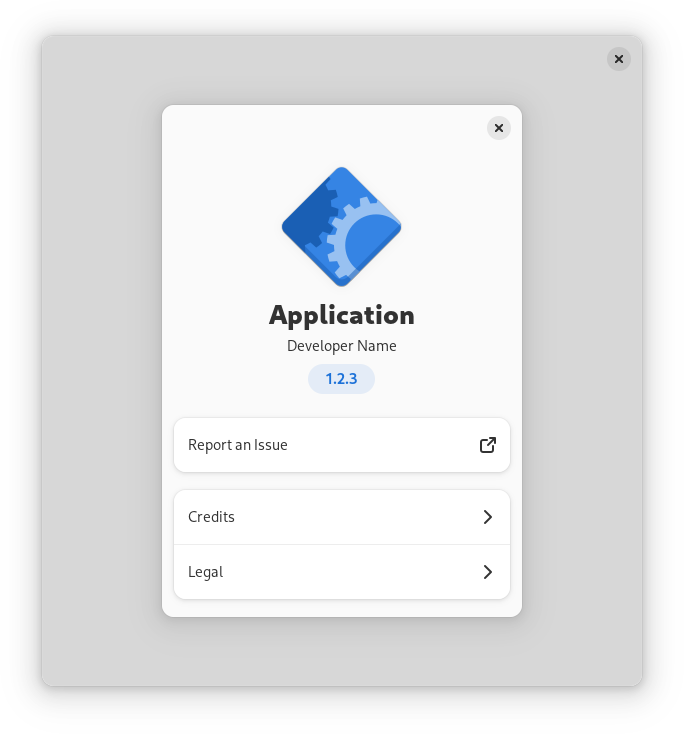
an about dialog is typically opened when the user activates the About …
item in the application's primary menu. All parts of the dialog are optional.
Main page
AdwAboutDialog prominently displays the application's icon, name, developer
name and version. They can be set with the AboutDialog:application-icon,
AboutDialog:application-name,
AboutDialog:developer-name and AboutDialog:version
respectively.
What's New
AdwAboutDialog provides a way for applications to display their release
notes, set with the AboutDialog:release-notes property.
Release notes are formatted the same way as AppStream descriptions.
The supported formatting options are:
- Paragraph (
<p>) - Ordered list (
<ol>), with list items (<li>) - Unordered list (
<ul>), with list items (<li>)
Within paragraphs and list items, emphasis (<em>) and inline code
(<code>) text styles are supported. The emphasis is rendered in italic,
while inline code is shown in a monospaced font.
Any text outside paragraphs or list items is ignored.
Nested lists are not supported.
Only one version can be shown at a time. By default, the displayed version
number matches AboutDialog:version. Use
AboutDialog:release-notes-version to override it.
Details
The Details page displays the application comments and links.
The comments can be set with the AboutDialog:comments property.
Unlike Gtk.AboutDialog:comments, this string can be long and
detailed. It can also contain links and Pango markup.
To set the application website, use AboutDialog:website.
To add extra links below the website, use addLink(java.lang.String, java.lang.String).
If the Details page doesn't have any other content besides website, the website will be displayed on the main page instead.
Troubleshooting
AdwAboutDialog displays the following two links on the main page:
- Support Questions, set with the
AboutDialog:support-urlproperty, - Report an Issue, set with the
AboutDialog:issue-urlproperty.
Additionally, applications can provide debugging information. It will be
shown separately on the Troubleshooting page. Use the
AboutDialog:debug-info property to specify it.
It's intended to be attached to issue reports when reporting issues against the application. As such, it cannot contain markup or links.
AdwAboutDialog provides a quick way to save debug information to a file.
When saving, AboutDialog:debug-info-filename would be used as
the suggested filename.
Credits and Acknowledgements
The Credits page has the following default sections:
- Developers, set with the
AboutDialog:developersproperty, - Designers, set with the
AboutDialog:designersproperty, - Artists, set with the
AboutDialog:artistsproperty, - Documenters, set with the
AboutDialog:documentersproperty, - Translators, set with the
AboutDialog:translator-creditsproperty.
When setting translator credits, use the strings "translator-credits" or
"translator_credits" and mark them as translatable.
The default sections that don't contain any names won't be displayed.
The Credits page can also contain an arbitrary number of extra sections below
the default ones. Use addCreditSection(java.lang.String, java.lang.String[]) to add them.
The Acknowledgements page can be used to acknowledge additional people and
organizations for their non-development contributions. Use
addAcknowledgementSection(java.lang.String, java.lang.String[]) to add sections to it. For
example, it can be used to list backers in a crowdfunded project or to give
special thanks.
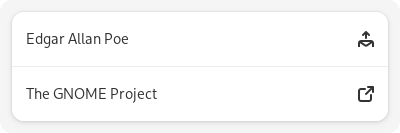
Each of the people or organizations can have an email address or a website
specified. To add a email address, use a string like
Edgar Allan Poe <edgar@poe.com>. To specify a website with a title, use a
string like The GNOME Project https://www.gnome.org:
Legal
The Legal page displays the copyright and licensing information for the
application and other modules.
The copyright string is set with the AboutDialog:copyright
property and should be a short string of one or two lines, for example:
© 2022 Example.
Licensing information can be quickly set from a list of known licenses with
the AboutDialog:license-type property. If the application's
license is not in the list, AboutDialog:license can be used
instead.
To add information about other modules, such as application dependencies or
data, use addLegalSection(java.lang.String, java.lang.String, org.gnome.gtk.License, java.lang.String).
Other applications
AdwAboutDialog can show links to your other apps at the end of the main
page. To add them, use addOtherApp(java.lang.String, java.lang.String, java.lang.String).
Constructing
To make constructing an AdwAboutDialog as convenient as possible, you can
use the function Adw.showAboutDialog(org.gnome.gtk.Widget, java.lang.String, java.lang.Object...) which constructs and shows a
dialog.
static void
 show_about (GtkApplication *app)
 {
   const char *developers[] = {
     "Angela Avery",
     NULL
   };

   const char *designers[] = {
     "GNOME Design Team",
     NULL
   };

   adw_show_about_dialog (GTK_WIDGET (gtk_application_get_active_window (app)),
                          "application-name", _("Example"),
                          "application-icon", "org.example.App",
                          "version", "1.2.3",
                          "copyright", "© 2022 Angela Avery",
                          "issue-url", "https://gitlab.gnome.org/example/example/-/issues/",
                          "license-type", GTK_LICENSE_GPL_3_0,
                          "developers", developers,
                          "designers", designers,
                          "translator-credits", _("translator-credits"),
                          NULL);
 }
CSS nodes
AdwAboutDialog has a main CSS node with the name dialog and the
style class .about.
- Since:
- 1.5
-
Nested Class Summary
Nested ClassesModifier and TypeClassDescriptionstatic classstatic interfaceFunctional interface declaration of theActivateLinkCallbackcallback.static classAboutDialog.Builder<B extends AboutDialog.Builder<B>>Inner class implementing a builder pattern to construct a GObject with properties.Nested classes/interfaces inherited from class org.gnome.adw.Dialog
Dialog.CloseAttemptCallback, Dialog.ClosedCallback, Dialog.DialogClassNested classes/interfaces inherited from class org.gnome.gtk.Widget
Widget.DestroyCallback, Widget.DirectionChangedCallback, Widget.HideCallback, Widget.KeynavFailedCallback, Widget.MapCallback, Widget.MnemonicActivateCallback, Widget.MoveFocusCallback, Widget.QueryTooltipCallback, Widget.RealizeCallback, Widget.ShowCallback, Widget.StateFlagsChangedCallback, Widget.UnmapCallback, Widget.UnrealizeCallback, Widget.Widget$Impl, Widget.WidgetClassNested classes/interfaces inherited from class org.gnome.gobject.InitiallyUnowned
InitiallyUnowned.InitiallyUnownedClassNested classes/interfaces inherited from class org.gnome.gobject.GObject
GObject.NotifyCallback, GObject.ObjectClassNested classes/interfaces inherited from interface org.gnome.gtk.Accessible
Accessible.Accessible$Impl, Accessible.AccessibleInterfaceNested classes/interfaces inherited from interface org.gnome.gtk.Buildable
Buildable.Buildable$Impl, Buildable.BuildableIfaceNested classes/interfaces inherited from interface org.gnome.gtk.ConstraintTarget
ConstraintTarget.ConstraintTarget$Impl, ConstraintTarget.ConstraintTargetInterfaceNested classes/interfaces inherited from interface org.gnome.gtk.ShortcutManager
ShortcutManager.ShortcutManager$Impl, ShortcutManager.ShortcutManagerInterface -
Constructor Summary
ConstructorsConstructorDescriptionCreates a new AboutDialog.AboutDialog(MemorySegment address) Create a AboutDialog proxy instance for the provided memory address. -
Method Summary
Modifier and TypeMethodDescriptionvoidaddAcknowledgementSection(@Nullable String name, @Nullable String @Nullable [] people) Adds a section to the Acknowledgements page.voidaddCreditSection(@Nullable String name, @Nullable String @Nullable [] people) Adds an extra section to the Credits page.voidaddLegalSection(String title, @Nullable String copyright, License licenseType, @Nullable String license) Adds an extra section to the Legal page.voidAdds an extra link to the Details page.voidaddOtherApp(String appid, String name, String summary) Adds another application toself.protected AboutDialogasParent()Returns this instance as if it were its parent type.static AboutDialog.Builder<? extends AboutDialog.Builder> builder()AAboutDialog.Builderobject constructs aAboutDialogwith the specified properties.booleanemitActivateLink(String uri) Emits the "activate-link" signal.static DialogfromAppdata(String resourcePath, @Nullable String releaseNotesVersion) Creates a newAdwAboutDialogusing AppStream metadata.Gets the name of the application icon forself.Gets the application name forself.@Nullable String @Nullable []Gets the list of artists of the application.Gets the comments about the application.Gets the copyright information forself.Gets the debug information forself.Gets the debug information filename forself.@Nullable String @Nullable []Gets the list of designers of the application.Gets the developer name forself.@Nullable String @Nullable []Gets the list of developers of the application.@Nullable String @Nullable []Gets the list of documenters of the application.Gets the issue tracker URL forself.Gets the license forself.Gets the license type forself.static MemoryLayoutThe memory layout of the native struct.Gets the release notes forself.Gets the version described by the application's release notes.Gets the URL of the support page forself.Gets the translator credits string.static @Nullable TypegetType()Get the GType of the AboutDialog classGets the version forself.Gets the application website URL forself.Emitted when a URL is activated.voidsetApplicationIcon(String applicationIcon) Sets the name of the application icon forself.voidsetApplicationName(String applicationName) Sets the application name forself.voidsetArtists(@Nullable String @Nullable [] artists) Sets the list of artists of the application.voidsetComments(String comments) Sets the comments about the application.voidsetCopyright(String copyright) Sets the copyright information forself.voidsetDebugInfo(String debugInfo) Sets the debug information forself.voidsetDebugInfoFilename(String filename) Sets the debug information filename forself.voidsetDesigners(@Nullable String @Nullable [] designers) Sets the list of designers of the application.voidsetDeveloperName(String developerName) Sets the developer name forself.voidsetDevelopers(@Nullable String @Nullable [] developers) Sets the list of developers of the application.voidsetDocumenters(@Nullable String @Nullable [] documenters) Sets the list of documenters of the application.voidsetIssueUrl(String issueUrl) Sets the issue tracker URL forself.voidsetLicense(String license) Sets the license forself.voidsetLicenseType(License licenseType) Sets the license for this AboutDialog from a list of known licenses.voidsetReleaseNotes(String releaseNotes) Sets the release notes forself.voidsetReleaseNotesVersion(String version) Sets the version described by the application's release notes.voidsetSupportUrl(String supportUrl) Sets the URL of the support page forself.voidsetTranslatorCredits(String translatorCredits) Sets the translator credits string.voidsetVersion(String version) Sets the version forself.voidsetWebsite(String website) Sets the application website URL forself.Methods inherited from class org.gnome.adw.Dialog
addBreakpoint, close, closeAttempt, closed, emitCloseAttempt, emitClosed, forceClose, getCanClose, getChild, getContentHeight, getContentWidth, getCurrentBreakpoint, getDefaultWidget, getFocus, getFollowsContentSize, getPresentationMode, getTitle, onCloseAttempt, onClosed, present, setCanClose, setChild, setContentHeight, setContentWidth, setDefaultWidget, setFocus, setFollowsContentSize, setPresentationMode, setTitleMethods inherited from class org.gnome.gtk.Widget
actionSetEnabled, activateActionIfExists, activateDefault, activateWidget, addController, addCssClass, addMnemonicLabel, addTickCallback, allocate, childFocus, computeBounds, computeExpand, computeExpand, computePoint, computeTransform, contains, createPangoContext, createPangoLayout, cssChanged, directionChanged, disposeTemplate, dragCheckThreshold, emitDestroy, emitDirectionChanged, emitHide, emitKeynavFailed, emitMap, emitMnemonicActivate, emitMoveFocus, emitQueryTooltip, emitRealize, emitShow, emitStateFlagsChanged, emitUnmap, emitUnrealize, errorBell, focus, getAllocatedBaseline, getAllocatedHeight, getAllocatedWidth, getAllocation, getAncestor, getBaseline, getCanFocus, getCanTarget, getChildVisible, getClipboard, getColor, getCssClasses, getCssName, getCursor, getDefaultDirection, getDirection, getDisplay, getFirstChild, getFocusable, getFocusChild, getFocusOnClick, getFontMap, getFontOptions, getFrameClock, getHalign, getHasTooltip, getHeight, getHexpand, getHexpandSet, getLastChild, getLayoutManager, getLimitEvents, getMapped, getMarginBottom, getMarginEnd, getMarginStart, getMarginTop, getName, getNative, getNextSibling, getOpacity, getOverflow, getPangoContext, getParent, getPreferredSize, getPrevSibling, getPrimaryClipboard, getRealized, getReceivesDefault, getRequestMode, getRoot, getScaleFactor, getSensitive, getSettings, getSize, getSizeRequest, getStateFlags, getStyleContext, getTemplateChild, getTooltipMarkup, getTooltipText, getValign, getVexpand, getVexpandSet, getVisible, getWidth, grabFocus, hasCssClass, hasDefault, hasFocus, hasVisibleFocus, hide, inDestruction, initTemplate, insertActionGroup, insertAfter, insertBefore, isAncestor, isDrawable, isFocus, isSensitive, isVisible, keynavFailed, listMnemonicLabels, map, measure, mnemonicActivate, moveFocus, observeChildren, observeControllers, onDestroy, onDirectionChanged, onHide, onKeynavFailed, onMap, onMnemonicActivate, onMoveFocus, onQueryTooltip, onRealize, onShow, onStateFlagsChanged, onUnmap, onUnrealize, pick, pick, queryTooltip, queueAllocate, queueDraw, queueResize, realize, removeController, removeCssClass, removeMnemonicLabel, removeTickCallback, root, setCanFocus, setCanTarget, setChildVisible, setCssClasses, setCursor, setCursorFromName, setDefaultDirection, setDirection, setFocusable, setFocusChild, setFocusOnClick, setFontMap, setFontOptions, setHalign, setHasTooltip, setHexpand, setHexpandSet, setLayoutManager, setLimitEvents, setMarginBottom, setMarginEnd, setMarginStart, setMarginTop, setName, setOpacity, setOverflow, setParent, setReceivesDefault, setSensitive, setSizeRequest, setStateFlags, setStateFlags, setTooltipMarkup, setTooltipText, setValign, setVexpand, setVexpandSet, setVisible, shouldLayout, show, sizeAllocate, sizeAllocate, snapshot, snapshotChild, stateFlagsChanged, systemSettingChanged, translateCoordinates, triggerTooltipQuery, unmap, unparent, unrealize, unroot, unsetStateFlags, unsetStateFlagsMethods inherited from class org.gnome.gobject.GObject
addToggleRef, addWeakPointer, bindProperty, bindProperty, bindProperty, bindPropertyFull, bindPropertyFull, bindPropertyWithClosures, bindPropertyWithClosures, compatControl, connect, connect, connect, constructed, disconnect, dispatchPropertiesChanged, dispose, dupData, dupQdata, emit, emitNotify, finalize_, forceFloating, freezeNotify, get, getData, getProperty, getProperty, getProperty, getQdata, getv, interfaceFindProperty, interfaceInstallProperty, interfaceListProperties, isFloating, newInstance, newInstance, newv, notify, notify, notifyByPspec, onNotify, ref, refSink, removeToggleRef, removeWeakPointer, replaceData, replaceQdata, runDispose, set, setData, setDataFull, setProperty, setProperty, setProperty, setQdata, setQdataFull, setv, stealData, stealQdata, takeRef, thawNotify, unref, watchClosure, weakRef, weakUnref, withPropertiesMethods inherited from class org.gnome.gobject.TypeInstance
callParent, callParent, cast, getPrivate, readGClass, writeGClassMethods inherited from class org.javagi.base.ProxyInstance
equals, handle, hashCodeMethods inherited from class java.lang.Object
clone, finalize, getClass, notify, notifyAll, toString, wait, wait, waitMethods inherited from interface org.gnome.gtk.Accessible
announce, getAccessibleParent, getAccessibleRole, getAtContext, getBounds, getFirstAccessibleChild, getNextAccessibleSibling, getPlatformState, resetProperty, resetRelation, resetState, setAccessibleParent, updateNextAccessibleSibling, updatePlatformState, updateProperty, updateRelation, updateStateMethods inherited from interface org.gnome.gtk.Buildable
getBuildableId
-
Constructor Details
-
AboutDialog
Create a AboutDialog proxy instance for the provided memory address.- Parameters:
address- the memory address of the native object
-
AboutDialog
public AboutDialog()Creates a new AboutDialog.
-
-
Method Details
-
getType
-
getMemoryLayout
The memory layout of the native struct.- Returns:
- the memory layout
-
asParent
Returns this instance as if it were its parent type. This is mostly synonymous to the Javasuperkeyword, but will set the native typeclass function pointers to the parent type. When overriding a native virtual method in Java, "chaining up" withsuper.methodName()doesn't work, because it invokes the overridden function pointer again. To chain up, callasParent().methodName(). This will call the native function pointer of this virtual method in the typeclass of the parent type. -
fromAppdata
Creates a newAdwAboutDialogusing AppStream metadata.This automatically sets the following properties with the following AppStream values:
AboutDialog:application-iconis set from the<id>AboutDialog:application-nameis set from the<name>AboutDialog:developer-nameis set from the<name>within<developer>AboutDialog:versionis set from the version of the latest releaseAboutDialog:websiteis set from the<url type="homepage">AboutDialog:support-urlis set from the<url type="help">AboutDialog:issue-urlis set from the<url type="bugtracker">AboutDialog:license-typeis set from the<project_license>. If the license type retrieved from AppStream is not listed inGtk.License, it will be set toGTK_LICENCE_CUSTOM.
If
releaseNotesVersionis notNULL,AboutDialog:release-notes-versionis set to match it, whileAboutDialog:release-notesis set from the AppStream release description for that version.- Parameters:
resourcePath- The resource to usereleaseNotesVersion- The version to retrieve release notes for- Returns:
- the newly created
AdwAboutDialog - Since:
- 1.5
-
addAcknowledgementSection
Adds a section to the Acknowledgements page.This can be used to acknowledge additional people and organizations for their non-development contributions - for example, backers in a crowdfunded project.
Each name may contain email addresses and URLs, see the introduction for more details.
See also:
AboutDialog:developersAboutDialog:designersAboutDialog:artistsAboutDialog:documentersAboutDialog:translator-creditsaddCreditSection(java.lang.String, java.lang.String[])
- Parameters:
name- the section namepeople- the list of names- Since:
- 1.5
-
addCreditSection
Adds an extra section to the Credits page.Extra sections are displayed below the standard categories.
Each name may contain email addresses and URLs, see the introduction for more details.
See also:
AboutDialog:developersAboutDialog:designersAboutDialog:artistsAboutDialog:documentersAboutDialog:translator-creditsaddAcknowledgementSection(java.lang.String, java.lang.String[])
- Parameters:
name- the section namepeople- the list of names- Since:
- 1.5
-
addLegalSection
public void addLegalSection(String title, @Nullable String copyright, License licenseType, @Nullable String license) Adds an extra section to the Legal page.Extra sections will be displayed below the application's own information.
The parameters
copyright,licenseTypeandlicensewill be used to present the it the same way asAboutDialog:copyright,AboutDialog:license-typeandAboutDialog:licenseare for the application's own information.See those properties for more details.
This can be useful to attribute the application dependencies or data.
Examples:
adw_about_dialog_add_legal_section (ADW_ABOUT_DIALOG (about), _("Copyright and a known license"), "© 2022 Example", GTK_LICENSE_LGPL_2_1, NULL); adw_about_dialog_add_legal_section (ADW_ABOUT_DIALOG (about), _("Copyright and custom license"), "© 2022 Example", GTK_LICENSE_CUSTOM, "Custom license text"); adw_about_dialog_add_legal_section (ADW_ABOUT_DIALOG (about), _("Copyright only"), "© 2022 Example", GTK_LICENSE_UNKNOWN, NULL); adw_about_dialog_add_legal_section (ADW_ABOUT_DIALOG (about), _("Custom license only"), NULL, GTK_LICENSE_CUSTOM, "Something completely custom here.");- Parameters:
title- the name of the sectioncopyright- a copyright stringlicenseType- the type of licenselicense- custom license information- Since:
- 1.5
-
addLink
-
addOtherApp
Adds another application toself.The application will be displayed at the bottom of the main page, in a separate section. Each added application will be presented as a row with
titleandsummary,as well as an icon with the nameappid.Clicking the row will showappidin the software center app.This can be used to link to your other applications if you have multiple.
Example:
adw_about_dialog_add_other_app (ADW_ABOUT_DIALOG (about), "org.gnome.Boxes", _("Boxes"), _("Virtualization made simple"));- Parameters:
appid- the application IDname- the application namesummary- the application summary- Since:
- 1.7
-
getApplicationIcon
Gets the name of the application icon forself.- Returns:
- the application icon name
- Since:
- 1.5
-
getApplicationName
Gets the application name forself.- Returns:
- the application name
- Since:
- 1.5
-
getArtists
Gets the list of artists of the application.- Returns:
- The list of artists
- Since:
- 1.5
-
getComments
Gets the comments about the application.- Returns:
- the comments
- Since:
- 1.5
-
getCopyright
Gets the copyright information forself.- Returns:
- the copyright information
- Since:
- 1.5
-
getDebugInfo
Gets the debug information forself.- Returns:
- the debug information
- Since:
- 1.5
-
getDebugInfoFilename
Gets the debug information filename forself.- Returns:
- the debug information filename
- Since:
- 1.5
-
getDesigners
Gets the list of designers of the application.- Returns:
- The list of designers
- Since:
- 1.5
-
getDeveloperName
Gets the developer name forself.- Returns:
- the developer_name
- Since:
- 1.5
-
getDevelopers
Gets the list of developers of the application.- Returns:
- The list of developers
- Since:
- 1.5
-
getDocumenters
Gets the list of documenters of the application.- Returns:
- The list of documenters
- Since:
- 1.5
-
getIssueUrl
Gets the issue tracker URL forself.- Returns:
- the issue tracker URL
- Since:
- 1.5
-
getLicense
-
getLicenseType
Gets the license type forself.- Returns:
- the license type
- Since:
- 1.5
-
getReleaseNotes
Gets the release notes forself.- Returns:
- the release notes
- Since:
- 1.5
-
getReleaseNotesVersion
Gets the version described by the application's release notes.- Returns:
- the release notes version
- Since:
- 1.5
-
getSupportUrl
Gets the URL of the support page forself.- Returns:
- the support page URL
- Since:
- 1.5
-
getTranslatorCredits
Gets the translator credits string.- Returns:
- The translator credits string
- Since:
- 1.5
-
getVersion
-
getWebsite
Gets the application website URL forself.- Returns:
- the website URL
- Since:
- 1.5
-
setApplicationIcon
Sets the name of the application icon forself.The icon is displayed at the top of the main page.
- Parameters:
applicationIcon- the application icon name- Since:
- 1.5
-
setApplicationName
Sets the application name forself.The name is displayed at the top of the main page.
- Parameters:
applicationName- the application name- Since:
- 1.5
-
setArtists
Sets the list of artists of the application.It will be displayed on the Credits page.
Each name may contain email addresses and URLs, see the introduction for more details.
See also:
AboutDialog:developersAboutDialog:designersAboutDialog:documentersAboutDialog:translator-creditsaddCreditSection(java.lang.String, java.lang.String[])addAcknowledgementSection(java.lang.String, java.lang.String[])
- Parameters:
artists- the list of artists- Since:
- 1.5
-
setComments
Sets the comments about the application.Comments will be shown on the Details page, above links.
Unlike
Gtk.AboutDialog:comments, this string can be long and detailed. It can also contain links and Pango markup.- Parameters:
comments- the comments- Since:
- 1.5
-
setCopyright
Sets the copyright information forself.This should be a short string of one or two lines, for example:
© 2022 Example.The copyright information will be displayed on the Legal page, before the application license.
addLegalSection(java.lang.String, java.lang.String, org.gnome.gtk.License, java.lang.String)can be used to add copyright information for the application dependencies or other components.- Parameters:
copyright- the copyright information- Since:
- 1.5
-
setDebugInfo
Sets the debug information forself.Debug information will be shown on the Troubleshooting page. It's intended to be attached to issue reports when reporting issues against the application.
AdwAboutDialogprovides a quick way to save debug information to a file. When saving,AboutDialog:debug-info-filenamewould be used as the suggested filename.Debug information cannot contain markup or links.
- Parameters:
debugInfo- the debug information- Since:
- 1.5
-
setDebugInfoFilename
Sets the debug information filename forself.It will be used as the suggested filename when saving debug information to a file.
See
AboutDialog:debug-info.- Parameters:
filename- the debug info filename- Since:
- 1.5
-
setDesigners
Sets the list of designers of the application.It will be displayed on the Credits page.
Each name may contain email addresses and URLs, see the introduction for more details.
See also:
AboutDialog:developersAboutDialog:artistsAboutDialog:documentersAboutDialog:translator-creditsaddCreditSection(java.lang.String, java.lang.String[])addAcknowledgementSection(java.lang.String, java.lang.String[])
- Parameters:
designers- the list of designers- Since:
- 1.5
-
setDeveloperName
Sets the developer name forself.The developer name is displayed on the main page, under the application name.
If the application is developed by multiple people, the developer name can be set to values like "AppName team", "AppName developers" or "The AppName project", and the individual contributors can be listed on the Credits page, with
AboutDialog:developersand related properties.- Parameters:
developerName- the developer name- Since:
- 1.5
-
setDevelopers
Sets the list of developers of the application.It will be displayed on the Credits page.
Each name may contain email addresses and URLs, see the introduction for more details.
See also:
AboutDialog:designersAboutDialog:artistsAboutDialog:documentersAboutDialog:translator-creditsaddCreditSection(java.lang.String, java.lang.String[])addAcknowledgementSection(java.lang.String, java.lang.String[])
- Parameters:
developers- the list of developers- Since:
- 1.5
-
setDocumenters
Sets the list of documenters of the application.It will be displayed on the Credits page.
Each name may contain email addresses and URLs, see the introduction for more details.
See also:
AboutDialog:developersAboutDialog:designersAboutDialog:artistsAboutDialog:translator-creditsaddCreditSection(java.lang.String, java.lang.String[])addAcknowledgementSection(java.lang.String, java.lang.String[])
- Parameters:
documenters- the list of documenters- Since:
- 1.5
-
setIssueUrl
Sets the issue tracker URL forself.The issue tracker link is displayed on the main page.
- Parameters:
issueUrl- the issue tracker URL- Since:
- 1.5
-
setLicense
Sets the license forself.This can be used to set a custom text for the license if it can't be set via
AboutDialog:license-type.When set,
AboutDialog:license-typewill be set toGTK_LICENSE_CUSTOM.The license text will be displayed on the Legal page, below the copyright information.
License text can contain Pango markup and links.
addLegalSection(java.lang.String, java.lang.String, org.gnome.gtk.License, java.lang.String)can be used to add license information for the application dependencies or other components.- Parameters:
license- the license- Since:
- 1.5
-
setLicenseType
Sets the license for this AboutDialog from a list of known licenses.If the application's license is not in the list,
AboutDialog:licensecan be used instead. The license type will be automatically set toGTK_LICENSE_CUSTOMin that case.If
licenseTypeisGTK_LICENSE_UNKNOWN, no information will be displayed.If
licenseTypeis different fromGTK_LICENSE_CUSTOM.AboutDialog:licensewill be cleared out.The license description will be displayed on the Legal page, below the copyright information.
addLegalSection(java.lang.String, java.lang.String, org.gnome.gtk.License, java.lang.String)can be used to add license information for the application dependencies or other components.- Parameters:
licenseType- the license type- Since:
- 1.5
-
setReleaseNotes
Sets the release notes forself.Release notes are displayed on the the What's New page.
Release notes are formatted the same way as AppStream descriptions.
The supported formatting options are:
- Paragraph (
<p>) - Ordered list (
<ol>), with list items (<li>) - Unordered list (
<ul>), with list items (<li>)
Within paragraphs and list items, emphasis (
<em>) and inline code (<code>) text styles are supported. The emphasis is rendered in italic, while inline code is shown in a monospaced font.Any text outside paragraphs or list items is ignored.
Nested lists are not supported.
AdwAboutDialogdisplays the version above the release notes. If set, theAboutDialog:release-notes-versionof the property will be used as the version; otherwise,AboutDialog:versionis used.- Parameters:
releaseNotes- the release notes- Since:
- 1.5
- Paragraph (
-
setReleaseNotesVersion
Sets the version described by the application's release notes.The release notes version is displayed on the What's New page, above the release notes.
If not set,
AboutDialog:versionwill be used instead.For example, an application with the current version 2.0.2 might want to keep the release notes from 2.0.0, and set the release notes version accordingly.
See
AboutDialog:release-notes.- Parameters:
version- the release notes version- Since:
- 1.5
-
setSupportUrl
Sets the URL of the support page forself.The support page link is displayed on the main page.
- Parameters:
supportUrl- the support page URL- Since:
- 1.5
-
setTranslatorCredits
Sets the translator credits string.It will be displayed on the Credits page.
This string should be
"translator-credits"or"translator_credits"and should be marked as translatable.The string may contain email addresses and URLs, see the introduction for more details. When there is more than one translator, they must be separated by a newline in the same string.
See also:
AboutDialog:developersAboutDialog:designersAboutDialog:artistsAboutDialog:documentersaddCreditSection(java.lang.String, java.lang.String[])addAcknowledgementSection(java.lang.String, java.lang.String[])
- Parameters:
translatorCredits- the translator credits- Since:
- 1.5
-
setVersion
Sets the version forself.The version is displayed on the main page.
If
AboutDialog:release-notes-versionis not set, the version will also be displayed above the release notes on the What's New page.- Parameters:
version- the version- Since:
- 1.5
-
setWebsite
Sets the application website URL forself.Website is displayed on the Details page, below comments, or on the main page if the Details page doesn't have any other content.
Applications can add other links below, see
addLink(java.lang.String, java.lang.String).- Parameters:
website- the website URL- Since:
- 1.5
-
onActivateLink
public SignalConnection<AboutDialog.ActivateLinkCallback> onActivateLink(AboutDialog.ActivateLinkCallback handler) Emitted when a URL is activated.Applications may connect to it to override the default behavior, which is to call
Gtk.showUri(org.gnome.gtk.Window, java.lang.String, int).- Parameters:
handler- the signal handler- Returns:
- a signal handler ID to keep track of the signal connection
- Since:
- 1.5
- See Also:
-
emitActivateLink
Emits the "activate-link" signal. SeeonActivateLink(org.gnome.adw.AboutDialog.ActivateLinkCallback). -
builder
AAboutDialog.Builderobject constructs aAboutDialogwith the specified properties. Use the variousset...()methods to set properties, and finish construction withAboutDialog.Builder.build().- Returns:
- the builder object
-