Class MessageDialog
- All Implemented Interfaces:
Accessible,Buildable,ConstraintTarget,Native,Root,ShortcutManager,Proxy
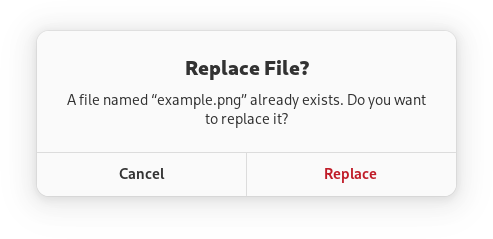
Message dialogs have a heading, a body, an optional child widget, and one or multiple responses, each presented as a button.
Each response has a unique string ID, and a button label. Additionally, each response can be enabled or disabled, and can have a suggested or destructive appearance.
When one of the responses is activated, or the dialog is closed, the
MessageDialog::response signal will be emitted. This signal is
detailed, and the detail, as well as the response parameter will be set to
the ID of the activated response, or to the value of the
MessageDialog:close-response property if the dialog had been
closed without activating any of the responses.
Response buttons can be presented horizontally or vertically depending on available space.
When a response is activated, AdwMessageDialog is closed automatically.
An example of using a message dialog:
GtkWidget *dialog;

 dialog = adw_message_dialog_new (parent, _("Replace File?"), NULL);

 adw_message_dialog_format_body (ADW_MESSAGE_DIALOG (dialog),
                                 _("A file named “%s” already exists. Do you want to replace it?"),
                                 filename);

 adw_message_dialog_add_responses (ADW_MESSAGE_DIALOG (dialog),
                                   "cancel",  _("_Cancel"),
                                   "replace", _("_Replace"),
                                   NULL);

 adw_message_dialog_set_response_appearance (ADW_MESSAGE_DIALOG (dialog), "replace", ADW_RESPONSE_DESTRUCTIVE);

 adw_message_dialog_set_default_response (ADW_MESSAGE_DIALOG (dialog), "cancel");
 adw_message_dialog_set_close_response (ADW_MESSAGE_DIALOG (dialog), "cancel");

 g_signal_connect (dialog, "response", G_CALLBACK (response_cb), self);

 gtk_window_present (GTK_WINDOW (dialog));
Async API
AdwMessageDialog can also be used via the choose(org.gnome.gio.Cancellable, org.gnome.gio.AsyncReadyCallback)
method. This API follows the GIO async pattern, for example:
static void
 dialog_cb (AdwMessageDialog *dialog,
            GAsyncResult     *result,
            MyWindow         *self)
 {
   const char *response = adw_message_dialog_choose_finish (dialog, result);

   // ...
 }

 static void
 show_dialog (MyWindow *self)
 {
   GtkWidget *dialog;

   dialog = adw_message_dialog_new (GTK_WINDOW (self), _("Replace File?"), NULL);

   adw_message_dialog_format_body (ADW_MESSAGE_DIALOG (dialog),
                                   _("A file named “%s” already exists. Do you want to replace it?"),
                                   filename);

   adw_message_dialog_add_responses (ADW_MESSAGE_DIALOG (dialog),
                                     "cancel",  _("_Cancel"),
                                     "replace", _("_Replace"),
                                     NULL);

   adw_message_dialog_set_response_appearance (ADW_MESSAGE_DIALOG (dialog), "replace", ADW_RESPONSE_DESTRUCTIVE);

   adw_message_dialog_set_default_response (ADW_MESSAGE_DIALOG (dialog), "cancel");
   adw_message_dialog_set_close_response (ADW_MESSAGE_DIALOG (dialog), "cancel");

   adw_message_dialog_choose (ADW_MESSAGE_DIALOG (dialog), NULL, (GAsyncReadyCallback) dialog_cb, self);
 }
AdwMessageDialog as GtkBuildable
AdwMessageDialog supports adding responses in UI definitions by via the
<responses> element that may contain multiple <response> elements, each
representing a response.
Each of the <response> elements must have the id attribute specifying the
response ID. The contents of the element are used as the response label.
Response labels can be translated with the usual translatable, context
and comments attributes.
The <response> elements can also have enabled and/or appearance
attributes. See setResponseEnabled(java.lang.String, boolean) and
setResponseAppearance(java.lang.String, org.gnome.adw.ResponseAppearance) for details.
Example of an AdwMessageDialog UI definition:
<object class="AdwMessageDialog" id="dialog">
   <property name="heading" translatable="yes">Save Changes?</property>
   <property name="body" translatable="yes">Open documents contain unsaved changes. Changes which are not saved will be permanently lost.</property>
   <property name="default-response">save</property>
   <property name="close-response">cancel</property>
   <signal name="response" handler="response_cb"/>
   <responses>
     <response id="cancel" translatable="yes">_Cancel</response>
     <response id="discard" translatable="yes" appearance="destructive">_Discard</response>
     <response id="save" translatable="yes" appearance="suggested" enabled="false">_Save</response>
   </responses>
 </object>
Accessibility
AdwMessageDialog uses the GTK_ACCESSIBLE_ROLE_DIALOG role.
- Since:
- 1.2
-
Nested Class Summary
Nested ClassesModifier and TypeClassDescriptionstatic classMessageDialog.Builder<B extends MessageDialog.Builder<B>>Deprecated.Inner class implementing a builder pattern to construct a GObject with properties.static classDeprecated.static interfaceDeprecated.Nested classes/interfaces inherited from class org.gnome.gtk.Window
Window.ActivateDefaultCallback, Window.ActivateFocusCallback, Window.CloseRequestCallback, Window.EnableDebuggingCallback, Window.KeysChangedCallback, Window.WindowClassNested classes/interfaces inherited from class org.gnome.gtk.Widget
Widget.DestroyCallback, Widget.DirectionChangedCallback, Widget.HideCallback, Widget.KeynavFailedCallback, Widget.MapCallback, Widget.MnemonicActivateCallback, Widget.MoveFocusCallback, Widget.QueryTooltipCallback, Widget.RealizeCallback, Widget.ShowCallback, Widget.StateFlagsChangedCallback, Widget.UnmapCallback, Widget.UnrealizeCallback, Widget.Widget$Impl, Widget.WidgetClassNested classes/interfaces inherited from class org.gnome.gobject.InitiallyUnowned
InitiallyUnowned.InitiallyUnownedClassNested classes/interfaces inherited from class org.gnome.gobject.GObject
GObject.NotifyCallback, GObject.ObjectClassNested classes/interfaces inherited from interface org.gnome.gtk.Accessible
Accessible.Accessible$Impl, Accessible.AccessibleInterfaceNested classes/interfaces inherited from interface org.gnome.gtk.Buildable
Buildable.Buildable$Impl, Buildable.BuildableIfaceNested classes/interfaces inherited from interface org.gnome.gtk.ConstraintTarget
ConstraintTarget.ConstraintTarget$Impl, ConstraintTarget.ConstraintTargetInterfaceNested classes/interfaces inherited from interface org.gnome.gtk.Native
Native.Native$Impl, Native.NativeInterfaceNested classes/interfaces inherited from interface org.gnome.gtk.Root
Root.Root$Impl, Root.RootInterfaceNested classes/interfaces inherited from interface org.gnome.gtk.ShortcutManager
ShortcutManager.ShortcutManager$Impl, ShortcutManager.ShortcutManagerInterface -
Constructor Summary
ConstructorsConstructorDescriptionDeprecated.Creates a new MessageDialog.MessageDialog(MemorySegment address) Deprecated.Create a MessageDialog proxy instance for the provided memory address.MessageDialog(@Nullable Window parent, @Nullable String heading, @Nullable String body) Deprecated.UseAlertDialog. -
Method Summary
Modifier and TypeMethodDescriptionvoidaddResponse(String id, String label) Deprecated.UseAlertDialog.voidaddResponses(String firstId, Object... varargs) Deprecated.UseAlertDialog.protected MessageDialogasParent()Deprecated.Returns this instance as if it were its parent type.static MessageDialog.Builder<? extends MessageDialog.Builder> builder()Deprecated.AMessageDialog.Builderobject constructs aMessageDialogwith the specified properties.voidchoose(@Nullable Cancellable cancellable, @Nullable AsyncReadyCallback callback) Deprecated.UseAlertDialog.chooseFinish(AsyncResult result) Deprecated.UseAlertDialog.voidemitResponse(@Nullable String detail, String response) Deprecated.voidformatBody(String format, Object... varargs) Deprecated.UseAlertDialog.voidformatBodyMarkup(String format, Object... varargs) Deprecated.UseAlertDialog.voidformatHeading(String format, Object... varargs) Deprecated.UseAlertDialog.voidformatHeadingMarkup(String format, Object... varargs) Deprecated.UseAlertDialog.getBody()Deprecated.UseAlertDialog.booleanDeprecated.UseAlertDialog.Deprecated.UseAlertDialog.@Nullable StringDeprecated.UseAlertDialog.@Nullable WidgetDeprecated.UseAlertDialog.@Nullable StringDeprecated.UseAlertDialog.booleanDeprecated.UseAlertDialog.static MemoryLayoutDeprecated.The memory layout of the native struct.getResponseAppearance(String response) Deprecated.UseAlertDialog.booleangetResponseEnabled(String response) Deprecated.UseAlertDialog.getResponseLabel(String response) Deprecated.UseAlertDialog.static @Nullable TypegetType()Deprecated.Get the GType of the MessageDialog classbooleanhasResponse(String response) Deprecated.UseAlertDialog.onResponse(@Nullable String detail, MessageDialog.ResponseCallback handler) Deprecated.UseAlertDialog.voidremoveResponse(String id) Deprecated.UseAlertDialog.voidDeprecated.UseAlertDialog.voidDeprecated.UseAlertDialog.voidsetBodyUseMarkup(boolean useMarkup) Deprecated.UseAlertDialog.voidsetCloseResponse(String response) Deprecated.UseAlertDialog.voidsetDefaultResponse(@Nullable String response) Deprecated.UseAlertDialog.voidsetExtraChild(@Nullable Widget child) Deprecated.UseAlertDialog.voidsetHeading(@Nullable String heading) Deprecated.UseAlertDialog.voidsetHeadingUseMarkup(boolean useMarkup) Deprecated.UseAlertDialog.voidsetResponseAppearance(String response, ResponseAppearance appearance) Deprecated.UseAlertDialog.voidsetResponseEnabled(String response, boolean enabled) Deprecated.UseAlertDialog.voidsetResponseLabel(String response, String label) Deprecated.UseAlertDialog.Methods inherited from class org.gnome.gtk.Window
activateDefault, activateFocus, close, closeRequest, destroy, emitActivateDefault, emitActivateFocus, emitCloseRequest, emitEnableDebugging, emitKeysChanged, enableDebugging, fullscreen, fullscreenOnMonitor, getApplication, getChild, getDecorated, getDefaultIconName, getDefaultSize, getDefaultWidget, getDeletable, getDestroyWithParent, getFocus, getFocusVisible, getGravity, getGroup, getHandleMenubarAccel, getHideOnClose, getIconName, getMnemonicsVisible, getModal, getResizable, getTitle, getTitlebar, getToplevels, getTransientFor, hasGroup, isActive, isFullscreen, isMaximized, isSuspended, keysChanged, listToplevels, maximize, minimize, onActivateDefault, onActivateFocus, onCloseRequest, onEnableDebugging, onKeysChanged, present, presentWithTime, setApplication, setAutoStartupNotification, setChild, setDecorated, setDefaultIconName, setDefaultSize, setDefaultWidget, setDeletable, setDestroyWithParent, setDisplay, setFocus, setFocusVisible, setGravity, setHandleMenubarAccel, setHideOnClose, setIconName, setInteractiveDebugging, setMnemonicsVisible, setModal, setResizable, setStartupId, setTitle, setTitlebar, setTransientFor, unfullscreen, unmaximize, unminimizeMethods inherited from class org.gnome.gtk.Widget
actionSetEnabled, activateActionIfExists, activateWidget, addController, addCssClass, addMnemonicLabel, addTickCallback, allocate, childFocus, computeBounds, computeExpand, computeExpand, computePoint, computeTransform, contains, createPangoContext, createPangoLayout, cssChanged, directionChanged, disposeTemplate, dragCheckThreshold, emitDestroy, emitDirectionChanged, emitHide, emitKeynavFailed, emitMap, emitMnemonicActivate, emitMoveFocus, emitQueryTooltip, emitRealize, emitShow, emitStateFlagsChanged, emitUnmap, emitUnrealize, errorBell, focus, getAllocatedBaseline, getAllocatedHeight, getAllocatedWidth, getAllocation, getAncestor, getBaseline, getCanFocus, getCanTarget, getChildVisible, getClipboard, getColor, getCssClasses, getCssName, getCursor, getDefaultDirection, getDirection, getDisplay, getFirstChild, getFocusable, getFocusChild, getFocusOnClick, getFontMap, getFontOptions, getFrameClock, getHalign, getHasTooltip, getHeight, getHexpand, getHexpandSet, getLastChild, getLayoutManager, getLimitEvents, getMapped, getMarginBottom, getMarginEnd, getMarginStart, getMarginTop, getName, getNative, getNextSibling, getOpacity, getOverflow, getPangoContext, getParent, getPreferredSize, getPrevSibling, getPrimaryClipboard, getRealized, getReceivesDefault, getRequestMode, getRoot, getScaleFactor, getSensitive, getSettings, getSize, getSizeRequest, getStateFlags, getStyleContext, getTemplateChild, getTooltipMarkup, getTooltipText, getValign, getVexpand, getVexpandSet, getVisible, getWidth, grabFocus, hasCssClass, hasDefault, hasFocus, hasVisibleFocus, hide, inDestruction, initTemplate, insertActionGroup, insertAfter, insertBefore, isAncestor, isDrawable, isFocus, isSensitive, isVisible, keynavFailed, listMnemonicLabels, map, measure, mnemonicActivate, moveFocus, observeChildren, observeControllers, onDestroy, onDirectionChanged, onHide, onKeynavFailed, onMap, onMnemonicActivate, onMoveFocus, onQueryTooltip, onRealize, onShow, onStateFlagsChanged, onUnmap, onUnrealize, pick, pick, queryTooltip, queueAllocate, queueDraw, queueResize, realize, removeController, removeCssClass, removeMnemonicLabel, removeTickCallback, root, setCanFocus, setCanTarget, setChildVisible, setCssClasses, setCursor, setCursorFromName, setDefaultDirection, setDirection, setFocusable, setFocusChild, setFocusOnClick, setFontMap, setFontOptions, setHalign, setHasTooltip, setHexpand, setHexpandSet, setLayoutManager, setLimitEvents, setMarginBottom, setMarginEnd, setMarginStart, setMarginTop, setName, setOpacity, setOverflow, setParent, setReceivesDefault, setSensitive, setSizeRequest, setStateFlags, setStateFlags, setTooltipMarkup, setTooltipText, setValign, setVexpand, setVexpandSet, setVisible, shouldLayout, show, sizeAllocate, sizeAllocate, snapshot, snapshotChild, stateFlagsChanged, systemSettingChanged, translateCoordinates, triggerTooltipQuery, unmap, unparent, unrealize, unroot, unsetStateFlags, unsetStateFlagsMethods inherited from class org.gnome.gobject.GObject
addToggleRef, addWeakPointer, bindProperty, bindProperty, bindProperty, bindPropertyFull, bindPropertyFull, bindPropertyWithClosures, bindPropertyWithClosures, compatControl, connect, connect, connect, constructed, disconnect, dispatchPropertiesChanged, dispose, dupData, dupQdata, emit, emitNotify, finalize_, forceFloating, freezeNotify, get, getData, getProperty, getProperty, getProperty, getQdata, getv, interfaceFindProperty, interfaceInstallProperty, interfaceListProperties, isFloating, newInstance, newInstance, newv, notify, notify, notifyByPspec, onNotify, ref, refSink, removeToggleRef, removeWeakPointer, replaceData, replaceQdata, runDispose, set, setData, setDataFull, setProperty, setProperty, setProperty, setQdata, setQdataFull, setv, stealData, stealQdata, takeRef, thawNotify, unref, watchClosure, weakRef, weakUnref, withPropertiesMethods inherited from class org.gnome.gobject.TypeInstance
callParent, callParent, cast, getPrivate, readGClass, writeGClassMethods inherited from class org.javagi.base.ProxyInstance
equals, handle, hashCodeMethods inherited from class java.lang.Object
clone, finalize, getClass, notify, notifyAll, toString, wait, wait, waitMethods inherited from interface org.gnome.gtk.Accessible
announce, getAccessibleParent, getAccessibleRole, getAtContext, getBounds, getFirstAccessibleChild, getNextAccessibleSibling, getPlatformState, resetProperty, resetRelation, resetState, setAccessibleParent, updateNextAccessibleSibling, updatePlatformState, updateProperty, updateRelation, updateStateMethods inherited from interface org.gnome.gtk.Buildable
getBuildableIdMethods inherited from interface org.gnome.gtk.Native
getRenderer, getSurface, getSurfaceTransform, realize, unrealizeMethods inherited from interface org.gnome.gtk.Root
getDisplay, getFocus, setFocus
-
Constructor Details
-
MessageDialog
Deprecated.Create a MessageDialog proxy instance for the provided memory address.- Parameters:
address- the memory address of the native object
-
MessageDialog
@Deprecated public MessageDialog(@Nullable Window parent, @Nullable String heading, @Nullable String body) Deprecated.UseAlertDialog.Creates a newAdwMessageDialog.headingandbodycan be set toNULL. This can be useful if they need to be formatted or use markup. In that case, set them toNULLand callformatBody(java.lang.String, java.lang.Object...)or similar methods afterwards:GtkWidget *dialog; dialog = adw_message_dialog_new (parent, _("Replace File?"), NULL); adw_message_dialog_format_body (ADW_MESSAGE_DIALOG (dialog), _("A file named “%s” already exists. Do you want to replace it?"), filename);- Parameters:
parent- transient parentheading- the headingbody- the body text- Since:
- 1.2
-
MessageDialog
public MessageDialog()Deprecated.Creates a new MessageDialog.
-
-
Method Details
-
getType
Deprecated.Get the GType of the MessageDialog class- Returns:
- the GType
-
getMemoryLayout
Deprecated.The memory layout of the native struct.- Returns:
- the memory layout
-
asParent
Deprecated.Returns this instance as if it were its parent type. This is mostly synonymous to the Javasuperkeyword, but will set the native typeclass function pointers to the parent type. When overriding a native virtual method in Java, "chaining up" withsuper.methodName()doesn't work, because it invokes the overridden function pointer again. To chain up, callasParent().methodName(). This will call the native function pointer of this virtual method in the typeclass of the parent type. -
addResponse
Deprecated.UseAlertDialog.Adds a response withidandlabeltoself.Responses are represented as buttons in the dialog.
Response ID must be unique. It will be used in
MessageDialog::responseto tell which response had been activated, as well as to inspect and modify the response later.An embedded underline in
labelindicates a mnemonic.setResponseLabel(java.lang.String, java.lang.String)can be used to change the response label after it had been added.setResponseEnabled(java.lang.String, boolean)andsetResponseAppearance(java.lang.String, org.gnome.adw.ResponseAppearance)can be used to customize the responses further.- Parameters:
id- the response IDlabel- the response label- Since:
- 1.2
-
addResponses
Deprecated.UseAlertDialog.Adds multiple responses toself.This is the same as calling
addResponse(java.lang.String, java.lang.String)repeatedly. The variable argument list should beNULL-terminated list of response IDs and labels.Example:
adw_message_dialog_add_responses (dialog, "cancel", _("_Cancel"), "discard", _("_Discard"), "save", _("_Save"), NULL);- Parameters:
firstId- response idvarargs- label for first response, then more id-label pairs- Since:
- 1.2
-
choose
@Deprecated public void choose(@Nullable Cancellable cancellable, @Nullable AsyncReadyCallback callback) Deprecated.UseAlertDialog.This function shows this MessageDialog to the user.- Parameters:
cancellable- aGCancellableto cancel the operationcallback- a callback to call when the operation is complete- Since:
- 1.3
-
chooseFinish
Deprecated.UseAlertDialog.Finishes thechoose(org.gnome.gio.Cancellable, org.gnome.gio.AsyncReadyCallback)call and returns the response ID.- Parameters:
result- aGAsyncResult- Returns:
- the ID of the response that was selected, or
MessageDialog:close-responseif the call was cancelled. - Since:
- 1.3
-
formatBody
Deprecated.UseAlertDialog.Sets the formatted body text ofself.See
MessageDialog:body.- Parameters:
format- the formatted string for the body textvarargs- the parameters to insert intoformat- Since:
- 1.2
-
formatBodyMarkup
Deprecated.UseAlertDialog.Sets the formatted body text of this MessageDialog with Pango markup.The
formatis assumed to contain Pango markup.Special XML characters in the
printf()arguments passed to this function will automatically be escaped as necessary, seeGLib.markupPrintfEscaped(java.lang.String, java.lang.Object...).See
MessageDialog:body.- Parameters:
format- the formatted string for the body text with Pango markupvarargs- the parameters to insert intoformat- Since:
- 1.2
-
formatHeading
Deprecated.UseAlertDialog.Sets the formatted heading ofself.See
MessageDialog:heading.- Parameters:
format- the formatted string for the headingvarargs- the parameters to insert intoformat- Since:
- 1.2
-
formatHeadingMarkup
Deprecated.UseAlertDialog.Sets the formatted heading of this MessageDialog with Pango markup.The
formatis assumed to contain Pango markup.Special XML characters in the
printf()arguments passed to this function will automatically be escaped as necessary, seeGLib.markupPrintfEscaped(java.lang.String, java.lang.Object...).See
MessageDialog:heading.- Parameters:
format- the formatted string for the heading with Pango markupvarargs- the parameters to insert intoformat- Since:
- 1.2
-
getBody
-
getBodyUseMarkup
Deprecated.UseAlertDialog.Gets whether the body text of this MessageDialog includes Pango markup.- Returns:
- whether this MessageDialog uses markup for body text
- Since:
- 1.2
-
getCloseResponse
Deprecated.UseAlertDialog.Gets the ID of the close response ofself.- Returns:
- the close response ID
- Since:
- 1.2
-
getDefaultResponse
Deprecated.UseAlertDialog.Gets the ID of the default response ofself.- Returns:
- the default response ID
- Since:
- 1.2
-
getExtraChild
Deprecated.UseAlertDialog.Gets the child widget ofself.- Returns:
- the child widget of
self. - Since:
- 1.2
-
getHeading
-
getHeadingUseMarkup
Deprecated.UseAlertDialog.Gets whether the heading of this MessageDialog includes Pango markup.- Returns:
- whether this MessageDialog uses markup for heading
- Since:
- 1.2
-
getResponseAppearance
Deprecated.UseAlertDialog.Gets the appearance ofresponse.See
setResponseAppearance(java.lang.String, org.gnome.adw.ResponseAppearance).- Parameters:
response- a response ID- Returns:
- the appearance of
response - Since:
- 1.2
-
getResponseEnabled
Deprecated.UseAlertDialog.Gets whetherresponseis enabled.- Parameters:
response- a response ID- Returns:
- whether
responseis enabled - Since:
- 1.2
-
getResponseLabel
Deprecated.UseAlertDialog.Gets the label ofresponse.- Parameters:
response- a response ID- Returns:
- the label of
response - Since:
- 1.2
-
hasResponse
Deprecated.UseAlertDialog.Gets whether this MessageDialog has a response with the IDresponse.- Parameters:
response- response ID- Returns:
- whether this MessageDialog has a response with the ID
response. - Since:
- 1.2
-
removeResponse
Deprecated.UseAlertDialog.Removes a response fromself.- Parameters:
id- the response ID- Since:
- 1.5
-
response
Deprecated.UseAlertDialog.Emits theMessageDialog::responsesignal with the given response ID.Used to indicate that the user has responded to the dialog in some way.
- Parameters:
response- response ID- Since:
- 1.2
-
setBody
Deprecated.UseAlertDialog.Sets the body text ofself.- Parameters:
body- the body of this MessageDialog- Since:
- 1.2
-
setBodyUseMarkup
Deprecated.UseAlertDialog.Sets whether the body text of this MessageDialog includes Pango markup.- Parameters:
useMarkup- whether to use markup for body text- Since:
- 1.2
-
setCloseResponse
Deprecated.UseAlertDialog.Sets the ID of the close response ofself.It will be passed to
MessageDialog::responseif the window is closed by pressingEscapeor with a system action.It doesn't have to correspond to any of the responses in the dialog.
The default close response is
close.- Parameters:
response- the close response ID- Since:
- 1.2
-
setDefaultResponse
Deprecated.UseAlertDialog.Sets the ID of the default response ofself.The button corresponding to this response will be set as the default widget of
self.If not set, the default widget will not be set, and the last added response will be focused by default.
See
Gtk.Window:default-widget.- Parameters:
response- the default response ID- Since:
- 1.2
-
setExtraChild
Deprecated.UseAlertDialog.Sets the child widget ofself.The child widget is displayed below the heading and body.
- Parameters:
child- the child widget- Since:
- 1.2
-
setHeading
Deprecated.UseAlertDialog.Sets the heading ofself.- Parameters:
heading- the heading of this MessageDialog- Since:
- 1.2
-
setHeadingUseMarkup
Deprecated.UseAlertDialog.Sets whether the heading of this MessageDialog includes Pango markup.- Parameters:
useMarkup- whether to use markup for heading- Since:
- 1.2
-
setResponseAppearance
Deprecated.UseAlertDialog.Sets the appearance forresponse.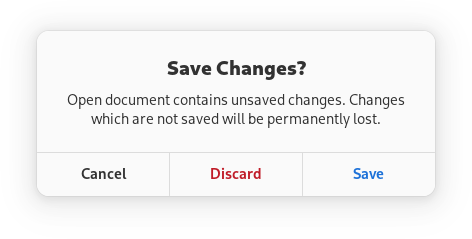
Use
ADW_RESPONSE_SUGGESTEDto mark important responses such as the affirmative action, like the Save button in the example.Use
ADW_RESPONSE_DESTRUCTIVEto draw attention to the potentially damaging consequences of usingresponse.This appearance acts as a warning to the user. The Discard button in the example is using this appearance.The default appearance is
ADW_RESPONSE_DEFAULT.Negative responses like Cancel or Close should use the default appearance.
- Parameters:
response- a response IDappearance- appearance forresponse- Since:
- 1.2
-
setResponseEnabled
Deprecated.UseAlertDialog.Sets whetherresponseis enabled.If
responseis not enabled, the corresponding button will haveGtk.Widget:sensitiveset toFALSEand it can't be activated as a default response.responsecan still be used asMessageDialog:close-responsewhile it's not enabled.Responses are enabled by default.
- Parameters:
response- a response IDenabled- whether to enableresponse- Since:
- 1.2
-
setResponseLabel
Deprecated.UseAlertDialog.Sets the label ofresponsetolabel.Labels are displayed on the dialog buttons. An embedded underline in
labelindicates a mnemonic.- Parameters:
response- a response IDlabel- the label ofresponse- Since:
- 1.2
-
onResponse
@Deprecated public SignalConnection<MessageDialog.ResponseCallback> onResponse(@Nullable String detail, MessageDialog.ResponseCallback handler) Deprecated.UseAlertDialog.This signal is emitted when the dialog is closed.responsewill be set to the response ID of the button that had been activated.if the dialog was closed by pressing
Escapeor with a system action,responsewill be set to the value ofMessageDialog:close-response.- Parameters:
detail- the signal detailhandler- the signal handler- Returns:
- a signal handler ID to keep track of the signal connection
- Since:
- 1.2
- See Also:
-
emitResponse
Deprecated.Emits the "response" signal. SeeonResponse(java.lang.String, org.gnome.adw.MessageDialog.ResponseCallback). -
builder
Deprecated.AMessageDialog.Builderobject constructs aMessageDialogwith the specified properties. Use the variousset...()methods to set properties, and finish construction withMessageDialog.Builder.build().- Returns:
- the builder object
-
AlertDialog.