Class Toast
- All Implemented Interfaces:
Proxy
ToastOverlay.
Toasts are meant to be passed into ToastOverlay.addToast(org.gnome.adw.Toast) as
follows:
adw_toast_overlay_add_toast (overlay, adw_toast_new (_("Simple Toast")));
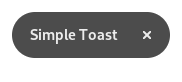
Toasts always have a close button. They emit the Toast::dismissed
signal when disappearing.
Toast:timeout determines how long the toast stays on screen, while
Toast:priority determines how it behaves if another toast is
already being displayed.
Toast titles use Pango markup by default, set Toast:use-markup to
FALSE if this is unwanted.
Toast:custom-title can be used to replace the title label with a
custom widget.
Actions
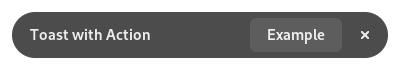
Toasts can have one button on them, with a label and an attached
Action.
AdwToast *toast = adw_toast_new (_("Toast with Action"));

 adw_toast_set_button_label (toast, _("_Example"));
 adw_toast_set_action_name (toast, "win.example");

 adw_toast_overlay_add_toast (overlay, toast);
Modifying toasts
Toasts can be modified after they have been shown. For this, an AdwToast
reference must be kept around while the toast is visible.
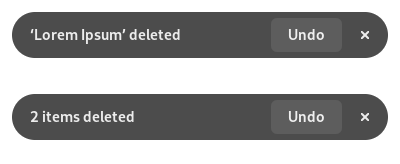
A common use case for this is using toasts as undo prompts that stack with each other, allowing to batch undo the last deleted items:
 static void
 toast_undo_cb (GtkWidget  *sender,
                const char *action,
                GVariant   *param)
 {
   // Undo the deletion
 }

 static void
 dismissed_cb (MyWindow *self)
 {
   self->undo_toast = NULL;

   // Permanently delete the items
 }

 static void
 delete_item (MyWindow *self,
              MyItem   *item)
 {
   g_autofree char *title = NULL;
   int n_items;

   // Mark the item as waiting for deletion
   n_items = ... // The number of waiting items

   if (!self->undo_toast) {
     self->undo_toast = adw_toast_new_format (_("‘%s’ deleted"), ...);

     adw_toast_set_priority (self->undo_toast, ADW_TOAST_PRIORITY_HIGH);
     adw_toast_set_button_label (self->undo_toast, _("_Undo"));
     adw_toast_set_action_name (self->undo_toast, "toast.undo");

     g_signal_connect_swapped (self->undo_toast, "dismissed",
                               G_CALLBACK (dismissed_cb), self);

     adw_toast_overlay_add_toast (self->toast_overlay, self->undo_toast);

     return;
   }

   title =
     g_strdup_printf (ngettext ("<span font_features='tnum=1'>%d</span> item deleted",
                                "<span font_features='tnum=1'>%d</span> items deleted",
                                n_items), n_items);

   adw_toast_set_title (self->undo_toast, title);

   // Bump the toast timeout
   adw_toast_overlay_add_toast (self->toast_overlay, g_object_ref (self->undo_toast));
 }

 static void
 my_window_class_init (MyWindowClass *klass)
 {
   GtkWidgetClass *widget_class = GTK_WIDGET_CLASS (klass);

   gtk_widget_class_install_action (widget_class, "toast.undo", NULL, toast_undo_cb);
 }
-
Nested Class Summary
Nested ClassesModifier and TypeClassDescriptionstatic classToast.Builder<B extends Toast.Builder<B>>Inner class implementing a builder pattern to construct a GObject with properties.static interfaceFunctional interface declaration of theButtonClickedCallbackcallback.static interfaceFunctional interface declaration of theDismissedCallbackcallback.static classNested classes/interfaces inherited from class org.gnome.gobject.GObject
GObject.NotifyCallback, GObject.ObjectClass -
Constructor Summary
ConstructorsConstructorDescriptionToast()Creates a new Toast.Toast(MemorySegment address) Create a Toast proxy instance for the provided memory address.Creates a newAdwToast. -
Method Summary
Modifier and TypeMethodDescriptionprotected ToastasParent()Returns this instance as if it were its parent type.static Toast.Builder<? extends Toast.Builder> builder()AToast.Builderobject constructs aToastwith the specified properties.voiddismiss()Dismissesself.voidEmits the "button-clicked" signal.voidEmits the "dismissed" signal.static ToastCreates a newAdwToast.@Nullable StringGets the name of the associated action.@Nullable VariantGets the parameter for action invocations.@Nullable StringGets the label to show on the button.@Nullable WidgetGets the custom title widget ofself.static MemoryLayoutThe memory layout of the native struct.Gets priority forself.intGets timeout forself.@Nullable StringgetTitle()Gets the title that will be displayed on the toast.static @Nullable TypegetType()Get the GType of the Toast classbooleanGets whether to use Pango markup for the toast title.Emitted after the button has been clicked.onDismissed(Toast.DismissedCallback handler) Emitted when the toast has been dismissed.voidsetActionName(@Nullable String actionName) Sets the name of the associated action.voidsetActionTarget(@Nullable String formatString, Object... varargs) Sets the parameter for action invocations.voidsetActionTargetValue(@Nullable Variant actionTarget) Sets the parameter for action invocations.voidsetButtonLabel(@Nullable String buttonLabel) Sets the label to show on the button.voidsetCustomTitle(@Nullable Widget widget) Sets the custom title widget ofself.voidsetDetailedActionName(@Nullable String detailedActionName) Sets the action name and its parameter.voidsetPriority(ToastPriority priority) Sets priority forself.voidsetTimeout(int timeout) Sets timeout forself.voidSets the title that will be displayed on the toast.voidsetUseMarkup(boolean useMarkup) Whether to use Pango markup for the toast title.Methods inherited from class org.gnome.gobject.GObject
addToggleRef, addWeakPointer, bindProperty, bindProperty, bindProperty, bindPropertyFull, bindPropertyFull, bindPropertyWithClosures, bindPropertyWithClosures, compatControl, connect, connect, connect, constructed, disconnect, dispatchPropertiesChanged, dispose, dupData, dupQdata, emit, emitNotify, finalize_, forceFloating, freezeNotify, get, getData, getProperty, getProperty, getProperty, getQdata, getv, interfaceFindProperty, interfaceInstallProperty, interfaceListProperties, isFloating, newInstance, newInstance, newv, notify, notify, notifyByPspec, onNotify, ref, refSink, removeToggleRef, removeWeakPointer, replaceData, replaceQdata, runDispose, set, setData, setDataFull, setProperty, setProperty, setProperty, setQdata, setQdataFull, setv, stealData, stealQdata, takeRef, thawNotify, unref, watchClosure, weakRef, weakUnref, withPropertiesMethods inherited from class org.gnome.gobject.TypeInstance
callParent, callParent, cast, getPrivate, readGClass, writeGClassMethods inherited from class org.javagi.base.ProxyInstance
equals, handle, hashCode
-
Constructor Details
-
Toast
Create a Toast proxy instance for the provided memory address.- Parameters:
address- the memory address of the native object
-
Toast
Creates a newAdwToast.The toast will use
titleas its title.titlecan be marked up with the Pango text markup language.- Parameters:
title- the title to be displayed
-
Toast
public Toast()Creates a new Toast.
-
-
Method Details
-
getType
-
getMemoryLayout
The memory layout of the native struct.- Returns:
- the memory layout
-
asParent
Returns this instance as if it were its parent type. This is mostly synonymous to the Javasuperkeyword, but will set the native typeclass function pointers to the parent type. When overriding a native virtual method in Java, "chaining up" withsuper.methodName()doesn't work, because it invokes the overridden function pointer again. To chain up, callasParent().methodName(). This will call the native function pointer of this virtual method in the typeclass of the parent type. -
format
- Parameters:
format- the formatted string for the toast titlevarargs- the parameters to insert into the format string- Returns:
- the newly created toast object
- Since:
- 1.2
-
dismiss
public void dismiss()Dismissesself.Does nothing if this Toast has already been dismissed, or hasn't been added to an
ToastOverlay. -
getActionName
Gets the name of the associated action.- Returns:
- the action name
-
getActionTargetValue
Gets the parameter for action invocations.- Returns:
- the action target
-
getButtonLabel
Gets the label to show on the button.- Returns:
- the button label
-
getCustomTitle
Gets the custom title widget ofself.- Returns:
- the custom title widget
- Since:
- 1.2
-
getPriority
-
getTimeout
public int getTimeout()Gets timeout forself.- Returns:
- the timeout
-
getTitle
Gets the title that will be displayed on the toast.If a custom title has been set with
setCustomTitle(org.gnome.gtk.Widget)the return value will benull.- Returns:
- the title
-
getUseMarkup
public boolean getUseMarkup()Gets whether to use Pango markup for the toast title.- Returns:
- whether the toast uses markup
- Since:
- 1.4
-
setActionName
Sets the name of the associated action.It will be activated when clicking the button.
See
Toast:action-target.- Parameters:
actionName- the action name
-
setActionTarget
Sets the parameter for action invocations.This is a convenience function that calls
Variant(java.lang.String, java.lang.Object...)forformatStringand uses the result to callsetActionTargetValue(org.gnome.glib.Variant).If you are setting a string-valued target and want to set the action name at the same time, you can use
setDetailedActionName(java.lang.String).- Parameters:
formatString- a variant format stringvarargs- arguments appropriate fortargetFormat
-
setActionTargetValue
Sets the parameter for action invocations.If the
actionTargetvariant has a floating reference this function will sink it.- Parameters:
actionTarget- the action target
-
setButtonLabel
Sets the label to show on the button.Underlines in the button text can be used to indicate a mnemonic.
If set to
NULL, the button won't be shown.See
Toast:action-name.- Parameters:
buttonLabel- a button label
-
setCustomTitle
Sets the custom title widget ofself.It will be displayed instead of the title if set. In this case,
Toast:titleis ignored.Setting a custom title will unset
Toast:title.- Parameters:
widget- the custom title widget- Since:
- 1.2
-
setDetailedActionName
Sets the action name and its parameter.detailedActionNameis a string in the format accepted byAction.parseDetailedName(java.lang.String, org.javagi.base.Out<java.lang.String>, org.javagi.base.Out<org.gnome.glib.Variant>).- Parameters:
detailedActionName- the detailed action name
-
setPriority
Sets priority forself.Priority controls how the toast behaves when another toast is already being displayed.
If
priorityisADW_TOAST_PRIORITY_NORMAL, the toast will be queued.If
priorityisADW_TOAST_PRIORITY_HIGH, the toast will be displayed immediately, pushing the previous toast into the queue instead.- Parameters:
priority- the priority
-
setTimeout
public void setTimeout(int timeout) Sets timeout forself.If
timeoutis 0, the toast is displayed indefinitely until manually dismissed.Toasts cannot disappear while being hovered, pressed (on touchscreen), or have keyboard focus inside them.
- Parameters:
timeout- the timeout
-
setTitle
Sets the title that will be displayed on the toast.The title can be marked up with the Pango text markup language.
Setting a title will unset
Toast:custom-title.If
Toast:custom-titleis set, it will be used instead.- Parameters:
title- a title
-
setUseMarkup
public void setUseMarkup(boolean useMarkup) Whether to use Pango markup for the toast title.- Parameters:
useMarkup- whether to use markup- Since:
- 1.4
-
onButtonClicked
public SignalConnection<Toast.ButtonClickedCallback> onButtonClicked(Toast.ButtonClickedCallback handler) Emitted after the button has been clicked.It can be used as an alternative to setting an action.
- Parameters:
handler- the signal handler- Returns:
- a signal handler ID to keep track of the signal connection
- Since:
- 1.2
- See Also:
-
emitButtonClicked
public void emitButtonClicked()Emits the "button-clicked" signal. SeeonButtonClicked(org.gnome.adw.Toast.ButtonClickedCallback). -
onDismissed
Emitted when the toast has been dismissed.- Parameters:
handler- the signal handler- Returns:
- a signal handler ID to keep track of the signal connection
- See Also:
-
emitDismissed
public void emitDismissed()Emits the "dismissed" signal. SeeonDismissed(org.gnome.adw.Toast.DismissedCallback). -
builder
AToast.Builderobject constructs aToastwith the specified properties. Use the variousset...()methods to set properties, and finish construction withToast.Builder.build().- Returns:
- the builder object
-