Class Pixbuf
- All Implemented Interfaces:
Icon,LoadableIcon,Proxy
GdkPixbuf contains information about an image's pixel data,
its color space, bits per sample, width and height, and the
rowstride (the number of bytes between the start of one row
and the start of the next).
Creating new GdkPixbuf
The most basic way to create a pixbuf is to wrap an existing pixel
buffer with a Pixbuf instance. You can use the
GdkPixbuf.Pixbuf.new_from_data{@code } function to do this.
<p>
Every time you create a new {@code GdkPixbuf} instance for some data, you
will need to specify the destroy notification function that will be
called when the data buffer needs to be freed; this will happen when
a {@code GdkPixbuf} is finalized by the reference counting functions. If
you have a chunk of static data compiled into your application, you
can pass in {@code NULL} as the destroy notification function so that the
data will not be freed.
<p>
The {@code GdkPixbuf.Pixbuf.new} constructor function can be used
as a convenience to create a pixbuf with an empty buffer; this is
equivalent to allocating a data buffer using malloc() and then
wrapping it with gdk_pixbuf_new_from_data(). The gdk_pixbuf_new()
function will compute an optimal rowstride so that rendering can be
performed with an efficient algorithm.
You can also copy an existing pixbuf with the copy()
function. This is not the same as just acquiring a reference to
the old pixbuf instance: the copy function will actually duplicate
the pixel data in memory and create a new Pixbuf instance
for it.
Reference counting
GdkPixbuf structures are reference counted. This means that an
application can share a single pixbuf among many parts of the
code. When a piece of the program needs to use a pixbuf, it should
acquire a reference to it by calling g_object_ref(); when it no
longer needs the pixbuf, it should release the reference it acquired
by calling g_object_unref(). The resources associated with a
GdkPixbuf will be freed when its reference count drops to zero.
Newly-created GdkPixbuf instances start with a reference count
of one.
Image Data
Image data in a pixbuf is stored in memory in an uncompressed,
packed format. Rows in the image are stored top to bottom, and
in each row pixels are stored from left to right.
There may be padding at the end of a row.
The "rowstride" value of a pixbuf, as returned by GdkPixbuf.Pixbuf.get_rowstride{@code },
indicates the number of bytes between rows.
<p>
**NOTE**: If you are copying raw pixbuf data with {@code memcpy()} note that the
last row in the pixbuf may not be as wide as the full rowstride, but rather
just as wide as the pixel data needs to be; that is: it is unsafe to do
{@code memcpy (dest, pixels, rowstride * height)} to copy a whole pixbuf. Use
{@link Pixbuf#copy} instead, or compute the width in bytes of the
last row as:
<p>
<pre>{@code last_row = width * ((n_channels * bits_per_sample + 7) / 8);
}</pre>
<p>
The same rule applies when iterating over each row of a {@code GdkPixbuf} pixels
array.
<p>
The following code illustrates a simple {@code put_pixel()}
function for RGB pixbufs with 8 bits per channel with an alpha
channel.
<p>
<pre>{@code static void
put_pixel (GdkPixbuf *pixbuf,
int x,
int y,
guchar red,
guchar green,
guchar blue,
guchar alpha)
{
int n_channels = gdk_pixbuf_get_n_channels (pixbuf);
// Ensure that the pixbuf is valid
g_assert (gdk_pixbuf_get_colorspace (pixbuf) == GDK_COLORSPACE_RGB);
g_assert (gdk_pixbuf_get_bits_per_sample (pixbuf) == 8);
g_assert (gdk_pixbuf_get_has_alpha (pixbuf));
g_assert (n_channels == 4);
int width = gdk_pixbuf_get_width (pixbuf);
int height = gdk_pixbuf_get_height (pixbuf);
// Ensure that the coordinates are in a valid range
g_assert (x >= 0 && x < width);
g_assert (y >= 0 && y < height);
int rowstride = gdk_pixbuf_get_rowstride (pixbuf);
// The pixel buffer in the GdkPixbuf instance
guchar *pixels = gdk_pixbuf_get_pixels (pixbuf);
// The pixel we wish to modify
guchar *p = pixels + y * rowstride + x * n_channels;
p[0] = red;
p[1] = green;
p[2] = blue;
p[3] = alpha;
}
}</pre>
<p>
<strong>Loading images</strong><br/>
The {@code GdkPixBuf} class provides a simple mechanism for loading
an image from a file in synchronous and asynchronous fashion.
<p>
For GUI applications, it is recommended to use the asynchronous
stream API to avoid blocking the control flow of the application.
<p>
Additionally, {@code GdkPixbuf} provides the {@code PixbufLoader}
API for progressive image loading.
Saving images
The GdkPixbuf class provides methods for saving image data in
a number of file formats. The formatted data can be written to a
file or to a memory buffer. GdkPixbuf can also call a user-defined
callback on the data, which allows to e.g. write the image
to a socket or store it in a database.
-
Nested Class Summary
Nested ClassesModifier and TypeClassDescriptionstatic classPixbuf.Builder<B extends Pixbuf.Builder<B>>Inner class implementing a builder pattern to construct a GObject with properties.Nested classes/interfaces inherited from class org.gnome.gobject.GObject
GObject.NotifyCallback, GObject.ObjectClassNested classes/interfaces inherited from interface org.gnome.gio.Icon
Icon.Icon$Impl, Icon.IconIfaceNested classes/interfaces inherited from interface org.gnome.gio.LoadableIcon
LoadableIcon.LoadableIcon$Impl, LoadableIcon.LoadableIconIface -
Constructor Summary
ConstructorsConstructorDescriptionPixbuf()Creates a new Pixbuf.Pixbuf(MemorySegment address) Create a Pixbuf proxy instance for the provided memory address.Pixbuf(Colorspace colorspace, boolean hasAlpha, int bitsPerSample, int width, int height) Creates a newGdkPixbufstructure and allocates a buffer for it. -
Method Summary
Modifier and TypeMethodDescription@Nullable PixbufaddAlpha(boolean substituteColor, byte r, byte g, byte b) Takes an existing pixbuf and adds an alpha channel to it.@Nullable PixbufTakes an existing pixbuf and checks for the presence of an associated "orientation" option.protected PixbufasParent()Returns this instance as if it were its parent type.static Pixbuf.Builder<? extends Pixbuf.Builder> builder()APixbuf.Builderobject constructs aPixbufwith the specified properties.static intcalculateRowstride(Colorspace colorspace, boolean hasAlpha, int bitsPerSample, int width, int height) Calculates the rowstride that an image created with those values would have.voidcomposite(Pixbuf dest, int destX, int destY, int destWidth, int destHeight, double offsetX, double offsetY, double scaleX, double scaleY, InterpType interpType, int overallAlpha) Creates a transformation of the source image this Pixbuf by scaling byscaleXandscaleYthen translating byoffsetXandoffsetY.voidcompositeColor(Pixbuf dest, int destX, int destY, int destWidth, int destHeight, double offsetX, double offsetY, double scaleX, double scaleY, InterpType interpType, int overallAlpha, int checkX, int checkY, int checkSize, int color1, int color2) Creates a transformation of the source image this Pixbuf by scaling byscaleXandscaleYthen translating byoffsetXandoffsetY,then alpha blends the rectangle (destX,destY,destWidth,destHeight)of the resulting image with a checkboard of the colorscolor1andcolor2and renders it onto the destination image.@Nullable PixbufcompositeColorSimple(int destWidth, int destHeight, InterpType interpType, int overallAlpha, int checkSize, int color1, int color2) Creates a new pixbuf by scalingsrctodest_widthxdest_heightand alpha blending the result with a checkboard of colorscolor1andcolor2.@Nullable Pixbufcopy()Creates a newGdkPixbufwith a copy of the information in the specifiedpixbuf.voidCopies a rectangular area fromsrc_pixbuftodest_pixbuf.booleancopyOptions(Pixbuf destPixbuf) Copies the key/value pair options attached to aGdkPixbufto anotherGdkPixbuf.voidfill(int pixel) Clears a pixbuf to the given RGBA value, converting the RGBA value into the pixbuf's pixel format.@Nullable Pixbufflip(boolean horizontal) Flips a pixbuf horizontally or vertically and returns the result in a new pixbuf.static PixbuffromBytes(byte[] data, Colorspace colorspace, boolean hasAlpha, int bitsPerSample, int width, int height, int rowstride) Creates a newGdkPixbufout of in-memory readonly image data.static PixbuffromData(@org.jspecify.annotations.Nullable byte @Nullable [] data, Colorspace colorspace, boolean hasAlpha, int bitsPerSample, int width, int height, int rowstride, @Nullable PixbufDestroyNotify destroyFn) Creates a newGdkPixbufout of in-memory image data.static PixbufCreates a new pixbuf by loading an image from a file.static PixbuffromFileAtScale(String filename, int width, int height, boolean preserveAspectRatio) Creates a new pixbuf by loading an image from a file.static PixbuffromFileAtScaleUtf8(String filename, int width, int height, boolean preserveAspectRatio) Same as gdk_pixbuf_new_from_file_at_scale().static PixbuffromFileAtSize(String filename, int width, int height) Creates a new pixbuf by loading an image from a file.static PixbuffromFileAtSizeUtf8(String filename, int width, int height) Same as gdk_pixbuf_new_from_file_at_size()static PixbuffromFileUtf8(String filename) Same as gdk_pixbuf_new_from_file()static PixbuffromInline(@org.jspecify.annotations.Nullable byte @Nullable [] data, boolean copyPixels) Deprecated.static PixbuffromResource(String resourcePath) Creates a new pixbuf by loading an image from an resource.static PixbuffromResourceAtScale(String resourcePath, int width, int height, boolean preserveAspectRatio) Creates a new pixbuf by loading an image from an resource.static PixbuffromStream(InputStream stream, @Nullable Cancellable cancellable) Creates a new pixbuf by loading an image from an input stream.static PixbuffromStreamAtScale(InputStream stream, int width, int height, boolean preserveAspectRatio, @Nullable Cancellable cancellable) Creates a new pixbuf by loading an image from an input stream.static PixbuffromStreamFinish(AsyncResult asyncResult) Finishes an asynchronous pixbuf creation operation started with gdk_pixbuf_new_from_stream_async().static PixbuffromXpmData(@Nullable String @Nullable [] data) Deprecated.UsefromStream(org.gnome.gio.InputStream, org.gnome.gio.Cancellable)with aMemoryInputStream, making sure to handle errors in case the XPM format loader is not availableintQueries the number of bits per color sample in a pixbuf.longReturns the length of the pixel data, in bytes.Queries the color space of a pixbuf.static @Nullable PixbufFormatParses an image file far enough to determine its format and size.static voidgetFileInfoAsync(String filename, @Nullable Cancellable cancellable, @Nullable AsyncReadyCallback callback) Asynchronously parses an image file far enough to determine its format and size.static @Nullable PixbufFormatgetFileInfoFinish(AsyncResult asyncResult, Out<Integer> width, Out<Integer> height) Finishes an asynchronous pixbuf parsing operation started with gdk_pixbuf_get_file_info_async().static SList<PixbufFormat> Obtains the available information about the image formats supported by GdkPixbuf.booleanQueries whether a pixbuf has an alpha channel (opacity information).intQueries the height of a pixbuf.static MemoryLayoutThe memory layout of the native struct.intQueries the number of channels of a pixbuf.@Nullable StringLooks upkeyin the list of options that may have been attached to the this Pixbuf when it was loaded, or that may have been attached by another function using gdk_pixbuf_set_option().Returns aGHashTablewith a list of all the options that may have been attached to thepixbufwhen it was loaded, or that may have been attached by another function usingsetOption(java.lang.String, java.lang.String).byte[]Queries a pointer to the pixel data of a pixbuf.intQueries the rowstride of a pixbuf, which is the number of bytes between the start of a row and the start of the next row.static @Nullable TypegetType()Get the GType of the Pixbuf classintgetWidth()Queries the width of a pixbuf.static booleaninitModules(String path) Initalizes the gdk-pixbuf loader modules referenced by theloaders.cachefile present inside that directory.static voidnewFromStreamAsync(InputStream stream, @Nullable Cancellable cancellable, @Nullable AsyncReadyCallback callback) Creates a new pixbuf by asynchronously loading an image from an input stream.static voidnewFromStreamAtScaleAsync(InputStream stream, int width, int height, boolean preserveAspectRatio, @Nullable Cancellable cancellable, @Nullable AsyncReadyCallback callback) Creates a new pixbuf by asynchronously loading an image from an input stream.newSubpixbuf(int srcX, int srcY, int width, int height) Creates a new pixbuf which represents a sub-region ofsrc_pixbuf.byte[]Provides aGBytesbuffer containing the raw pixel data; the data must not be modified.Provides a read-only pointer to the raw pixel data.ref()Deprecated.Use g_object_ref().booleanremoveOption(String key) Removes the key/value pair option attached to aGdkPixbuf.@Nullable PixbufrotateSimple(PixbufRotation angle) Rotates a pixbuf by a multiple of 90 degrees, and returns the result in a new pixbuf.voidsaturateAndPixelate(Pixbuf dest, float saturation, boolean pixelate) Modifies saturation and optionally pixelatessrc, placing the result indest.booleanSaves pixbuf to a file in formattype.By default, "jpeg", "png", "ico" and "bmp" are possible file formats to save in, but more formats may be installed.booleansaveToBuffer(@Nullable Out<byte[]> buffer, String type, GError[] error, Object... varargs) Saves pixbuf to a new buffer in formattype, which is currently "jpeg", "png", "tiff", "ico" or "bmp".booleansaveToBufferv(@Nullable Out<byte[]> buffer, String type, @Nullable String @Nullable [] optionKeys, @Nullable String @Nullable [] optionValues) Vector version ofgdk_pixbuf_save_to_buffer().booleansaveToCallback(@Nullable PixbufSaveFunc saveFunc, String type, GError[] error, Object... varargs) Saves pixbuf in formattypeby feeding the produced data to a callback.booleansaveToCallbackv(@Nullable PixbufSaveFunc saveFunc, String type, @Nullable String @Nullable [] optionKeys, @Nullable String @Nullable [] optionValues) Vector version ofgdk_pixbuf_save_to_callback().booleansaveToStream(OutputStream stream, String type, @Nullable Cancellable cancellable, GError[] error, Object... varargs) Savespixbufto an output stream.voidsaveToStreamAsync(OutputStream stream, String type, @Nullable Cancellable cancellable, @Nullable AsyncReadyCallback callback, Object... varargs) Savespixbufto an output stream asynchronously.static booleansaveToStreamFinish(AsyncResult asyncResult) Finishes an asynchronous pixbuf save operation started with gdk_pixbuf_save_to_stream_async().booleansaveToStreamv(OutputStream stream, String type, @Nullable String @Nullable [] optionKeys, @Nullable String @Nullable [] optionValues, @Nullable Cancellable cancellable) Savespixbufto an output stream.voidsaveToStreamvAsync(OutputStream stream, String type, @Nullable String @Nullable [] optionKeys, @Nullable String @Nullable [] optionValues, @Nullable Cancellable cancellable, @Nullable AsyncReadyCallback callback) Savespixbufto an output stream asynchronously.booleanbooleansavev(String filename, String type, @Nullable String @Nullable [] optionKeys, @Nullable String @Nullable [] optionValues) Vector version ofgdk_pixbuf_save().booleansavevUtf8(String filename, String type, @Nullable String @Nullable [] optionKeys, @Nullable String @Nullable [] optionValues) Same as gdk_pixbuf_savev()voidscale(Pixbuf dest, int destX, int destY, int destWidth, int destHeight, double offsetX, double offsetY, double scaleX, double scaleY, InterpType interpType) Creates a transformation of the source image this Pixbuf by scaling byscaleXandscaleYthen translating byoffsetXandoffsetY,then renders the rectangle (destX,destY,destWidth,destHeight)of the resulting image onto the destination image replacing the previous contents.@Nullable PixbufscaleSimple(int destWidth, int destHeight, InterpType interpType) Create a new pixbuf containing a copy ofsrcscaled todest_widthxdest_height.booleanAttaches a key/value pair as an option to aGdkPixbuf.voidunref()Deprecated.Use g_object_unref().Methods inherited from class org.gnome.gobject.GObject
addToggleRef, addWeakPointer, bindProperty, bindProperty, bindProperty, bindPropertyFull, bindPropertyFull, bindPropertyWithClosures, bindPropertyWithClosures, compatControl, connect, connect, connect, constructed, disconnect, dispatchPropertiesChanged, dispose, dupData, dupQdata, emit, emitNotify, finalize_, forceFloating, freezeNotify, get, getData, getProperty, getProperty, getProperty, getQdata, getv, interfaceFindProperty, interfaceInstallProperty, interfaceListProperties, isFloating, newInstance, newInstance, newv, notify, notify, notifyByPspec, onNotify, refSink, removeToggleRef, removeWeakPointer, replaceData, replaceQdata, runDispose, set, setData, setDataFull, setProperty, setProperty, setProperty, setQdata, setQdataFull, setv, stealData, stealQdata, takeRef, thawNotify, watchClosure, weakRef, weakUnref, withPropertiesMethods inherited from class org.gnome.gobject.TypeInstance
callParent, callParent, cast, getPrivate, readGClass, writeGClassMethods inherited from class org.javagi.base.ProxyInstance
equals, handle, hashCodeMethods inherited from class java.lang.Object
clone, finalize, getClass, notify, notifyAll, toString, wait, wait, waitMethods inherited from interface org.gnome.gio.Icon
equal, hash, serialize, serializeToStringMethods inherited from interface org.gnome.gio.LoadableIcon
load, loadAsync, loadFinish
-
Constructor Details
-
Pixbuf
Create a Pixbuf proxy instance for the provided memory address.- Parameters:
address- the memory address of the native object
-
Pixbuf
Creates a newGdkPixbufstructure and allocates a buffer for it.If the allocation of the buffer failed, this function will return
NULL.The buffer has an optimal rowstride. Note that the buffer is not cleared; you will have to fill it completely yourself.
- Parameters:
colorspace- Color space for imagehasAlpha- Whether the image should have transparency informationbitsPerSample- Number of bits per color samplewidth- Width of image in pixels, must be > 0height- Height of image in pixels, must be > 0
-
Pixbuf
public Pixbuf()Creates a new Pixbuf.
-
-
Method Details
-
getType
-
getMemoryLayout
The memory layout of the native struct.- Returns:
- the memory layout
-
asParent
Returns this instance as if it were its parent type. This is mostly synonymous to the Javasuperkeyword, but will set the native typeclass function pointers to the parent type. When overriding a native virtual method in Java, "chaining up" withsuper.methodName()doesn't work, because it invokes the overridden function pointer again. To chain up, callasParent().methodName(). This will call the native function pointer of this virtual method in the typeclass of the parent type. -
fromBytes
public static Pixbuf fromBytes(byte[] data, Colorspace colorspace, boolean hasAlpha, int bitsPerSample, int width, int height, int rowstride) Creates a newGdkPixbufout of in-memory readonly image data.Currently only RGB images with 8 bits per sample are supported.
This is the
GBytesvariant of gdk_pixbuf_new_from_data(), useful for language bindings.- Parameters:
data- Image data in 8-bit/sample packed format inside aGBytescolorspace- Colorspace for the image datahasAlpha- Whether the data has an opacity channelbitsPerSample- Number of bits per samplewidth- Width of the image in pixels, must be > 0height- Height of the image in pixels, must be > 0rowstride- Distance in bytes between row starts- Returns:
- A newly-created pixbuf
- Since:
- 2.32
-
fromData
public static Pixbuf fromData(@org.jspecify.annotations.Nullable byte @Nullable [] data, Colorspace colorspace, boolean hasAlpha, int bitsPerSample, int width, int height, int rowstride, @Nullable PixbufDestroyNotify destroyFn) Creates a newGdkPixbufout of in-memory image data.Currently only RGB images with 8 bits per sample are supported.
Since you are providing a pre-allocated pixel buffer, you must also specify a way to free that data. This is done with a function of type
GdkPixbufDestroyNotify. When a pixbuf created with is finalized, your destroy notification function will be called, and it is its responsibility to free the pixel array.See also:
fromBytes(byte[], org.gnome.gdkpixbuf.Colorspace, boolean, int, int, int, int)- Parameters:
data- Image data in 8-bit/sample packed formatcolorspace- Colorspace for the image datahasAlpha- Whether the data has an opacity channelbitsPerSample- Number of bits per samplewidth- Width of the image in pixels, must be > 0height- Height of the image in pixels, must be > 0rowstride- Distance in bytes between row startsdestroyFn- Function used to free the data when the pixbuf's reference count drops to zero, orNULLif the data should not be freed- Returns:
- A newly-created pixbuf
-
fromFile
Creates a new pixbuf by loading an image from a file.The file format is detected automatically.
If
NULLis returned, thenerrorwill be set. Possible errors are:- the file could not be opened
- there is no loader for the file's format
- there is not enough memory to allocate the image buffer
- the image buffer contains invalid data
The error domains are
GDK_PIXBUF_ERRORandG_FILE_ERROR.- Parameters:
filename- Name of file to load, in the GLib file name encoding- Returns:
- A newly-created pixbuf
- Throws:
GErrorException- seeGError
-
fromFileAtScale
public static Pixbuf fromFileAtScale(String filename, int width, int height, boolean preserveAspectRatio) throws GErrorException Creates a new pixbuf by loading an image from a file.The file format is detected automatically.
If
NULLis returned, thenerrorwill be set. Possible errors are:- the file could not be opened
- there is no loader for the file's format
- there is not enough memory to allocate the image buffer
- the image buffer contains invalid data
The error domains are
GDK_PIXBUF_ERRORandG_FILE_ERROR.The image will be scaled to fit in the requested size, optionally preserving the image's aspect ratio.
When preserving the aspect ratio, a
widthof -1 will cause the image to be scaled to the exact given height, and aheightof -1 will cause the image to be scaled to the exact given width. When not preserving aspect ratio, awidthorheightof -1 means to not scale the image at all in that dimension. Negative values forwidthandheightare allowed since 2.8.- Parameters:
filename- Name of file to load, in the GLib file name encodingwidth- The width the image should have or -1 to not constrain the widthheight- The height the image should have or -1 to not constrain the heightpreserveAspectRatio-TRUEto preserve the image's aspect ratio- Returns:
- A newly-created pixbuf
- Throws:
GErrorException- seeGError- Since:
- 2.6
-
fromFileAtSize
Creates a new pixbuf by loading an image from a file.The file format is detected automatically.
If
NULLis returned, thenerrorwill be set. Possible errors are:- the file could not be opened
- there is no loader for the file's format
- there is not enough memory to allocate the image buffer
- the image buffer contains invalid data
The error domains are
GDK_PIXBUF_ERRORandG_FILE_ERROR.The image will be scaled to fit in the requested size, preserving the image's aspect ratio. Note that the returned pixbuf may be smaller than
widthxheight, if the aspect ratio requires it. To load and image at the requested size, regardless of aspect ratio, usefromFileAtScale(java.lang.String, int, int, boolean).- Parameters:
filename- Name of file to load, in the GLib file name encodingwidth- The width the image should have or -1 to not constrain the widthheight- The height the image should have or -1 to not constrain the height- Returns:
- A newly-created pixbuf
- Throws:
GErrorException- seeGError- Since:
- 2.4
-
fromInline
@Deprecated public static Pixbuf fromInline(@org.jspecify.annotations.Nullable byte @Nullable [] data, boolean copyPixels) throws GErrorException Deprecated.UseGResourceinstead.Creates aGdkPixbuffrom a flat representation that is suitable for storing as inline data in a program.This is useful if you want to ship a program with images, but don't want to depend on any external files.
GdkPixbuf ships with a program called
gdk-pixbuf-csource, which allows for conversion ofGdkPixbufs into such a inline representation.In almost all cases, you should pass the
--rawoption togdk-pixbuf-csource. A sample invocation would be:gdk-pixbuf-csource --raw --name=myimage_inline myimage.pngFor the typical case where the inline pixbuf is read-only static data, you don't need to copy the pixel data unless you intend to write to it, so you can pass
FALSEforcopy_pixels. If you pass--rletogdk-pixbuf-csource, a copy will be made even ifcopy_pixelsisFALSE, so using this option is generally a bad idea.If you create a pixbuf from const inline data compiled into your program, it's probably safe to ignore errors and disable length checks, since things will always succeed:
pixbuf = gdk_pixbuf_new_from_inline (-1, myimage_inline, FALSE, NULL);For non-const inline data, you could get out of memory. For untrusted inline data located at runtime, you could have corrupt inline data in addition.
- Parameters:
data- Byte data containing a serializedGdkPixdatastructurecopyPixels- Whether to copy the pixel data, or use direct pointersdatafor the resulting pixbuf- Returns:
- A newly-created pixbuf
- Throws:
GErrorException- seeGError
-
fromResource
Creates a new pixbuf by loading an image from an resource.The file format is detected automatically. If
NULLis returned, thenerrorwill be set.- Parameters:
resourcePath- the path of the resource file- Returns:
- A newly-created pixbuf
- Throws:
GErrorException- seeGError- Since:
- 2.26
-
fromResourceAtScale
public static Pixbuf fromResourceAtScale(String resourcePath, int width, int height, boolean preserveAspectRatio) throws GErrorException Creates a new pixbuf by loading an image from an resource.The file format is detected automatically. If
NULLis returned, thenerrorwill be set.The image will be scaled to fit in the requested size, optionally preserving the image's aspect ratio. When preserving the aspect ratio, a
widthof -1 will cause the image to be scaled to the exact given height, and aheightof -1 will cause the image to be scaled to the exact given width. When not preserving aspect ratio, awidthorheightof -1 means to not scale the image at all in that dimension.The stream is not closed.
- Parameters:
resourcePath- the path of the resource filewidth- The width the image should have or -1 to not constrain the widthheight- The height the image should have or -1 to not constrain the heightpreserveAspectRatio-TRUEto preserve the image's aspect ratio- Returns:
- A newly-created pixbuf
- Throws:
GErrorException- seeGError- Since:
- 2.26
-
fromStream
public static Pixbuf fromStream(InputStream stream, @Nullable Cancellable cancellable) throws GErrorException Creates a new pixbuf by loading an image from an input stream.The file format is detected automatically.
If
NULLis returned, thenerrorwill be set.The
cancellablecan be used to abort the operation from another thread. If the operation was cancelled, the errorG_IO_ERROR_CANCELLEDwill be returned. Other possible errors are in theGDK_PIXBUF_ERRORandG_IO_ERRORdomains.The stream is not closed.
- Parameters:
stream- aGInputStreamto load the pixbuf fromcancellable- optionalGCancellableobject,NULLto ignore- Returns:
- A newly-created pixbuf
- Throws:
GErrorException- seeGError- Since:
- 2.14
-
fromStreamAtScale
public static Pixbuf fromStreamAtScale(InputStream stream, int width, int height, boolean preserveAspectRatio, @Nullable Cancellable cancellable) throws GErrorException Creates a new pixbuf by loading an image from an input stream.The file format is detected automatically. If
NULLis returned, thenerrorwill be set. Thecancellablecan be used to abort the operation from another thread. If the operation was cancelled, the errorG_IO_ERROR_CANCELLEDwill be returned. Other possible errors are in theGDK_PIXBUF_ERRORandG_IO_ERRORdomains.The image will be scaled to fit in the requested size, optionally preserving the image's aspect ratio.
When preserving the aspect ratio, a
widthof -1 will cause the image to be scaled to the exact given height, and aheightof -1 will cause the image to be scaled to the exact given width. If bothwidthandheightare given, this function will behave as if the smaller of the two values is passed as -1.When not preserving aspect ratio, a
widthorheightof -1 means to not scale the image at all in that dimension.The stream is not closed.
- Parameters:
stream- aGInputStreamto load the pixbuf fromwidth- The width the image should have or -1 to not constrain the widthheight- The height the image should have or -1 to not constrain the heightpreserveAspectRatio-TRUEto preserve the image's aspect ratiocancellable- optionalGCancellableobject,NULLto ignore- Returns:
- A newly-created pixbuf
- Throws:
GErrorException- seeGError- Since:
- 2.14
-
fromStreamFinish
Finishes an asynchronous pixbuf creation operation started with gdk_pixbuf_new_from_stream_async().- Parameters:
asyncResult- aGAsyncResult- Returns:
- the newly created pixbuf
- Throws:
GErrorException- seeGError- Since:
- 2.24
-
fromXpmData
Deprecated.UsefromStream(org.gnome.gio.InputStream, org.gnome.gio.Cancellable)with aMemoryInputStream, making sure to handle errors in case the XPM format loader is not availableCreates a new pixbuf by parsing XPM data in memory.This data is commonly the result of including an XPM file into a program's C source.
- Parameters:
data- Pointer to inline XPM data.- Returns:
- A newly-created pixbuf
-
fromFileAtScaleUtf8
public static Pixbuf fromFileAtScaleUtf8(String filename, int width, int height, boolean preserveAspectRatio) throws GErrorException Same as gdk_pixbuf_new_from_file_at_scale().- Parameters:
filename- Name of file to load, in the GLib file name encodingwidth- The width the image should have or -1 to not constrain the widthheight- The height the image should have or -1 to not constrain the heightpreserveAspectRatio-TRUEto preserve the image's aspect ratio- Returns:
- A newly-created pixbuf with a reference count of 1,
or
NULLif any of several error conditions occurred: the file could not be opened, there was no loader for the file's format, there was not enough memory to allocate the image buffer, or the image file contained invalid data. - Throws:
GErrorException- seeGError- Since:
- 2.6
-
fromFileAtSizeUtf8
public static Pixbuf fromFileAtSizeUtf8(String filename, int width, int height) throws GErrorException Same as gdk_pixbuf_new_from_file_at_size()- Parameters:
filename- Name of file to load, in the GLib file name encodingwidth- The width the image should have or -1 to not constrain the widthheight- The height the image should have or -1 to not constrain the height- Returns:
- A newly-created pixbuf with a reference count of 1, or
NULLif any of several error conditions occurred: the file could not be opened, there was no loader for the file's format, there was not enough memory to allocate the image buffer, or the image file contained invalid data. - Throws:
GErrorException- seeGError- Since:
- 2.4
-
fromFileUtf8
Same as gdk_pixbuf_new_from_file()- Parameters:
filename- Name of file to load, in the GLib file name encoding- Returns:
- A newly-created pixbuf with a reference count of 1,
or
NULLif any of several error conditions occurred: the file could not be opened, there was no loader for the file's format, there was not enough memory to allocate the image buffer, or the image file contained invalid data. - Throws:
GErrorException- seeGError
-
calculateRowstride
public static int calculateRowstride(Colorspace colorspace, boolean hasAlpha, int bitsPerSample, int width, int height) Calculates the rowstride that an image created with those values would have.This function is useful for front-ends and backends that want to check image values without needing to create a
GdkPixbuf.- Parameters:
colorspace- Color space for imagehasAlpha- Whether the image should have transparency informationbitsPerSample- Number of bits per color samplewidth- Width of image in pixels, must be > 0height- Height of image in pixels, must be > 0- Returns:
- the rowstride for the given values, or -1 in case of error.
- Since:
- 2.36.8
-
getFileInfo
public static @Nullable PixbufFormat getFileInfo(String filename, @Nullable Out<Integer> width, @Nullable Out<Integer> height) Parses an image file far enough to determine its format and size.- Parameters:
filename- The name of the file to identify.width- Return location for the width of the imageheight- Return location for the height of the image- Returns:
- A
GdkPixbufFormatdescribing the image format of the file - Since:
- 2.4
-
getFileInfoAsync
public static void getFileInfoAsync(String filename, @Nullable Cancellable cancellable, @Nullable AsyncReadyCallback callback) Asynchronously parses an image file far enough to determine its format and size.For more details see gdk_pixbuf_get_file_info(), which is the synchronous version of this function.
When the operation is finished,
callbackwill be called in the main thread. You can then call gdk_pixbuf_get_file_info_finish() to get the result of the operation.- Parameters:
filename- The name of the file to identifycancellable- optionalGCancellableobject,NULLto ignorecallback- aGAsyncReadyCallbackto call when the file info is available- Since:
- 2.32
-
getFileInfoFinish
public static @Nullable PixbufFormat getFileInfoFinish(AsyncResult asyncResult, Out<Integer> width, Out<Integer> height) throws GErrorException Finishes an asynchronous pixbuf parsing operation started with gdk_pixbuf_get_file_info_async().- Parameters:
asyncResult- aGAsyncResultwidth- Return location for the width of the image, orNULLheight- Return location for the height of the image, orNULL- Returns:
- A
GdkPixbufFormatdescribing the image format of the file - Throws:
GErrorException- seeGError- Since:
- 2.32
-
getFormats
Obtains the available information about the image formats supported by GdkPixbuf.- Returns:
- A list of support image formats.
- Since:
- 2.2
-
initModules
Initalizes the gdk-pixbuf loader modules referenced by theloaders.cachefile present inside that directory.This is to be used by applications that want to ship certain loaders in a different location from the system ones.
This is needed when the OS or runtime ships a minimal number of loaders so as to reduce the potential attack surface of carefully crafted image files, especially for uncommon file types. Applications that require broader image file types coverage, such as image viewers, would be expected to ship the gdk-pixbuf modules in a separate location, bundled with the application in a separate directory from the OS or runtime- provided modules.
- Parameters:
path- Path to directory where theloaders.cacheis installed- Throws:
GErrorException- seeGError- Since:
- 2.40
-
newFromStreamAsync
public static void newFromStreamAsync(InputStream stream, @Nullable Cancellable cancellable, @Nullable AsyncReadyCallback callback) Creates a new pixbuf by asynchronously loading an image from an input stream.For more details see gdk_pixbuf_new_from_stream(), which is the synchronous version of this function.
When the operation is finished,
callbackwill be called in the main thread. You can then call gdk_pixbuf_new_from_stream_finish() to get the result of the operation.- Parameters:
stream- aGInputStreamfrom which to load the pixbufcancellable- optionalGCancellableobject,NULLto ignorecallback- aGAsyncReadyCallbackto call when the pixbuf is loaded- Since:
- 2.24
-
newFromStreamAtScaleAsync
public static void newFromStreamAtScaleAsync(InputStream stream, int width, int height, boolean preserveAspectRatio, @Nullable Cancellable cancellable, @Nullable AsyncReadyCallback callback) Creates a new pixbuf by asynchronously loading an image from an input stream.For more details see gdk_pixbuf_new_from_stream_at_scale(), which is the synchronous version of this function.
When the operation is finished,
callbackwill be called in the main thread. You can then call gdk_pixbuf_new_from_stream_finish() to get the result of the operation.- Parameters:
stream- aGInputStreamfrom which to load the pixbufwidth- the width the image should have or -1 to not constrain the widthheight- the height the image should have or -1 to not constrain the heightpreserveAspectRatio-TRUEto preserve the image's aspect ratiocancellable- optionalGCancellableobject,NULLto ignorecallback- aGAsyncReadyCallbackto call when the pixbuf is loaded- Since:
- 2.24
-
saveToStreamFinish
Finishes an asynchronous pixbuf save operation started with gdk_pixbuf_save_to_stream_async().- Parameters:
asyncResult- aGAsyncResult- Returns:
TRUEif the pixbuf was saved successfully,FALSEif an error was set.- Throws:
GErrorException- seeGError- Since:
- 2.24
-
addAlpha
Takes an existing pixbuf and adds an alpha channel to it.If the existing pixbuf already had an alpha channel, the channel values are copied from the original; otherwise, the alpha channel is initialized to 255 (full opacity).
If
substitute_colorisTRUE, then the color specified by the (r,g,b) arguments will be assigned zero opacity. That is, if you pass(255, 255, 255)for the substitute color, all white pixels will become fully transparent.If
substitute_colorisFALSE, then the (r,g,b) arguments will be ignored.- Parameters:
substituteColor- Whether to set a color to zero opacity.r- Red value to substitute.g- Green value to substitute.b- Blue value to substitute.- Returns:
- A newly-created pixbuf
-
applyEmbeddedOrientation
Takes an existing pixbuf and checks for the presence of an associated "orientation" option.The orientation option may be provided by the JPEG loader (which reads the exif orientation tag) or the TIFF loader (which reads the TIFF orientation tag, and compensates it for the partial transforms performed by libtiff).
If an orientation option/tag is present, the appropriate transform will be performed so that the pixbuf is oriented correctly.
- Returns:
- A newly-created pixbuf
- Since:
- 2.12
-
composite
public void composite(Pixbuf dest, int destX, int destY, int destWidth, int destHeight, double offsetX, double offsetY, double scaleX, double scaleY, InterpType interpType, int overallAlpha) Creates a transformation of the source image this Pixbuf by scaling byscaleXandscaleYthen translating byoffsetXandoffsetY.This gives an image in the coordinates of the destination pixbuf. The rectangle (
destX,destY,destWidth,destHeight)is then alpha blended onto the corresponding rectangle of the original destination image.When the destination rectangle contains parts not in the source image, the data at the edges of the source image is replicated to infinity.
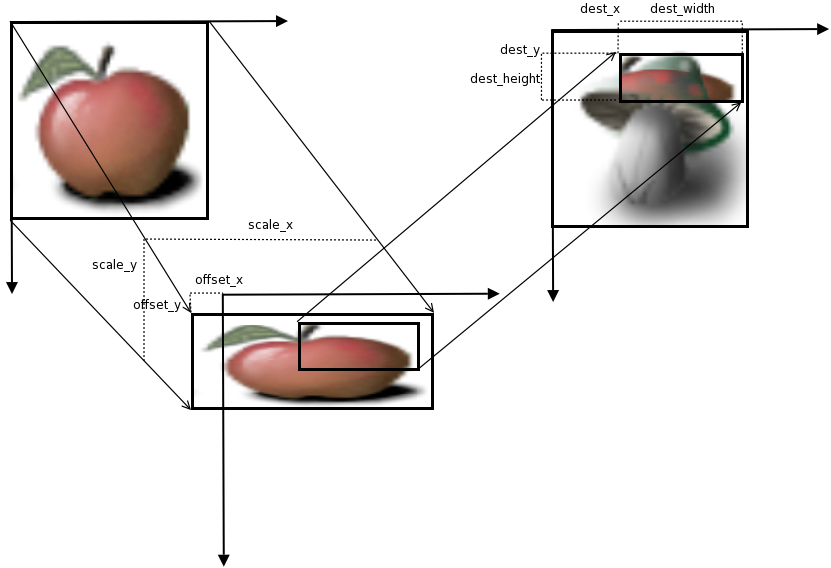
- Parameters:
dest- theGdkPixbufinto which to render the resultsdestX- the left coordinate for region to renderdestY- the top coordinate for region to renderdestWidth- the width of the region to renderdestHeight- the height of the region to renderoffsetX- the offset in the X direction (currently rounded to an integer)offsetY- the offset in the Y direction (currently rounded to an integer)scaleX- the scale factor in the X directionscaleY- the scale factor in the Y directioninterpType- the interpolation type for the transformation.overallAlpha- overall alpha for source image (0..255)
-
compositeColor
public void compositeColor(Pixbuf dest, int destX, int destY, int destWidth, int destHeight, double offsetX, double offsetY, double scaleX, double scaleY, InterpType interpType, int overallAlpha, int checkX, int checkY, int checkSize, int color1, int color2) Creates a transformation of the source image this Pixbuf by scaling byscaleXandscaleYthen translating byoffsetXandoffsetY,then alpha blends the rectangle (destX,destY,destWidth,destHeight)of the resulting image with a checkboard of the colorscolor1andcolor2and renders it onto the destination image.If the source image has no alpha channel, and
overallAlphais 255, a fast path is used which omits the alpha blending and just performs the scaling.See gdk_pixbuf_composite_color_simple() for a simpler variant of this function suitable for many tasks.
- Parameters:
dest- theGdkPixbufinto which to render the resultsdestX- the left coordinate for region to renderdestY- the top coordinate for region to renderdestWidth- the width of the region to renderdestHeight- the height of the region to renderoffsetX- the offset in the X direction (currently rounded to an integer)offsetY- the offset in the Y direction (currently rounded to an integer)scaleX- the scale factor in the X directionscaleY- the scale factor in the Y directioninterpType- the interpolation type for the transformation.overallAlpha- overall alpha for source image (0..255)checkX- the X offset for the checkboard (origin of checkboard is at -checkX,-checkY)checkY- the Y offset for the checkboardcheckSize- the size of checks in the checkboard (must be a power of two)color1- the color of check at upper leftcolor2- the color of the other check
-
compositeColorSimple
public @Nullable Pixbuf compositeColorSimple(int destWidth, int destHeight, InterpType interpType, int overallAlpha, int checkSize, int color1, int color2) Creates a new pixbuf by scalingsrctodest_widthxdest_heightand alpha blending the result with a checkboard of colorscolor1andcolor2.- Parameters:
destWidth- the width of destination imagedestHeight- the height of destination imageinterpType- the interpolation type for the transformation.overallAlpha- overall alpha for source image (0..255)checkSize- the size of checks in the checkboard (must be a power of two)color1- the color of check at upper leftcolor2- the color of the other check- Returns:
- the new pixbuf
-
copy
Creates a newGdkPixbufwith a copy of the information in the specifiedpixbuf.Note that this does not copy the options set on the original
GdkPixbuf, use gdk_pixbuf_copy_options() for this.- Returns:
- A newly-created pixbuf
-
copyArea
public void copyArea(int srcX, int srcY, int width, int height, Pixbuf destPixbuf, int destX, int destY) Copies a rectangular area fromsrc_pixbuftodest_pixbuf.Conversion of pixbuf formats is done automatically.
If the source rectangle overlaps the destination rectangle on the same pixbuf, it will be overwritten during the copy operation. Therefore, you can not use this function to scroll a pixbuf.
- Parameters:
srcX- Source X coordinate withinsrcPixbuf.srcY- Source Y coordinate withinsrcPixbuf.width- Width of the area to copy.height- Height of the area to copy.destPixbuf- Destination pixbuf.destX- X coordinate withindestPixbuf.destY- Y coordinate withindestPixbuf.
-
copyOptions
Copies the key/value pair options attached to aGdkPixbufto anotherGdkPixbuf.This is useful to keep original metadata after having manipulated a file. However be careful to remove metadata which you've already applied, such as the "orientation" option after rotating the image.
- Parameters:
destPixbuf- the destination pixbuf- Returns:
TRUEon success.- Since:
- 2.36
-
fill
public void fill(int pixel) Clears a pixbuf to the given RGBA value, converting the RGBA value into the pixbuf's pixel format.The alpha component will be ignored if the pixbuf doesn't have an alpha channel.
- Parameters:
pixel- RGBA pixel to used to clear (0xffffffffis opaque white,0x00000000transparent black)
-
flip
Flips a pixbuf horizontally or vertically and returns the result in a new pixbuf.- Parameters:
horizontal-TRUEto flip horizontally,FALSEto flip vertically- Returns:
- the new pixbuf
- Since:
- 2.6
-
getBitsPerSample
public int getBitsPerSample()Queries the number of bits per color sample in a pixbuf.- Returns:
- Number of bits per color sample.
-
getByteLength
public long getByteLength()Returns the length of the pixel data, in bytes.- Returns:
- The length of the pixel data.
- Since:
- 2.26
-
getColorspace
-
getHasAlpha
public boolean getHasAlpha()Queries whether a pixbuf has an alpha channel (opacity information).- Returns:
TRUEif it has an alpha channel,FALSEotherwise.
-
getHeight
public int getHeight()Queries the height of a pixbuf.- Returns:
- Height in pixels.
-
getNChannels
public int getNChannels()Queries the number of channels of a pixbuf.- Returns:
- Number of channels.
-
getOption
Looks upkeyin the list of options that may have been attached to the this Pixbuf when it was loaded, or that may have been attached by another function using gdk_pixbuf_set_option().For instance, the ANI loader provides "Title" and "Artist" options. The ICO, XBM, and XPM loaders provide "x_hot" and "y_hot" hot-spot options for cursor definitions. The PNG loader provides the tEXt ancillary chunk key/value pairs as options. Since 2.12, the TIFF and JPEG loaders return an "orientation" option string that corresponds to the embedded TIFF/Exif orientation tag (if present). Since 2.32, the TIFF loader sets the "multipage" option string to "yes" when a multi-page TIFF is loaded. Since 2.32 the JPEG and PNG loaders set "x-dpi" and "y-dpi" if the file contains image density information in dots per inch. Since 2.36.6, the JPEG loader sets the "comment" option with the comment EXIF tag.
- Parameters:
key- a nul-terminated string.- Returns:
- the value associated with
key
-
getOptions
Returns aGHashTablewith a list of all the options that may have been attached to thepixbufwhen it was loaded, or that may have been attached by another function usingsetOption(java.lang.String, java.lang.String).- Returns:
- a
GHashTableof key/values pairs - Since:
- 2.32
-
getPixels
public byte[] getPixels()Queries a pointer to the pixel data of a pixbuf.This function will cause an implicit copy of the pixbuf data if the pixbuf was created from read-only data.
Please see the section on image data for information about how the pixel data is stored in memory.
- Returns:
- A pointer to the pixbuf's pixel data.
- Since:
- 2.26
-
getRowstride
public int getRowstride()Queries the rowstride of a pixbuf, which is the number of bytes between the start of a row and the start of the next row.- Returns:
- Distance between row starts.
-
getWidth
public int getWidth()Queries the width of a pixbuf.- Returns:
- Width in pixels.
-
newSubpixbuf
Creates a new pixbuf which represents a sub-region ofsrc_pixbuf.The new pixbuf shares its pixels with the original pixbuf, so writing to one affects both. The new pixbuf holds a reference to
src_pixbuf, sosrc_pixbufwill not be finalized until the new pixbuf is finalized.Note that if
src_pixbufis read-only, this function will force it to be mutable.- Parameters:
srcX- X coord in this PixbufsrcY- Y coord in this Pixbufwidth- width of region in this Pixbufheight- height of region in this Pixbuf- Returns:
- a new pixbuf
-
readPixelBytes
public byte[] readPixelBytes()Provides aGBytesbuffer containing the raw pixel data; the data must not be modified.This function allows skipping the implicit copy that must be made if gdk_pixbuf_get_pixels() is called on a read-only pixbuf.
- Returns:
- A new reference to a read-only copy of
the pixel data. Note that for mutable pixbufs, this function will
incur a one-time copy of the pixel data for conversion into the
returned
GBytes. - Since:
- 2.32
-
readPixels
Provides a read-only pointer to the raw pixel data.This function allows skipping the implicit copy that must be made if gdk_pixbuf_get_pixels() is called on a read-only pixbuf.
- Returns:
- a read-only pointer to the raw pixel data
- Since:
- 2.32
-
ref
Deprecated.Use g_object_ref().Adds a reference to a pixbuf. -
removeOption
Removes the key/value pair option attached to aGdkPixbuf.- Parameters:
key- a nul-terminated string representing the key to remove.- Returns:
TRUEif an option was removed,FALSEif not.- Since:
- 2.36
-
rotateSimple
Rotates a pixbuf by a multiple of 90 degrees, and returns the result in a new pixbuf.If
angleis 0, this function will return a copy ofsrc.- Parameters:
angle- the angle to rotate by- Returns:
- the new pixbuf
- Since:
- 2.6
-
saturateAndPixelate
Modifies saturation and optionally pixelatessrc, placing the result indest.The
srcanddestpixbufs must have the same image format, size, and rowstride.The
srcanddestarguments may be the same pixbuf with no ill effects.If
saturationis 1.0 then saturation is not changed. If it's less than 1.0, saturation is reduced (the image turns toward grayscale); if greater than 1.0, saturation is increased (the image gets more vivid colors).If
pixelateisTRUE, then pixels are faded in a checkerboard pattern to create a pixelated image.- Parameters:
dest- place to write modified version of this Pixbufsaturation- saturation factorpixelate- whether to pixelate
-
save
Saves pixbuf to a file in formattype.By default, "jpeg", "png", "ico" and "bmp" are possible file formats to save in, but more formats may be installed. The list of all writable formats can be determined in the following way:void add_if_writable (GdkPixbufFormat *data, GSList **list) { if (gdk_pixbuf_format_is_writable (data)) *list = g_slist_prepend (*list, data); } GSList *formats = gdk_pixbuf_get_formats (); GSList *writable_formats = NULL; g_slist_foreach (formats, add_if_writable, &writable_formats); g_slist_free (formats);If
erroris set,FALSEwill be returned. Possible errors include those in theGDK_PIXBUF_ERRORdomain and those in theG_FILE_ERRORdomain.The variable argument list should be
NULL-terminated; if not empty, it should contain pairs of strings that modify the save parameters. For example:gdk_pixbuf_save (pixbuf, handle, "jpeg", &error, "quality", "100", NULL);Currently only few parameters exist.
JPEG images can be saved with a "quality" parameter; its value should be in the range
[0, 100]. JPEG and PNG density can be set by setting the "x-dpi" and "y-dpi" parameters to the appropriate values in dots per inch.Text chunks can be attached to PNG images by specifying parameters of the form "tEXt::key", where key is an ASCII string of length 1-79. The values are UTF-8 encoded strings. The PNG compression level can be specified using the "compression" parameter; it's value is in an integer in the range of
[0, 9].ICC color profiles can also be embedded into PNG, JPEG and TIFF images. The "icc-profile" value should be the complete ICC profile encoded into base64.
char *contents;
 gsize length;

 // icm_path is set elsewhere
 g_file_get_contents (icm_path, &contents, &length, NULL);

 char *contents_encode = g_base64_encode ((const guchar *) contents, length);

 gdk_pixbuf_save (pixbuf, handle, "png", &error, "icc-profile", contents_encode, NULL);
TIFF images recognize:
1. a "bits-per-sample" option (integer) which can be either 1 for saving bi-level CCITTFAX4 images, or 8 for saving 8-bits per sample 2. a "compression" option (integer) which can be 1 for no compression, 2 for Huffman, 5 for LZW, 7 for JPEG and 8 for DEFLATE (see the libtiff documentation and tiff.h for all supported codec values) 3. an "icc-profile" option (zero-terminated string) containing a base64 encoded ICC color profile.
ICO images can be saved in depth 16, 24, or 32, by using the "depth" parameter. When the ICO saver is given "x_hot" and "y_hot" parameters, it produces a CUR instead of an ICO.
- Parameters:
filename- name of file to save.type- name of file format.error- return location for errorvarargs- list of key-value save options, followed byNULL- Returns:
TRUEon success, andFALSEotherwise
-
saveToBuffer
public boolean saveToBuffer(@Nullable Out<byte[]> buffer, String type, GError[] error, Object... varargs) Saves pixbuf to a new buffer in formattype, which is currently "jpeg", "png", "tiff", "ico" or "bmp".This is a convenience function that uses
gdk_pixbuf_save_to_callback()to do the real work.Note that the buffer is not
NUL-terminated and may contain embeddedNULcharacters.If
erroris set,FALSEwill be returned andbufferwill be set toNULL. Possible errors include those in theGDK_PIXBUF_ERRORdomain.See
gdk_pixbuf_save()for more details.- Parameters:
buffer- location to receive a pointer to the new buffer.type- name of file format.error- return location for error, orNULLvarargs- list of key-value save options- Returns:
- whether an error was set
- Since:
- 2.4
-
saveToBufferv
public boolean saveToBufferv(@Nullable Out<byte[]> buffer, String type, @Nullable String @Nullable [] optionKeys, @Nullable String @Nullable [] optionValues) throws GErrorException Vector version ofgdk_pixbuf_save_to_buffer().Saves pixbuf to a new buffer in format
type,which is currently "jpeg", "tiff", "png", "ico" or "bmp".See
saveToBuffer(org.javagi.base.Out<byte[]>, java.lang.String, org.gnome.glib.GError[], java.lang.Object...)for more details.- Parameters:
buffer- location to receive a pointer to the new buffer.type- name of file format.optionKeys- name of options to setoptionValues- values for named options- Returns:
- whether an error was set
- Throws:
GErrorException- seeGError- Since:
- 2.4
-
saveToCallback
public boolean saveToCallback(@Nullable PixbufSaveFunc saveFunc, String type, GError[] error, Object... varargs) Saves pixbuf in formattypeby feeding the produced data to a callback.This function can be used when you want to store the image to something other than a file, such as an in-memory buffer or a socket.
If
erroris set,FALSEwill be returned. Possible errors include those in theGDK_PIXBUF_ERRORdomain and whatever the save function generates.See
save(java.lang.String, java.lang.String, org.gnome.glib.GError[], java.lang.Object...)for more details.- Parameters:
saveFunc- a function that is called to save each block of data that the save routine generates.type- name of file format.error- return location for error, orNULLvarargs- list of key-value save options- Returns:
- whether an error was set
- Since:
- 2.4
-
saveToCallbackv
public boolean saveToCallbackv(@Nullable PixbufSaveFunc saveFunc, String type, @Nullable String @Nullable [] optionKeys, @Nullable String @Nullable [] optionValues) throws GErrorException Vector version ofgdk_pixbuf_save_to_callback().Saves pixbuf to a callback in format
type,which is currently "jpeg", "png", "tiff", "ico" or "bmp".If
erroris set,FALSEwill be returned.See
saveToCallback(org.gnome.gdkpixbuf.PixbufSaveFunc, java.lang.String, org.gnome.glib.GError[], java.lang.Object...)for more details.- Parameters:
saveFunc- a function that is called to save each block of data that the save routine generatestype- name of file formatoptionKeys- name of options to setoptionValues- values for named options- Returns:
- whether an error was set
- Throws:
GErrorException- seeGError- Since:
- 2.4
-
saveToStream
public boolean saveToStream(OutputStream stream, String type, @Nullable Cancellable cancellable, GError[] error, Object... varargs) Savespixbufto an output stream.Supported file formats are currently "jpeg", "tiff", "png", "ico" or "bmp". See
gdk_pixbuf_save_to_buffer()for more details.The
cancellablecan be used to abort the operation from another thread. If the operation was cancelled, the errorG_IO_ERROR_CANCELLEDwill be returned. Other possible errors are in theGDK_PIXBUF_ERRORandG_IO_ERRORdomains.The stream is not closed at the end of this call.
- Parameters:
stream- aGOutputStreamto save the pixbuf totype- name of file formatcancellable- optionalGCancellableobject,NULLto ignoreerror- return location for error, orNULLvarargs- list of key-value save options- Returns:
TRUEif the pixbuf was saved successfully,FALSEif an error was set.- Since:
- 2.14
-
saveToStreamAsync
public void saveToStreamAsync(OutputStream stream, String type, @Nullable Cancellable cancellable, @Nullable AsyncReadyCallback callback, Object... varargs) Savespixbufto an output stream asynchronously.For more details see gdk_pixbuf_save_to_stream(), which is the synchronous version of this function.
When the operation is finished,
callbackwill be called in the main thread.You can then call gdk_pixbuf_save_to_stream_finish() to get the result of the operation.
- Parameters:
stream- aGOutputStreamto which to save the pixbuftype- name of file formatcancellable- optionalGCancellableobject,NULLto ignorecallback- aGAsyncReadyCallbackto call when the pixbuf is savedvarargs- list of key-value save options- Since:
- 2.24
-
saveToStreamv
public boolean saveToStreamv(OutputStream stream, String type, @Nullable String @Nullable [] optionKeys, @Nullable String @Nullable [] optionValues, @Nullable Cancellable cancellable) throws GErrorException Savespixbufto an output stream.Supported file formats are currently "jpeg", "tiff", "png", "ico" or "bmp".
See
saveToStream(org.gnome.gio.OutputStream, java.lang.String, org.gnome.gio.Cancellable, org.gnome.glib.GError[], java.lang.Object...)for more details.- Parameters:
stream- aGOutputStreamto save the pixbuf totype- name of file formatoptionKeys- name of options to setoptionValues- values for named optionscancellable- optionalGCancellableobject,NULLto ignore- Returns:
TRUEif the pixbuf was saved successfully,FALSEif an error was set.- Throws:
GErrorException- seeGError- Since:
- 2.36
-
saveToStreamvAsync
public void saveToStreamvAsync(OutputStream stream, String type, @Nullable String @Nullable [] optionKeys, @Nullable String @Nullable [] optionValues, @Nullable Cancellable cancellable, @Nullable AsyncReadyCallback callback) Savespixbufto an output stream asynchronously.For more details see gdk_pixbuf_save_to_streamv(), which is the synchronous version of this function.
When the operation is finished,
callbackwill be called in the main thread.You can then call gdk_pixbuf_save_to_stream_finish() to get the result of the operation.
- Parameters:
stream- aGOutputStreamto which to save the pixbuftype- name of file formatoptionKeys- name of options to setoptionValues- values for named optionscancellable- optionalGCancellableobject,NULLto ignorecallback- aGAsyncReadyCallbackto call when the pixbuf is saved- Since:
- 2.36
-
savev
public boolean savev(String filename, String type, @Nullable String @Nullable [] optionKeys, @Nullable String @Nullable [] optionValues) throws GErrorException Vector version ofgdk_pixbuf_save().Saves pixbuf to a file in
type, which is currently "jpeg", "png", "tiff", "ico" or "bmp".If
erroris set,FALSEwill be returned.See
save(java.lang.String, java.lang.String, org.gnome.glib.GError[], java.lang.Object...)for more details.- Parameters:
filename- name of file to save.type- name of file format.optionKeys- name of options to setoptionValues- values for named options- Returns:
- whether an error was set
- Throws:
GErrorException- seeGError
-
scale
public void scale(Pixbuf dest, int destX, int destY, int destWidth, int destHeight, double offsetX, double offsetY, double scaleX, double scaleY, InterpType interpType) Creates a transformation of the source image this Pixbuf by scaling byscaleXandscaleYthen translating byoffsetXandoffsetY,then renders the rectangle (destX,destY,destWidth,destHeight)of the resulting image onto the destination image replacing the previous contents.Try to use gdk_pixbuf_scale_simple() first; this function is the industrial-strength power tool you can fall back to, if gdk_pixbuf_scale_simple() isn't powerful enough.
If the source rectangle overlaps the destination rectangle on the same pixbuf, it will be overwritten during the scaling which results in rendering artifacts.
- Parameters:
dest- theGdkPixbufinto which to render the resultsdestX- the left coordinate for region to renderdestY- the top coordinate for region to renderdestWidth- the width of the region to renderdestHeight- the height of the region to renderoffsetX- the offset in the X direction (currently rounded to an integer)offsetY- the offset in the Y direction (currently rounded to an integer)scaleX- the scale factor in the X directionscaleY- the scale factor in the Y directioninterpType- the interpolation type for the transformation.
-
scaleSimple
Create a new pixbuf containing a copy ofsrcscaled todest_widthxdest_height.This function leaves
srcunaffected.The
interp_typeshould beGDK_INTERP_NEARESTif you want maximum speed (but when scaling downGDK_INTERP_NEARESTis usually unusably ugly). The defaultinterp_typeshould beGDK_INTERP_BILINEARwhich offers reasonable quality and speed.You can scale a sub-portion of
srcby creating a sub-pixbuf pointing intosrc; seenewSubpixbuf(int, int, int, int).If
dest_widthanddest_heightare equal to the width and height ofsrc, this function will return an unscaled copy ofsrc.For more complicated scaling/alpha blending see
scale(org.gnome.gdkpixbuf.Pixbuf, int, int, int, int, double, double, double, double, org.gnome.gdkpixbuf.InterpType)andcomposite(org.gnome.gdkpixbuf.Pixbuf, int, int, int, int, double, double, double, double, org.gnome.gdkpixbuf.InterpType, int).- Parameters:
destWidth- the width of destination imagedestHeight- the height of destination imageinterpType- the interpolation type for the transformation.- Returns:
- the new pixbuf
-
setOption
Attaches a key/value pair as an option to aGdkPixbuf.If
keyalready exists in the list of options attached to thepixbuf, the new value is ignored andFALSEis returned.- Parameters:
key- a nul-terminated string.value- a nul-terminated string.- Returns:
TRUEon success- Since:
- 2.2
-
unref
Deprecated.Use g_object_unref().Removes a reference from a pixbuf. -
saveUtf8
-
savevUtf8
public boolean savevUtf8(String filename, String type, @Nullable String @Nullable [] optionKeys, @Nullable String @Nullable [] optionValues) throws GErrorException Same as gdk_pixbuf_savev()- Parameters:
filename- name of file to save.type- name of file format.optionKeys- name of options to setoptionValues- values for named options- Returns:
- whether an error was set
- Throws:
GErrorException- seeGError
-
builder
APixbuf.Builderobject constructs aPixbufwith the specified properties. Use the variousset...()methods to set properties, and finish construction withPixbuf.Builder.build().- Returns:
- the builder object
-
GResourceinstead.