Class LevelBar
- All Implemented Interfaces:
Accessible,AccessibleRange,Buildable,ConstraintTarget,Orientable,Proxy
Typical use cases are displaying the strength of a password, or showing the charge level of a battery.
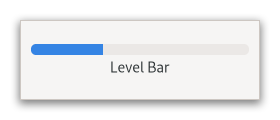
Use setValue(double) to set the current value, and
addOffsetValue(java.lang.String, double) to set the value offsets at which
the bar will be considered in a different state. GTK will add a few
offsets by default on the level bar: GTK_LEVEL_BAR_OFFSET_LOW,
GTK_LEVEL_BAR_OFFSET_HIGH and GTK_LEVEL_BAR_OFFSET_FULL, with
values 0.25, 0.75 and 1.0 respectively.
Note that it is your responsibility to update preexisting offsets when changing the minimum or maximum value. GTK will simply clamp them to the new range.
Adding a custom offset on the bar
static GtkWidget *
 create_level_bar (void)
 {
   GtkWidget *widget;
   GtkLevelBar *bar;

   widget = gtk_level_bar_new ();
   bar = GTK_LEVEL_BAR (widget);

   // This changes the value of the default low offset

   gtk_level_bar_add_offset_value (bar,
                                   GTK_LEVEL_BAR_OFFSET_LOW,
                                   0.10);

   // This adds a new offset to the bar; the application will
   // be able to change its color CSS like this:
   //
   // levelbar block.my-offset {
   //   background-color: magenta;
   //   border-style: solid;
   //   border-color: black;
   //   border-width: 1px;
   // }

   gtk_level_bar_add_offset_value (bar, "my-offset", 0.60);

   return widget;
 }
The default interval of values is between zero and one, but it’s possible
to modify the interval using setMinValue(double) and
setMaxValue(double). The value will be always drawn in
proportion to the admissible interval, i.e. a value of 15 with a specified
interval between 10 and 20 is equivalent to a value of 0.5 with an interval
between 0 and 1. When LevelBarMode.DISCRETE is used, the bar level
is rendered as a finite number of separated blocks instead of a single one.
The number of blocks that will be rendered is equal to the number of units
specified by the admissible interval.
For instance, to build a bar rendered with five blocks, it’s sufficient to set the minimum value to 0 and the maximum value to 5 after changing the indicator mode to discrete.
GtkLevelBar as GtkBuildable
The GtkLevelBar implementation of the GtkBuildable interface supports a
custom <offsets> element, which can contain any number of <offset> elements,
each of which must have "name" and "value" attributes.
CSS nodes
 levelbar[.discrete]
 ╰── trough
     ├── block.filled.level-name
     ┊
     ├── block.empty
     ┊
GtkLevelBar has a main CSS node with name levelbar and one of the style
classes .discrete or .continuous and a subnode with name trough. Below the
trough node are a number of nodes with name block and style class .filled
or .empty. In continuous mode, there is exactly one node of each, in discrete
mode, the number of filled and unfilled nodes corresponds to blocks that are
drawn. The block.filled nodes also get a style class .level-name corresponding
to the level for the current value.
In horizontal orientation, the nodes are always arranged from left to right, regardless of text direction.
Accessibility
GtkLevelBar uses the Gtk.AccessibleRole.meter role.
-
Nested Class Summary
Nested ClassesModifier and TypeClassDescriptionstatic classLevelBar.Builder<B extends LevelBar.Builder<B>>Inner class implementing a builder pattern to construct a GObject with properties.static interfaceFunctional interface declaration of theOffsetChangedCallbackcallback.Nested classes/interfaces inherited from class org.gnome.gtk.Widget
Widget.DestroyCallback, Widget.DirectionChangedCallback, Widget.HideCallback, Widget.KeynavFailedCallback, Widget.MapCallback, Widget.MnemonicActivateCallback, Widget.MoveFocusCallback, Widget.QueryTooltipCallback, Widget.RealizeCallback, Widget.ShowCallback, Widget.StateFlagsChangedCallback, Widget.UnmapCallback, Widget.UnrealizeCallback, Widget.Widget$Impl, Widget.WidgetClassNested classes/interfaces inherited from class org.gnome.gobject.InitiallyUnowned
InitiallyUnowned.InitiallyUnownedClassNested classes/interfaces inherited from class org.gnome.gobject.GObject
GObject.NotifyCallback, GObject.ObjectClassNested classes/interfaces inherited from interface org.gnome.gtk.Accessible
Accessible.Accessible$Impl, Accessible.AccessibleInterfaceNested classes/interfaces inherited from interface org.gnome.gtk.AccessibleRange
AccessibleRange.AccessibleRange$Impl, AccessibleRange.AccessibleRangeInterfaceNested classes/interfaces inherited from interface org.gnome.gtk.Buildable
Buildable.Buildable$Impl, Buildable.BuildableIfaceNested classes/interfaces inherited from interface org.gnome.gtk.ConstraintTarget
ConstraintTarget.ConstraintTarget$Impl, ConstraintTarget.ConstraintTargetInterfaceNested classes/interfaces inherited from interface org.gnome.gtk.Orientable
Orientable.Orientable$Impl, Orientable.OrientableIface -
Constructor Summary
ConstructorsConstructorDescriptionLevelBar()Creates a new LevelBar.LevelBar(MemorySegment address) Create a LevelBar proxy instance for the provided memory address. -
Method Summary
Modifier and TypeMethodDescriptionvoidaddOffsetValue(String name, double value) Adds a new offset marker on this LevelBar at the position specified byvalue.protected LevelBarasParent()Returns this instance as if it were its parent type.static LevelBar.Builder<? extends LevelBar.Builder> builder()ALevelBar.Builderobject constructs aLevelBarwith the specified properties.voidemitOffsetChanged(@Nullable String detail, String name) Emits the "offset-changed" signal.static LevelBarforInterval(double minValue, double maxValue) Creates a newGtkLevelBarfor the specified interval.booleanReturns whether the levelbar is inverted.doubleReturns themax-valueof theGtkLevelBar.static MemoryLayoutThe memory layout of the native struct.doubleReturns themin-valueof theGtkLevelBar.getMode()Returns themodeof theGtkLevelBar.booleangetOffsetValue(@Nullable String name, Out<Double> value) Fetches the value specified for the offset markernameinself.static @Nullable TypegetType()Get the GType of the LevelBar classdoublegetValue()Returns thevalueof theGtkLevelBar.onOffsetChanged(@Nullable String detail, LevelBar.OffsetChangedCallback handler) Emitted when an offset specified on the bar changes value.voidremoveOffsetValue(@Nullable String name) Removes an offset marker from aGtkLevelBar.voidsetInverted(boolean inverted) Sets whether theGtkLevelBaris inverted.voidsetMaxValue(double value) Sets themax-valueof theGtkLevelBar.voidsetMinValue(double value) Sets themin-valueof theGtkLevelBar.voidsetMode(LevelBarMode mode) Sets themodeof theGtkLevelBar.voidsetValue(double value) Sets the value of theGtkLevelBar.Methods inherited from class org.gnome.gtk.Widget
actionSetEnabled, activateActionIfExists, activateDefault, activateWidget, addController, addCssClass, addMnemonicLabel, addTickCallback, allocate, childFocus, computeBounds, computeExpand, computeExpand, computePoint, computeTransform, contains, createPangoContext, createPangoLayout, cssChanged, directionChanged, disposeTemplate, dragCheckThreshold, emitDestroy, emitDirectionChanged, emitHide, emitKeynavFailed, emitMap, emitMnemonicActivate, emitMoveFocus, emitQueryTooltip, emitRealize, emitShow, emitStateFlagsChanged, emitUnmap, emitUnrealize, errorBell, focus, getAllocatedBaseline, getAllocatedHeight, getAllocatedWidth, getAllocation, getAncestor, getBaseline, getCanFocus, getCanTarget, getChildVisible, getClipboard, getColor, getCssClasses, getCssName, getCursor, getDefaultDirection, getDirection, getDisplay, getFirstChild, getFocusable, getFocusChild, getFocusOnClick, getFontMap, getFontOptions, getFrameClock, getHalign, getHasTooltip, getHeight, getHexpand, getHexpandSet, getLastChild, getLayoutManager, getLimitEvents, getMapped, getMarginBottom, getMarginEnd, getMarginStart, getMarginTop, getName, getNative, getNextSibling, getOpacity, getOverflow, getPangoContext, getParent, getPreferredSize, getPrevSibling, getPrimaryClipboard, getRealized, getReceivesDefault, getRequestMode, getRoot, getScaleFactor, getSensitive, getSettings, getSize, getSizeRequest, getStateFlags, getStyleContext, getTemplateChild, getTooltipMarkup, getTooltipText, getValign, getVexpand, getVexpandSet, getVisible, getWidth, grabFocus, hasCssClass, hasDefault, hasFocus, hasVisibleFocus, hide, inDestruction, initTemplate, insertActionGroup, insertAfter, insertBefore, isAncestor, isDrawable, isFocus, isSensitive, isVisible, keynavFailed, listMnemonicLabels, map, measure, mnemonicActivate, moveFocus, observeChildren, observeControllers, onDestroy, onDirectionChanged, onHide, onKeynavFailed, onMap, onMnemonicActivate, onMoveFocus, onQueryTooltip, onRealize, onShow, onStateFlagsChanged, onUnmap, onUnrealize, pick, pick, queryTooltip, queueAllocate, queueDraw, queueResize, realize, removeController, removeCssClass, removeMnemonicLabel, removeTickCallback, root, setCanFocus, setCanTarget, setChildVisible, setCssClasses, setCursor, setCursorFromName, setDefaultDirection, setDirection, setFocusable, setFocusChild, setFocusOnClick, setFontMap, setFontOptions, setHalign, setHasTooltip, setHexpand, setHexpandSet, setLayoutManager, setLimitEvents, setMarginBottom, setMarginEnd, setMarginStart, setMarginTop, setName, setOpacity, setOverflow, setParent, setReceivesDefault, setSensitive, setSizeRequest, setStateFlags, setStateFlags, setTooltipMarkup, setTooltipText, setValign, setVexpand, setVexpandSet, setVisible, shouldLayout, show, sizeAllocate, sizeAllocate, snapshot, snapshotChild, stateFlagsChanged, systemSettingChanged, translateCoordinates, triggerTooltipQuery, unmap, unparent, unrealize, unroot, unsetStateFlags, unsetStateFlagsMethods inherited from class org.gnome.gobject.GObject
addToggleRef, addWeakPointer, bindProperty, bindProperty, bindProperty, bindPropertyFull, bindPropertyFull, bindPropertyWithClosures, bindPropertyWithClosures, compatControl, connect, connect, connect, constructed, disconnect, dispatchPropertiesChanged, dispose, dupData, dupQdata, emit, emitNotify, finalize_, forceFloating, freezeNotify, get, getData, getProperty, getProperty, getProperty, getQdata, getv, interfaceFindProperty, interfaceInstallProperty, interfaceListProperties, isFloating, newInstance, newInstance, newv, notify, notify, notifyByPspec, onNotify, ref, refSink, removeToggleRef, removeWeakPointer, replaceData, replaceQdata, runDispose, set, setData, setDataFull, setProperty, setProperty, setProperty, setQdata, setQdataFull, setv, stealData, stealQdata, takeRef, thawNotify, unref, watchClosure, weakRef, weakUnref, withPropertiesMethods inherited from class org.gnome.gobject.TypeInstance
callParent, callParent, cast, getPrivate, readGClass, writeGClassMethods inherited from class org.javagi.base.ProxyInstance
equals, handle, hashCodeMethods inherited from class java.lang.Object
clone, finalize, getClass, notify, notifyAll, toString, wait, wait, waitMethods inherited from interface org.gnome.gtk.Accessible
announce, getAccessibleParent, getAccessibleRole, getAtContext, getBounds, getFirstAccessibleChild, getNextAccessibleSibling, getPlatformState, resetProperty, resetRelation, resetState, setAccessibleParent, updateNextAccessibleSibling, updatePlatformState, updateProperty, updateRelation, updateStateMethods inherited from interface org.gnome.gtk.Buildable
getBuildableIdMethods inherited from interface org.gnome.gtk.Orientable
getOrientation, setOrientation
-
Constructor Details
-
LevelBar
Create a LevelBar proxy instance for the provided memory address.- Parameters:
address- the memory address of the native object
-
LevelBar
public LevelBar()Creates a new LevelBar.
-
-
Method Details
-
getType
-
getMemoryLayout
The memory layout of the native struct.- Returns:
- the memory layout
-
asParent
Returns this instance as if it were its parent type. This is mostly synonymous to the Javasuperkeyword, but will set the native typeclass function pointers to the parent type. When overriding a native virtual method in Java, "chaining up" withsuper.methodName()doesn't work, because it invokes the overridden function pointer again. To chain up, callasParent().methodName(). This will call the native function pointer of this virtual method in the typeclass of the parent type. -
forInterval
Creates a newGtkLevelBarfor the specified interval.- Parameters:
minValue- a positive valuemaxValue- a positive value- Returns:
- a
GtkLevelBar
-
addOffsetValue
Adds a new offset marker on this LevelBar at the position specified byvalue.When the bar value is in the interval topped by
value(or betweenvalueandGtk.LevelBar:max-valuein case the offset is the last one on the bar) a style class namedlevel-namewill be applied when rendering the level bar fill.If another offset marker named
nameexists, its value will be replaced byvalue.- Parameters:
name- the name of the new offsetvalue- the value for the new offset
-
getInverted
public boolean getInverted()Returns whether the levelbar is inverted.- Returns:
trueif the level bar is inverted
-
getMaxValue
public double getMaxValue()Returns themax-valueof theGtkLevelBar.- Returns:
- a positive value
-
getMinValue
public double getMinValue()Returns themin-valueof theGtkLevelBar.- Returns:
- a positive value
-
getMode
-
getOffsetValue
-
getValue
public double getValue()Returns thevalueof theGtkLevelBar.- Returns:
- a value in the interval between
Gtk.LevelBar:min-valueandGtk.LevelBar:max-value
-
removeOffsetValue
Removes an offset marker from aGtkLevelBar.The marker must have been previously added with
addOffsetValue(java.lang.String, double).- Parameters:
name- the name of an offset in the bar
-
setInverted
public void setInverted(boolean inverted) Sets whether theGtkLevelBaris inverted.- Parameters:
inverted-trueto invert the level bar
-
setMaxValue
public void setMaxValue(double value) Sets themax-valueof theGtkLevelBar.You probably want to update preexisting level offsets after calling this function.
- Parameters:
value- a positive value
-
setMinValue
public void setMinValue(double value) Sets themin-valueof theGtkLevelBar.You probably want to update preexisting level offsets after calling this function.
- Parameters:
value- a positive value
-
setMode
Sets themodeof theGtkLevelBar.- Parameters:
mode- aGtkLevelBarMode
-
setValue
public void setValue(double value) Sets the value of theGtkLevelBar.- Parameters:
value- a value in the interval betweenGtk.LevelBar:min-valueandGtk.LevelBar:max-value
-
onOffsetChanged
public SignalConnection<LevelBar.OffsetChangedCallback> onOffsetChanged(@Nullable String detail, LevelBar.OffsetChangedCallback handler) Emitted when an offset specified on the bar changes value.This typically is the result of a
addOffsetValue(java.lang.String, double)call.The signal supports detailed connections; you can connect to the detailed signal "changed::x" in order to only receive callbacks when the value of offset "x" changes.
- Parameters:
detail- the signal detailhandler- the signal handler- Returns:
- a signal handler ID to keep track of the signal connection
- See Also:
-
emitOffsetChanged
Emits the "offset-changed" signal. SeeonOffsetChanged(java.lang.String, org.gnome.gtk.LevelBar.OffsetChangedCallback). -
builder
ALevelBar.Builderobject constructs aLevelBarwith the specified properties. Use the variousset...()methods to set properties, and finish construction withLevelBar.Builder.build().- Returns:
- the builder object
-