Class ListBox
- All Implemented Interfaces:
Accessible,Buildable,ConstraintTarget,Proxy
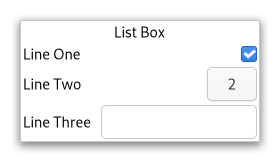
A GtkListBox only contains GtkListBoxRow children. These rows can
by dynamically sorted and filtered, and headers can be added dynamically
depending on the row content. It also allows keyboard and mouse navigation
and selection like a typical list.
Using GtkListBox is often an alternative to GtkTreeView, especially
when the list contents has a more complicated layout than what is allowed
by a GtkCellRenderer, or when the contents is interactive (i.e. has a
button in it).
Although a GtkListBox must have only GtkListBoxRow children, you can
add any kind of widget to it via prepend(org.gnome.gtk.Widget),
append(org.gnome.gtk.Widget) and insert(org.gnome.gtk.Widget, int) and a
GtkListBoxRow widget will automatically be inserted between the list
and the widget.
GtkListBoxRows can be marked as activatable or selectable. If a row is
activatable, Gtk.ListBox::row-activated will be emitted for it when
the user tries to activate it. If it is selectable, the row will be marked
as selected when the user tries to select it.
GtkListBox as GtkBuildable
The GtkListBox implementation of the GtkBuildable interface supports
setting a child as the placeholder by specifying “placeholder” as the “type”
attribute of a <child> element. See setPlaceholder(org.gnome.gtk.Widget)
for info.
Shortcuts and Gestures
The following signals have default keybindings:
Gtk.ListBox::move-cursorGtk.ListBox::select-allGtk.ListBox::toggle-cursor-rowGtk.ListBox::unselect-all
CSS nodes
 list[.separators][.rich-list][.navigation-sidebar][.boxed-list]
 ╰── row[.activatable]
GtkListBox uses a single CSS node named list. It may carry the .separators
style class, when the Gtk.ListBox:show-separators property is set.
Each GtkListBoxRow uses a single CSS node named row. The row nodes get the
.activatable style class added when appropriate.
It may also carry the .boxed-list style class. In this case, the list will be automatically surrounded by a frame and have separators.
The main list node may also carry style classes to select the style of list presentation: .rich-list, .navigation-sidebar or .data-table.
Accessibility
GtkListBox uses the Gtk.AccessibleRole.list role and GtkListBoxRow uses
the Gtk.AccessibleRole.list_item role.
-
Nested Class Summary
Nested ClassesModifier and TypeClassDescriptionstatic interfaceFunctional interface declaration of theActivateCursorRowCallbackcallback.static classListBox.Builder<B extends ListBox.Builder<B>>Inner class implementing a builder pattern to construct a GObject with properties.static interfaceFunctional interface declaration of theMoveCursorCallbackcallback.static interfaceFunctional interface declaration of theRowActivatedCallbackcallback.static interfaceFunctional interface declaration of theRowSelectedCallbackcallback.static interfaceFunctional interface declaration of theSelectAllCallbackcallback.static interfaceFunctional interface declaration of theSelectedRowsChangedCallbackcallback.static interfaceFunctional interface declaration of theToggleCursorRowCallbackcallback.static interfaceFunctional interface declaration of theUnselectAllCallbackcallback.Nested classes/interfaces inherited from class org.gnome.gtk.Widget
Widget.DestroyCallback, Widget.DirectionChangedCallback, Widget.HideCallback, Widget.KeynavFailedCallback, Widget.MapCallback, Widget.MnemonicActivateCallback, Widget.MoveFocusCallback, Widget.QueryTooltipCallback, Widget.RealizeCallback, Widget.ShowCallback, Widget.StateFlagsChangedCallback, Widget.UnmapCallback, Widget.UnrealizeCallback, Widget.Widget$Impl, Widget.WidgetClassNested classes/interfaces inherited from class org.gnome.gobject.InitiallyUnowned
InitiallyUnowned.InitiallyUnownedClassNested classes/interfaces inherited from class org.gnome.gobject.GObject
GObject.NotifyCallback, GObject.ObjectClassNested classes/interfaces inherited from interface org.gnome.gtk.Accessible
Accessible.Accessible$Impl, Accessible.AccessibleInterfaceNested classes/interfaces inherited from interface org.gnome.gtk.Buildable
Buildable.Buildable$Impl, Buildable.BuildableIfaceNested classes/interfaces inherited from interface org.gnome.gtk.ConstraintTarget
ConstraintTarget.ConstraintTarget$Impl, ConstraintTarget.ConstraintTargetInterface -
Constructor Summary
ConstructorsConstructorDescriptionListBox()Creates a new ListBox.ListBox(MemorySegment address) Create a ListBox proxy instance for the provided memory address. -
Method Summary
Modifier and TypeMethodDescriptionvoidAppend a widget to the list.protected ListBoxasParent()Returns this instance as if it were its parent type.voidbindModel(@Nullable ListModel model, @Nullable ListBoxCreateWidgetFunc createWidgetFunc) Bindsmodeltobox.static ListBox.Builder<? extends ListBox.Builder> builder()AListBox.Builderobject constructs aListBoxwith the specified properties.voidAdd a drag highlight to a row.voidIf a row has previously been highlighted via gtk_list_box_drag_highlight_row(), it will have the highlight removed.voidEmits the "activate-cursor-row" signal.voidemitMoveCursor(MovementStep step, int count, boolean extend, boolean modify) Emits the "move-cursor" signal.voidemitRowActivated(@Nullable ListBoxRow row) Emits the "row-activated" signal.voidemitRowSelected(@Nullable ListBoxRow row) Emits the "row-selected" signal.voidEmits the "select-all" signal.voidEmits the "selected-rows-changed" signal.voidEmits the "toggle-cursor-row" signal.voidEmits the "unselect-all" signal.booleanReturns whether rows activate on single clicks.@Nullable AdjustmentGets the adjustment (if any) that the widget uses to for vertical scrolling.static MemoryLayoutThe memory layout of the native struct.@Nullable ListBoxRowgetRowAtIndex(int index) Gets the n-th child in the list (not counting headers).@Nullable ListBoxRowgetRowAtY(int y) Gets the row at theyposition.@Nullable ListBoxRowGets the selected row, ornullif no rows are selected.Creates a list of all selected children.Gets the selection mode of the listbox.booleanReturns whether the list box should show separators between rows.Returns the behavior of theTabandShift+Tabkeys.static @Nullable TypegetType()Get the GType of the ListBox classvoidInsert thechildinto the this ListBox atposition.voidUpdate the filtering for all rows.voidUpdate the separators for all rows.voidUpdate the sorting for all rows.Emitted when the cursor row is activated.onMoveCursor(ListBox.MoveCursorCallback handler) Emitted when the user initiates a cursor movement.Emitted when a row has been activated by the user.onRowSelected(ListBox.RowSelectedCallback handler) Emitted when a new row is selected, or (with anullrow)when the selection is cleared.onSelectAll(ListBox.SelectAllCallback handler) Emitted to select all children of the box, if the selection mode permits it.Emitted when the set of selected rows changes.Emitted when the cursor row is toggled.onUnselectAll(ListBox.UnselectAllCallback handler) Emitted to unselect all children of the box, if the selection mode permits it.voidPrepend a widget to the list.voidRemoves a child frombox.voidRemoves all rows frombox.voidSelect all children ofbox,if the selection mode allows it.voidselectedForeach(@Nullable ListBoxForeachFunc func) Calls a function for each selected child.voidselectRow(@Nullable ListBoxRow row) Makerowthe currently selected row.voidsetActivateOnSingleClick(boolean single) Ifsingleistrue, rows will be activated when you click on them, otherwise you need to double-click.voidsetAdjustment(@Nullable Adjustment adjustment) Sets the adjustment (if any) that the widget uses to for vertical scrolling.voidsetFilterFunc(@Nullable ListBoxFilterFunc filterFunc) By setting a filter function on the this ListBox one can decide dynamically which of the rows to show.voidsetHeaderFunc(@Nullable ListBoxUpdateHeaderFunc updateHeader) Sets a header function.voidsetPlaceholder(@Nullable Widget placeholder) Sets the placeholder widget that is shown in the list when it doesn't display any visible children.voidSets how selection works in the listbox.voidsetShowSeparators(boolean showSeparators) Sets whether the list box should show separators between rows.voidsetSortFunc(@Nullable ListBoxSortFunc sortFunc) Sets a sort function.voidsetTabBehavior(ListTabBehavior behavior) Sets the behavior of theTabandShift+Tabkeys.voidUnselect all children ofbox,if the selection mode allows it.voidunselectRow(ListBoxRow row) Unselects a single row ofbox,if the selection mode allows it.Methods inherited from class org.gnome.gtk.Widget
actionSetEnabled, activateActionIfExists, activateDefault, activateWidget, addController, addCssClass, addMnemonicLabel, addTickCallback, allocate, childFocus, computeBounds, computeExpand, computeExpand, computePoint, computeTransform, contains, createPangoContext, createPangoLayout, cssChanged, directionChanged, disposeTemplate, dragCheckThreshold, emitDestroy, emitDirectionChanged, emitHide, emitKeynavFailed, emitMap, emitMnemonicActivate, emitMoveFocus, emitQueryTooltip, emitRealize, emitShow, emitStateFlagsChanged, emitUnmap, emitUnrealize, errorBell, focus, getAllocatedBaseline, getAllocatedHeight, getAllocatedWidth, getAllocation, getAncestor, getBaseline, getCanFocus, getCanTarget, getChildVisible, getClipboard, getColor, getCssClasses, getCssName, getCursor, getDefaultDirection, getDirection, getDisplay, getFirstChild, getFocusable, getFocusChild, getFocusOnClick, getFontMap, getFontOptions, getFrameClock, getHalign, getHasTooltip, getHeight, getHexpand, getHexpandSet, getLastChild, getLayoutManager, getLimitEvents, getMapped, getMarginBottom, getMarginEnd, getMarginStart, getMarginTop, getName, getNative, getNextSibling, getOpacity, getOverflow, getPangoContext, getParent, getPreferredSize, getPrevSibling, getPrimaryClipboard, getRealized, getReceivesDefault, getRequestMode, getRoot, getScaleFactor, getSensitive, getSettings, getSize, getSizeRequest, getStateFlags, getStyleContext, getTemplateChild, getTooltipMarkup, getTooltipText, getValign, getVexpand, getVexpandSet, getVisible, getWidth, grabFocus, hasCssClass, hasDefault, hasFocus, hasVisibleFocus, hide, inDestruction, initTemplate, insertActionGroup, insertAfter, insertBefore, isAncestor, isDrawable, isFocus, isSensitive, isVisible, keynavFailed, listMnemonicLabels, map, measure, mnemonicActivate, moveFocus, observeChildren, observeControllers, onDestroy, onDirectionChanged, onHide, onKeynavFailed, onMap, onMnemonicActivate, onMoveFocus, onQueryTooltip, onRealize, onShow, onStateFlagsChanged, onUnmap, onUnrealize, pick, pick, queryTooltip, queueAllocate, queueDraw, queueResize, realize, removeController, removeCssClass, removeMnemonicLabel, removeTickCallback, root, setCanFocus, setCanTarget, setChildVisible, setCssClasses, setCursor, setCursorFromName, setDefaultDirection, setDirection, setFocusable, setFocusChild, setFocusOnClick, setFontMap, setFontOptions, setHalign, setHasTooltip, setHexpand, setHexpandSet, setLayoutManager, setLimitEvents, setMarginBottom, setMarginEnd, setMarginStart, setMarginTop, setName, setOpacity, setOverflow, setParent, setReceivesDefault, setSensitive, setSizeRequest, setStateFlags, setStateFlags, setTooltipMarkup, setTooltipText, setValign, setVexpand, setVexpandSet, setVisible, shouldLayout, show, sizeAllocate, sizeAllocate, snapshot, snapshotChild, stateFlagsChanged, systemSettingChanged, translateCoordinates, triggerTooltipQuery, unmap, unparent, unrealize, unroot, unsetStateFlags, unsetStateFlagsMethods inherited from class org.gnome.gobject.GObject
addToggleRef, addWeakPointer, bindProperty, bindProperty, bindProperty, bindPropertyFull, bindPropertyFull, bindPropertyWithClosures, bindPropertyWithClosures, compatControl, connect, connect, connect, constructed, disconnect, dispatchPropertiesChanged, dispose, dupData, dupQdata, emit, emitNotify, finalize_, forceFloating, freezeNotify, get, getData, getProperty, getProperty, getProperty, getQdata, getv, interfaceFindProperty, interfaceInstallProperty, interfaceListProperties, isFloating, newInstance, newInstance, newv, notify, notify, notifyByPspec, onNotify, ref, refSink, removeToggleRef, removeWeakPointer, replaceData, replaceQdata, runDispose, set, setData, setDataFull, setProperty, setProperty, setProperty, setQdata, setQdataFull, setv, stealData, stealQdata, takeRef, thawNotify, unref, watchClosure, weakRef, weakUnref, withPropertiesMethods inherited from class org.gnome.gobject.TypeInstance
callParent, callParent, cast, getPrivate, readGClass, writeGClassMethods inherited from class org.javagi.base.ProxyInstance
equals, handle, hashCodeMethods inherited from class java.lang.Object
clone, finalize, getClass, notify, notifyAll, toString, wait, wait, waitMethods inherited from interface org.gnome.gtk.Accessible
announce, getAccessibleParent, getAccessibleRole, getAtContext, getBounds, getFirstAccessibleChild, getNextAccessibleSibling, getPlatformState, resetProperty, resetRelation, resetState, setAccessibleParent, updateNextAccessibleSibling, updatePlatformState, updateProperty, updateRelation, updateStateMethods inherited from interface org.gnome.gtk.Buildable
getBuildableId
-
Constructor Details
-
ListBox
Create a ListBox proxy instance for the provided memory address.- Parameters:
address- the memory address of the native object
-
ListBox
public ListBox()Creates a new ListBox.
-
-
Method Details
-
getType
-
getMemoryLayout
The memory layout of the native struct.- Returns:
- the memory layout
-
asParent
Returns this instance as if it were its parent type. This is mostly synonymous to the Javasuperkeyword, but will set the native typeclass function pointers to the parent type. When overriding a native virtual method in Java, "chaining up" withsuper.methodName()doesn't work, because it invokes the overridden function pointer again. To chain up, callasParent().methodName(). This will call the native function pointer of this virtual method in the typeclass of the parent type. -
append
Append a widget to the list.If a sort function is set, the widget will actually be inserted at the calculated position.
- Parameters:
child- theGtkWidgetto add
-
bindModel
public void bindModel(@Nullable ListModel model, @Nullable ListBoxCreateWidgetFunc createWidgetFunc) Bindsmodeltobox.If this ListBox was already bound to a model, that previous binding is destroyed.
The contents of this ListBox are cleared and then filled with widgets that represent items from
model.this ListBox is updated whenevermodelchanges. Ifmodelisnull, this ListBox is left empty.It is undefined to add or remove widgets directly (for example, with
insert(org.gnome.gtk.Widget, int)) while this ListBox is bound to a model.Note that using a model is incompatible with the filtering and sorting functionality in
GtkListBox. When using a model, filtering and sorting should be implemented by the model.- Parameters:
model- theGListModelto be bound to this ListBoxcreateWidgetFunc- a function that creates widgets for items ornullin case you also passednullasmodel
-
dragHighlightRow
Add a drag highlight to a row.This is a helper function for implementing DnD onto a
GtkListBox. The passed inrowwill be highlighted by setting theStateFlags.DROP_ACTIVEstate and any previously highlighted row will be unhighlighted.The row will also be unhighlighted when the widget gets a drag leave event.
- Parameters:
row- aGtkListBoxRow
-
dragUnhighlightRow
public void dragUnhighlightRow()If a row has previously been highlighted via gtk_list_box_drag_highlight_row(), it will have the highlight removed. -
getActivateOnSingleClick
public boolean getActivateOnSingleClick()Returns whether rows activate on single clicks.- Returns:
trueif rows are activated on single click,falseotherwise
-
getAdjustment
Gets the adjustment (if any) that the widget uses to for vertical scrolling.- Returns:
- the adjustment
-
getRowAtIndex
Gets the n-th child in the list (not counting headers).If
indexis negative or larger than the number of items in the list,nullis returned.- Parameters:
index- the index of the row- Returns:
- the child
GtkWidget
-
getRowAtY
Gets the row at theyposition.- Parameters:
y- position- Returns:
- the row
-
getSelectedRow
Gets the selected row, ornullif no rows are selected.Note that the box may allow multiple selection, in which case you should use
selectedForeach(org.gnome.gtk.ListBoxForeachFunc)to find all selected rows.- Returns:
- the selected row
-
getSelectedRows
Creates a list of all selected children.- Returns:
- A
GListcontaining theGtkWidgetfor each selected child. Free with g_list_free() when done.
-
getSelectionMode
Gets the selection mode of the listbox.- Returns:
- a
GtkSelectionMode
-
getShowSeparators
public boolean getShowSeparators()Returns whether the list box should show separators between rows.- Returns:
trueif the list box shows separators
-
getTabBehavior
Returns the behavior of theTabandShift+Tabkeys.- Returns:
- the tab behavior
- Since:
- 4.18
-
insert
Insert thechildinto the this ListBox atposition.If a sort function is set, the widget will actually be inserted at the calculated position.
If
positionis -1, or larger than the total number of items in thebox,then thechildwill be appended to the end.- Parameters:
child- theGtkWidgetto addposition- the position to insertchildin
-
invalidateFilter
public void invalidateFilter()Update the filtering for all rows.Call this when result of the filter function on the this ListBox is changed due to an external factor. For instance, this would be used if the filter function just looked for a specific search string and the entry with the search string has changed.
-
invalidateHeaders
public void invalidateHeaders()Update the separators for all rows.Call this when result of the header function on the this ListBox is changed due to an external factor.
-
invalidateSort
public void invalidateSort()Update the sorting for all rows.Call this when result of the sort function on the this ListBox is changed due to an external factor.
-
prepend
Prepend a widget to the list.If a sort function is set, the widget will actually be inserted at the calculated position.
- Parameters:
child- theGtkWidgetto add
-
remove
-
removeAll
public void removeAll()Removes all rows frombox.This function does nothing if this ListBox is backed by a model.
- Since:
- 4.12
-
selectAll
public void selectAll()Select all children ofbox,if the selection mode allows it. -
selectRow
Makerowthe currently selected row.- Parameters:
row- The row to select
-
selectedForeach
Calls a function for each selected child.Note that the selection cannot be modified from within this function.
- Parameters:
func- the function to call for each selected child
-
setActivateOnSingleClick
public void setActivateOnSingleClick(boolean single) Ifsingleistrue, rows will be activated when you click on them, otherwise you need to double-click.- Parameters:
single- a boolean
-
setAdjustment
Sets the adjustment (if any) that the widget uses to for vertical scrolling.For instance, this is used to get the page size for PageUp/Down key handling.
In the normal case when the this ListBox is packed inside a
GtkScrolledWindowthe adjustment from that will be picked up automatically, so there is no need to manually do that.- Parameters:
adjustment- the adjustment
-
setFilterFunc
By setting a filter function on the this ListBox one can decide dynamically which of the rows to show.For instance, to implement a search function on a list that filters the original list to only show the matching rows.
The
filterFuncwill be called for each row after the call, and it will continue to be called each time a row changes (viaListBoxRow.changed()) or wheninvalidateFilter()is called.Note that using a filter function is incompatible with using a model (see
bindModel(org.gnome.gio.ListModel, org.gnome.gtk.ListBoxCreateWidgetFunc)).- Parameters:
filterFunc- callback that lets you filter which rows to show
-
setHeaderFunc
Sets a header function.By setting a header function on the this ListBox one can dynamically add headers in front of rows, depending on the contents of the row and its position in the list.
For instance, one could use it to add headers in front of the first item of a new kind, in a list sorted by the kind.
The
updateHeadercan look at the current header widget usingListBoxRow.getHeader()and either update the state of the widget as needed, or set a new one usingListBoxRow.setHeader(org.gnome.gtk.Widget). If no header is needed, set the header tonull.Note that you may get many calls
updateHeaderto this for a particular row when e.g. changing things that don’t affect the header. In this case it is important for performance to not blindly replace an existing header with an identical one.The
updateHeaderfunction will be called for each row after the call, and it will continue to be called each time a row changes (viaListBoxRow.changed()) and when the row before changes (either byListBoxRow.changed()on the previous row, or when the previous row becomes a different row). It is also called for all rows wheninvalidateHeaders()is called.- Parameters:
updateHeader- callback that lets you add row headers
-
setPlaceholder
Sets the placeholder widget that is shown in the list when it doesn't display any visible children.- Parameters:
placeholder- aGtkWidget
-
setSelectionMode
Sets how selection works in the listbox.- Parameters:
mode- TheGtkSelectionMode
-
setShowSeparators
public void setShowSeparators(boolean showSeparators) Sets whether the list box should show separators between rows.- Parameters:
showSeparators-trueto show separators
-
setSortFunc
Sets a sort function.By setting a sort function on the this ListBox one can dynamically reorder the rows of the list, based on the contents of the rows.
The
sortFuncwill be called for each row after the call, and will continue to be called each time a row changes (viaListBoxRow.changed()) and wheninvalidateSort()is called.Note that using a sort function is incompatible with using a model (see
bindModel(org.gnome.gio.ListModel, org.gnome.gtk.ListBoxCreateWidgetFunc)).- Parameters:
sortFunc- the sort function
-
setTabBehavior
Sets the behavior of theTabandShift+Tabkeys.- Parameters:
behavior- the tab behavior- Since:
- 4.18
-
unselectAll
public void unselectAll()Unselect all children ofbox,if the selection mode allows it. -
unselectRow
Unselects a single row ofbox,if the selection mode allows it.- Parameters:
row- the row to unselect
-
onActivateCursorRow
public SignalConnection<ListBox.ActivateCursorRowCallback> onActivateCursorRow(ListBox.ActivateCursorRowCallback handler) Emitted when the cursor row is activated.- Parameters:
handler- the signal handler- Returns:
- a signal handler ID to keep track of the signal connection
- See Also:
-
emitActivateCursorRow
public void emitActivateCursorRow()Emits the "activate-cursor-row" signal. SeeonActivateCursorRow(org.gnome.gtk.ListBox.ActivateCursorRowCallback). -
onMoveCursor
public SignalConnection<ListBox.MoveCursorCallback> onMoveCursor(ListBox.MoveCursorCallback handler) Emitted when the user initiates a cursor movement.The default bindings for this signal come in two variants, the variant with the Shift modifier extends the selection, the variant without the Shift modifier does not. There are too many key combinations to list them all here.
←,→,↑,↓move by individual childrenHome,Endmove to the ends of the boxPgUp,PgDnmove vertically by pages
- Parameters:
handler- the signal handler- Returns:
- a signal handler ID to keep track of the signal connection
- See Also:
-
emitMoveCursor
Emits the "move-cursor" signal. SeeonMoveCursor(org.gnome.gtk.ListBox.MoveCursorCallback). -
onRowActivated
public SignalConnection<ListBox.RowActivatedCallback> onRowActivated(ListBox.RowActivatedCallback handler) Emitted when a row has been activated by the user.- Parameters:
handler- the signal handler- Returns:
- a signal handler ID to keep track of the signal connection
- See Also:
-
emitRowActivated
Emits the "row-activated" signal. SeeonRowActivated(org.gnome.gtk.ListBox.RowActivatedCallback). -
onRowSelected
public SignalConnection<ListBox.RowSelectedCallback> onRowSelected(ListBox.RowSelectedCallback handler) Emitted when a new row is selected, or (with anullrow)when the selection is cleared.When the
boxis usingSelectionMode.MULTIPLE, this signal will not give you the full picture of selection changes, and you should use theGtk.ListBox::selected-rows-changedsignal instead.- Parameters:
handler- the signal handler- Returns:
- a signal handler ID to keep track of the signal connection
- See Also:
-
emitRowSelected
Emits the "row-selected" signal. SeeonRowSelected(org.gnome.gtk.ListBox.RowSelectedCallback). -
onSelectAll
Emitted to select all children of the box, if the selection mode permits it.This is a keybinding signal.
The default binding for this signal is
Ctrl-a.- Parameters:
handler- the signal handler- Returns:
- a signal handler ID to keep track of the signal connection
- See Also:
-
emitSelectAll
public void emitSelectAll()Emits the "select-all" signal. SeeonSelectAll(org.gnome.gtk.ListBox.SelectAllCallback). -
onSelectedRowsChanged
public SignalConnection<ListBox.SelectedRowsChangedCallback> onSelectedRowsChanged(ListBox.SelectedRowsChangedCallback handler) Emitted when the set of selected rows changes.- Parameters:
handler- the signal handler- Returns:
- a signal handler ID to keep track of the signal connection
- See Also:
-
emitSelectedRowsChanged
public void emitSelectedRowsChanged()Emits the "selected-rows-changed" signal. SeeonSelectedRowsChanged(org.gnome.gtk.ListBox.SelectedRowsChangedCallback). -
onToggleCursorRow
public SignalConnection<ListBox.ToggleCursorRowCallback> onToggleCursorRow(ListBox.ToggleCursorRowCallback handler) Emitted when the cursor row is toggled.The default bindings for this signal is
Ctrl+␣.- Parameters:
handler- the signal handler- Returns:
- a signal handler ID to keep track of the signal connection
- See Also:
-
emitToggleCursorRow
public void emitToggleCursorRow()Emits the "toggle-cursor-row" signal. SeeonToggleCursorRow(org.gnome.gtk.ListBox.ToggleCursorRowCallback). -
onUnselectAll
public SignalConnection<ListBox.UnselectAllCallback> onUnselectAll(ListBox.UnselectAllCallback handler) Emitted to unselect all children of the box, if the selection mode permits it.This is a keybinding signal.
The default binding for this signal is
Ctrl-Shift-a.- Parameters:
handler- the signal handler- Returns:
- a signal handler ID to keep track of the signal connection
- See Also:
-
emitUnselectAll
public void emitUnselectAll()Emits the "unselect-all" signal. SeeonUnselectAll(org.gnome.gtk.ListBox.UnselectAllCallback). -
builder
AListBox.Builderobject constructs aListBoxwith the specified properties. Use the variousset...()methods to set properties, and finish construction withListBox.Builder.build().- Returns:
- the builder object
-