Class HeaderBar
- All Implemented Interfaces:
Accessible,Buildable,ConstraintTarget,Proxy
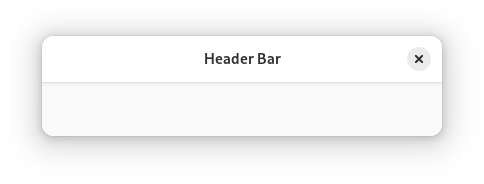
AdwHeaderBar is similar to HeaderBar, but provides additional
features compared to it. Refer to GtkHeaderBar for details. It is typically
used as a top bar within ToolbarView.
Dialog Integration
When placed inside an Dialog, AdwHeaderBar will display the dialog
title instead of window title. It will also adjust the decoration layout to
ensure it always has a close button and nothing else. Set
HeaderBar:show-start-title-buttons and
HeaderBar:show-end-title-buttons to FALSE to remove it if it's
unwanted.
Navigation View Integration
When placed inside an NavigationPage, AdwHeaderBar will display the
page title instead of window title.
When used together with NavigationView or NavigationSplitView,
it will also display a back button that can be used to go back to the previous
page. The button also has a context menu, allowing to pop multiple pages at
once, potentially across multiple navigation views.
Set HeaderBar:show-back-button to FALSE to disable this behavior
in rare scenarios where it's unwanted.
Split View Integration
When placed inside NavigationSplitView or OverlaySplitView,
AdwHeaderBar will automatically hide the title buttons other than at the
edges of the window.
Bottom Sheet Integration
When played inside BottomSheet, AdwHeaderBar will not show the title
unless BottomSheet:show-drag-handle is set to FALSE, regardless
of HeaderBar:show-title. This only applies to the default title,
titles set with HeaderBar:title-widget will still be shown.
Centering Policy
HeaderBar:centering-policy allows to enforce strict centering of
the title widget. This can be useful for entries inside Clamp.
Title Buttons
Unlike GtkHeaderBar, AdwHeaderBar allows to toggle title button
visibility for each side individually, using the
HeaderBar:show-start-title-buttons and
HeaderBar:show-end-title-buttons properties.
CSS nodes
 headerbar
 ╰── windowhandle
     ╰── box
         ├── widget
         │   ╰── box.start
         │       ├── windowcontrols.start
         │       ├── widget
         │       │   ╰── [button.back]
         │       ╰── [other children]
         ├── widget
         │   ╰── [Title Widget]
         ╰── widget
             ╰── box.end
                 ├── [other children]
                 ╰── windowcontrols.end
AdwHeaderBar's CSS node is called headerbar. It contains a windowhandle
subnode, which contains a box subnode, which contains three widget
subnodes at the start, center and end of the header bar. The start and end
subnodes contain a box subnode with the .start and .end style classes
respectively, and the center node contains a node that represents the title.
Each of the boxes contains a windowcontrols subnode, see
WindowControls for details, as well as other children.
When HeaderBar:show-back-button is TRUE, the start box also
contains a node with the name widget that contains a node with the name
button and .back style class.
Accessibility
AdwHeaderBar uses the GTK_ACCESSIBLE_ROLE_GROUP role.
-
Nested Class Summary
Nested ClassesModifier and TypeClassDescriptionstatic classHeaderBar.Builder<B extends HeaderBar.Builder<B>>Inner class implementing a builder pattern to construct a GObject with properties.static classNested classes/interfaces inherited from class org.gnome.gtk.Widget
Widget.DestroyCallback, Widget.DirectionChangedCallback, Widget.HideCallback, Widget.KeynavFailedCallback, Widget.MapCallback, Widget.MnemonicActivateCallback, Widget.MoveFocusCallback, Widget.QueryTooltipCallback, Widget.RealizeCallback, Widget.ShowCallback, Widget.StateFlagsChangedCallback, Widget.UnmapCallback, Widget.UnrealizeCallback, Widget.Widget$Impl, Widget.WidgetClassNested classes/interfaces inherited from class org.gnome.gobject.InitiallyUnowned
InitiallyUnowned.InitiallyUnownedClassNested classes/interfaces inherited from class org.gnome.gobject.GObject
GObject.NotifyCallback, GObject.ObjectClassNested classes/interfaces inherited from interface org.gnome.gtk.Accessible
Accessible.Accessible$Impl, Accessible.AccessibleInterfaceNested classes/interfaces inherited from interface org.gnome.gtk.Buildable
Buildable.Buildable$Impl, Buildable.BuildableIfaceNested classes/interfaces inherited from interface org.gnome.gtk.ConstraintTarget
ConstraintTarget.ConstraintTarget$Impl, ConstraintTarget.ConstraintTargetInterface -
Constructor Summary
ConstructorsConstructorDescriptionCreates a new HeaderBar.HeaderBar(MemorySegment address) Create a HeaderBar proxy instance for the provided memory address. -
Method Summary
Modifier and TypeMethodDescriptionprotected HeaderBarasParent()Returns this instance as if it were its parent type.static HeaderBar.Builder<? extends HeaderBar.Builder> builder()AHeaderBar.Builderobject constructs aHeaderBarwith the specified properties.Gets the policy for aligning the center widget.@Nullable StringGets the decoration layout forself.static MemoryLayoutThe memory layout of the native struct.booleanGets whether this HeaderBar can show the back button.booleanGets whether to show title buttons at the end ofself.booleanGets whether to show title buttons at the start ofself.booleanGets whether the title widget should be shown.@Nullable WidgetGets the title widget widget ofself.static @Nullable TypegetType()Get the GType of the HeaderBar classvoidAddschildtoself,packed with reference to the end ofself.voidAddschildtoself,packed with reference to the start of theself.voidRemoves a child fromself.voidsetCenteringPolicy(CenteringPolicy centeringPolicy) Sets the policy for aligning the center widget.voidsetDecorationLayout(@Nullable String layout) Sets the decoration layout forself.voidsetShowBackButton(boolean showBackButton) Sets whether this HeaderBar can show the back button.voidsetShowEndTitleButtons(boolean setting) Sets whether to show title buttons at the end ofself.voidsetShowStartTitleButtons(boolean setting) Sets whether to show title buttons at the start ofself.voidsetShowTitle(boolean showTitle) Sets whether the title widget should be shown.voidsetTitleWidget(@Nullable Widget titleWidget) Sets the title widget forself.Methods inherited from class org.gnome.gtk.Widget
actionSetEnabled, activateActionIfExists, activateDefault, activateWidget, addController, addCssClass, addMnemonicLabel, addTickCallback, allocate, childFocus, computeBounds, computeExpand, computeExpand, computePoint, computeTransform, contains, createPangoContext, createPangoLayout, cssChanged, directionChanged, disposeTemplate, dragCheckThreshold, emitDestroy, emitDirectionChanged, emitHide, emitKeynavFailed, emitMap, emitMnemonicActivate, emitMoveFocus, emitQueryTooltip, emitRealize, emitShow, emitStateFlagsChanged, emitUnmap, emitUnrealize, errorBell, focus, getAllocatedBaseline, getAllocatedHeight, getAllocatedWidth, getAllocation, getAncestor, getBaseline, getCanFocus, getCanTarget, getChildVisible, getClipboard, getColor, getCssClasses, getCssName, getCursor, getDefaultDirection, getDirection, getDisplay, getFirstChild, getFocusable, getFocusChild, getFocusOnClick, getFontMap, getFontOptions, getFrameClock, getHalign, getHasTooltip, getHeight, getHexpand, getHexpandSet, getLastChild, getLayoutManager, getLimitEvents, getMapped, getMarginBottom, getMarginEnd, getMarginStart, getMarginTop, getName, getNative, getNextSibling, getOpacity, getOverflow, getPangoContext, getParent, getPreferredSize, getPrevSibling, getPrimaryClipboard, getRealized, getReceivesDefault, getRequestMode, getRoot, getScaleFactor, getSensitive, getSettings, getSize, getSizeRequest, getStateFlags, getStyleContext, getTemplateChild, getTooltipMarkup, getTooltipText, getValign, getVexpand, getVexpandSet, getVisible, getWidth, grabFocus, hasCssClass, hasDefault, hasFocus, hasVisibleFocus, hide, inDestruction, initTemplate, insertActionGroup, insertAfter, insertBefore, isAncestor, isDrawable, isFocus, isSensitive, isVisible, keynavFailed, listMnemonicLabels, map, measure, mnemonicActivate, moveFocus, observeChildren, observeControllers, onDestroy, onDirectionChanged, onHide, onKeynavFailed, onMap, onMnemonicActivate, onMoveFocus, onQueryTooltip, onRealize, onShow, onStateFlagsChanged, onUnmap, onUnrealize, pick, pick, queryTooltip, queueAllocate, queueDraw, queueResize, realize, removeController, removeCssClass, removeMnemonicLabel, removeTickCallback, root, setCanFocus, setCanTarget, setChildVisible, setCssClasses, setCursor, setCursorFromName, setDefaultDirection, setDirection, setFocusable, setFocusChild, setFocusOnClick, setFontMap, setFontOptions, setHalign, setHasTooltip, setHexpand, setHexpandSet, setLayoutManager, setLimitEvents, setMarginBottom, setMarginEnd, setMarginStart, setMarginTop, setName, setOpacity, setOverflow, setParent, setReceivesDefault, setSensitive, setSizeRequest, setStateFlags, setStateFlags, setTooltipMarkup, setTooltipText, setValign, setVexpand, setVexpandSet, setVisible, shouldLayout, show, sizeAllocate, sizeAllocate, snapshot, snapshotChild, stateFlagsChanged, systemSettingChanged, translateCoordinates, triggerTooltipQuery, unmap, unparent, unrealize, unroot, unsetStateFlags, unsetStateFlagsMethods inherited from class org.gnome.gobject.GObject
addToggleRef, addWeakPointer, bindProperty, bindProperty, bindProperty, bindPropertyFull, bindPropertyFull, bindPropertyWithClosures, bindPropertyWithClosures, compatControl, connect, connect, connect, constructed, disconnect, dispatchPropertiesChanged, dispose, dupData, dupQdata, emit, emitNotify, finalize_, forceFloating, freezeNotify, get, getData, getProperty, getProperty, getProperty, getQdata, getv, interfaceFindProperty, interfaceInstallProperty, interfaceListProperties, isFloating, newInstance, newInstance, newv, notify, notify, notifyByPspec, onNotify, ref, refSink, removeToggleRef, removeWeakPointer, replaceData, replaceQdata, runDispose, set, setData, setDataFull, setProperty, setProperty, setProperty, setQdata, setQdataFull, setv, stealData, stealQdata, takeRef, thawNotify, unref, watchClosure, weakRef, weakUnref, withPropertiesMethods inherited from class org.gnome.gobject.TypeInstance
callParent, callParent, cast, getPrivate, readGClass, writeGClassMethods inherited from class org.javagi.base.ProxyInstance
equals, handle, hashCodeMethods inherited from class java.lang.Object
clone, finalize, getClass, notify, notifyAll, toString, wait, wait, waitMethods inherited from interface org.gnome.gtk.Accessible
announce, getAccessibleParent, getAccessibleRole, getAtContext, getBounds, getFirstAccessibleChild, getNextAccessibleSibling, getPlatformState, resetProperty, resetRelation, resetState, setAccessibleParent, updateNextAccessibleSibling, updatePlatformState, updateProperty, updateRelation, updateStateMethods inherited from interface org.gnome.gtk.Buildable
getBuildableId
-
Constructor Details
-
HeaderBar
Create a HeaderBar proxy instance for the provided memory address.- Parameters:
address- the memory address of the native object
-
HeaderBar
public HeaderBar()Creates a new HeaderBar.
-
-
Method Details
-
getType
-
getMemoryLayout
The memory layout of the native struct.- Returns:
- the memory layout
-
asParent
Returns this instance as if it were its parent type. This is mostly synonymous to the Javasuperkeyword, but will set the native typeclass function pointers to the parent type. When overriding a native virtual method in Java, "chaining up" withsuper.methodName()doesn't work, because it invokes the overridden function pointer again. To chain up, callasParent().methodName(). This will call the native function pointer of this virtual method in the typeclass of the parent type. -
getCenteringPolicy
Gets the policy for aligning the center widget.- Returns:
- the centering policy
-
getDecorationLayout
Gets the decoration layout forself.- Returns:
- the decoration layout
-
getShowBackButton
public boolean getShowBackButton()Gets whether this HeaderBar can show the back button.- Returns:
- whether to show the back button
- Since:
- 1.4
-
getShowEndTitleButtons
public boolean getShowEndTitleButtons()Gets whether to show title buttons at the end ofself.- Returns:
TRUEif title buttons at the end are shown
-
getShowStartTitleButtons
public boolean getShowStartTitleButtons()Gets whether to show title buttons at the start ofself.- Returns:
TRUEif title buttons at the start are shown
-
getShowTitle
public boolean getShowTitle()Gets whether the title widget should be shown.- Returns:
- whether the title widget should be shown.
- Since:
- 1.4
-
getTitleWidget
Gets the title widget widget ofself.- Returns:
- the title widget
-
packEnd
Addschildtoself,packed with reference to the end ofself.- Parameters:
child- the widget to be added to this HeaderBar
-
packStart
Addschildtoself,packed with reference to the start of theself.- Parameters:
child- the widget to be added to this HeaderBar
-
remove
Removes a child fromself.The child must have been added with
packStart(org.gnome.gtk.Widget),packEnd(org.gnome.gtk.Widget)orHeaderBar:title-widget.- Parameters:
child- the child to remove
-
setCenteringPolicy
Sets the policy for aligning the center widget.- Parameters:
centeringPolicy- the centering policy
-
setDecorationLayout
Sets the decoration layout forself.If this property is not set, the
Gtk.Settings:gtk-decoration-layoutsetting is used.The format of the string is button names, separated by commas. A colon separates the buttons that should appear at the start from those at the end. Recognized button names are minimize, maximize, close and icon (the window icon).
For example, “icon:minimize,maximize,close” specifies an icon at the start, and minimize, maximize and close buttons at the end.
- Parameters:
layout- a decoration layout
-
setShowBackButton
public void setShowBackButton(boolean showBackButton) Sets whether this HeaderBar can show the back button.The back button will never be shown unless the header bar is placed inside an
NavigationView. Usually, there is no reason to set it toFALSE.- Parameters:
showBackButton- whether to show the back button- Since:
- 1.4
-
setShowEndTitleButtons
public void setShowEndTitleButtons(boolean setting) Sets whether to show title buttons at the end ofself.See
HeaderBar:show-start-title-buttonsfor the other side.Which buttons are actually shown and where is determined by the
HeaderBar:decoration-layoutproperty, and by the state of the window (e.g. a close button will not be shown if the window can't be closed).- Parameters:
setting-TRUEto show standard title buttons
-
setShowStartTitleButtons
public void setShowStartTitleButtons(boolean setting) Sets whether to show title buttons at the start ofself.See
HeaderBar:show-end-title-buttonsfor the other side.Which buttons are actually shown and where is determined by the
HeaderBar:decoration-layoutproperty, and by the state of the window (e.g. a close button will not be shown if the window can't be closed).- Parameters:
setting-TRUEto show standard title buttons
-
setShowTitle
public void setShowTitle(boolean showTitle) Sets whether the title widget should be shown.- Parameters:
showTitle- whether the title widget is visible- Since:
- 1.4
-
setTitleWidget
Sets the title widget forself.When set to
NULL, the header bar will display the title of the window it is contained in.To use a different title, use
WindowTitle:<object class="AdwHeaderBar"> <property name="title-widget"> <object class="AdwWindowTitle"> <property name="title" translatable="yes">Title</property> </object> </property> </object>- Parameters:
titleWidget- a widget to use for a title
-
builder
AHeaderBar.Builderobject constructs aHeaderBarwith the specified properties. Use the variousset...()methods to set properties, and finish construction withHeaderBar.Builder.build().- Returns:
- the builder object
-