Class ToolbarView
- All Implemented Interfaces:
Accessible,Buildable,ConstraintTarget,Proxy
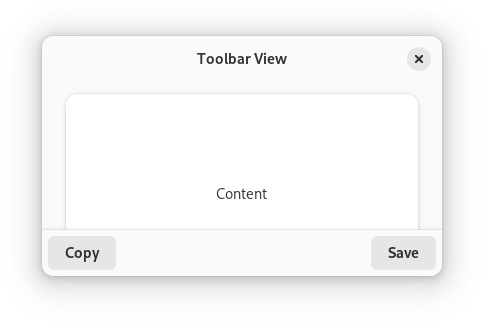
AdwToolbarView has a single content widget and one or multiple top and
bottom bars, shown at the top and bottom sides respectively.
Example of an AdwToolbarView UI definition:
<object class="AdwToolbarView">
   <child type="top">
     <object class="AdwHeaderBar"/>
   </child>
   <property name="content">
     <object class="AdwPreferencesPage">
       <!-- ... -->
     </object>
   </property>
 </object>
The following kinds of top and bottom bars are supported:
HeaderBarTabBarViewSwitcherBarActionBarHeaderBarPopoverMenuBarSearchBar- Any
Boxor a similar widget with the.toolbarstyle class
By default, top and bottom bars are flat and scrolling content has a subtle
undershoot shadow, same as when using the
.undershoot-top and
.undershoot-bottom style
classes. This works well in most cases, e.g. with StatusPage or
PreferencesPage, where the background at the top and bottom parts of
the page is uniform. Additionally, windows with sidebars should always use
this style.
ToolbarView:top-bar-style and
ToolbarView:bottom-bar-style properties can be used add an opaque
background and a persistent shadow to top and bottom bars, this can be useful
for content such as utility panes,
where some elements are adjacent to the top/bottom bars, or TabView,
where each page can have a different background.
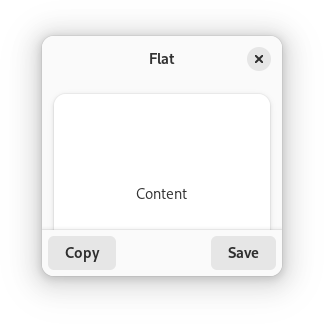
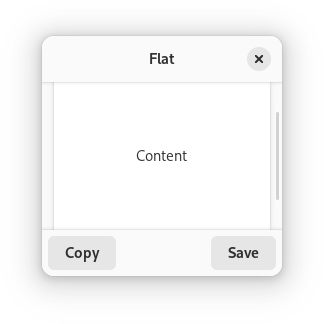
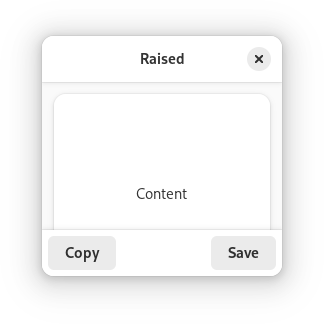
AdwToolbarView ensures the top and bottom bars have consistent backdrop
styles and vertical spacing. For comparison:
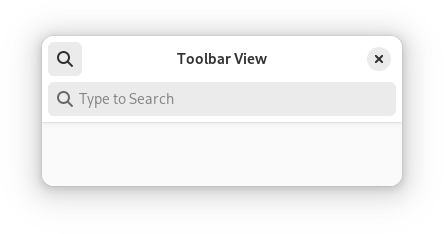
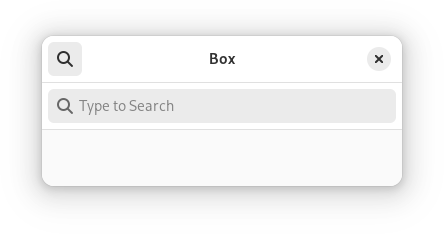
Any top and bottom bars can also be dragged to move the window, equivalent
to putting them into a WindowHandle.
Content is typically place between top and bottom bars, but can also extend
behind them. This is controlled with the
ToolbarView:extend-content-to-top-edge and
ToolbarView:extend-content-to-bottom-edge properties.
Top and bottom bars can be hidden and revealed with an animation using the
ToolbarView:reveal-top-bars and
ToolbarView:reveal-bottom-bars properties.
AdwToolbarView as GtkBuildable
The AdwToolbarView implementation of the Buildable interface
supports adding a top bar by specifying “top” as the “type” attribute of a
<child> element, or adding a bottom bar by specifying “bottom”.
Accessibility
AdwToolbarView uses the GTK_ACCESSIBLE_ROLE_GROUP role.
- Since:
- 1.4
-
Nested Class Summary
Nested ClassesModifier and TypeClassDescriptionstatic classToolbarView.Builder<B extends ToolbarView.Builder<B>>Inner class implementing a builder pattern to construct a GObject with properties.static classNested classes/interfaces inherited from class org.gnome.gtk.Widget
Widget.DestroyCallback, Widget.DirectionChangedCallback, Widget.HideCallback, Widget.KeynavFailedCallback, Widget.MapCallback, Widget.MnemonicActivateCallback, Widget.MoveFocusCallback, Widget.QueryTooltipCallback, Widget.RealizeCallback, Widget.ShowCallback, Widget.StateFlagsChangedCallback, Widget.UnmapCallback, Widget.UnrealizeCallback, Widget.Widget$Impl, Widget.WidgetClassNested classes/interfaces inherited from class org.gnome.gobject.InitiallyUnowned
InitiallyUnowned.InitiallyUnownedClassNested classes/interfaces inherited from class org.gnome.gobject.GObject
GObject.NotifyCallback, GObject.ObjectClassNested classes/interfaces inherited from interface org.gnome.gtk.Accessible
Accessible.Accessible$Impl, Accessible.AccessibleInterfaceNested classes/interfaces inherited from interface org.gnome.gtk.Buildable
Buildable.Buildable$Impl, Buildable.BuildableIfaceNested classes/interfaces inherited from interface org.gnome.gtk.ConstraintTarget
ConstraintTarget.ConstraintTarget$Impl, ConstraintTarget.ConstraintTargetInterface -
Constructor Summary
ConstructorsConstructorDescriptionCreates a new ToolbarView.ToolbarView(MemorySegment address) Create a ToolbarView proxy instance for the provided memory address. -
Method Summary
Modifier and TypeMethodDescriptionvoidaddBottomBar(Widget widget) Adds a bottom bar toself.voidAdds a top bar toself.protected ToolbarViewasParent()Returns this instance as if it were its parent type.static ToolbarView.Builder<? extends ToolbarView.Builder> builder()AToolbarView.Builderobject constructs aToolbarViewwith the specified properties.intGets the current bottom bar height forself.Gets appearance of the bottom bars forself.@Nullable WidgetGets the content widget forself.booleanGets whether the content widget can extend behind bottom bars.booleanGets whether the content widget can extend behind top bars.static MemoryLayoutThe memory layout of the native struct.booleanGets whether bottom bars are revealed forself.booleanGets whether top bars are revealed forself.intGets the current top bar height forself.Gets appearance of the top bars forself.static @Nullable TypegetType()Get the GType of the ToolbarView classvoidRemoves a child fromself.voidsetBottomBarStyle(ToolbarStyle style) Sets appearance of the bottom bars forself.voidsetContent(@Nullable Widget content) Sets the content widget forself.voidsetExtendContentToBottomEdge(boolean extend) Sets whether the content widget can extend behind bottom bars.voidsetExtendContentToTopEdge(boolean extend) Sets whether the content widget can extend behind top bars.voidsetRevealBottomBars(boolean reveal) Sets whether bottom bars are revealed forself.voidsetRevealTopBars(boolean reveal) Sets whether top bars are revealed forself.voidsetTopBarStyle(ToolbarStyle style) Sets appearance of the top bars forself.Methods inherited from class org.gnome.gtk.Widget
actionSetEnabled, activateActionIfExists, activateDefault, activateWidget, addController, addCssClass, addMnemonicLabel, addTickCallback, allocate, childFocus, computeBounds, computeExpand, computeExpand, computePoint, computeTransform, contains, createPangoContext, createPangoLayout, cssChanged, directionChanged, disposeTemplate, dragCheckThreshold, emitDestroy, emitDirectionChanged, emitHide, emitKeynavFailed, emitMap, emitMnemonicActivate, emitMoveFocus, emitQueryTooltip, emitRealize, emitShow, emitStateFlagsChanged, emitUnmap, emitUnrealize, errorBell, focus, getAllocatedBaseline, getAllocatedHeight, getAllocatedWidth, getAllocation, getAncestor, getBaseline, getCanFocus, getCanTarget, getChildVisible, getClipboard, getColor, getCssClasses, getCssName, getCursor, getDefaultDirection, getDirection, getDisplay, getFirstChild, getFocusable, getFocusChild, getFocusOnClick, getFontMap, getFontOptions, getFrameClock, getHalign, getHasTooltip, getHeight, getHexpand, getHexpandSet, getLastChild, getLayoutManager, getLimitEvents, getMapped, getMarginBottom, getMarginEnd, getMarginStart, getMarginTop, getName, getNative, getNextSibling, getOpacity, getOverflow, getPangoContext, getParent, getPreferredSize, getPrevSibling, getPrimaryClipboard, getRealized, getReceivesDefault, getRequestMode, getRoot, getScaleFactor, getSensitive, getSettings, getSize, getSizeRequest, getStateFlags, getStyleContext, getTemplateChild, getTooltipMarkup, getTooltipText, getValign, getVexpand, getVexpandSet, getVisible, getWidth, grabFocus, hasCssClass, hasDefault, hasFocus, hasVisibleFocus, hide, inDestruction, initTemplate, insertActionGroup, insertAfter, insertBefore, isAncestor, isDrawable, isFocus, isSensitive, isVisible, keynavFailed, listMnemonicLabels, map, measure, mnemonicActivate, moveFocus, observeChildren, observeControllers, onDestroy, onDirectionChanged, onHide, onKeynavFailed, onMap, onMnemonicActivate, onMoveFocus, onQueryTooltip, onRealize, onShow, onStateFlagsChanged, onUnmap, onUnrealize, pick, pick, queryTooltip, queueAllocate, queueDraw, queueResize, realize, removeController, removeCssClass, removeMnemonicLabel, removeTickCallback, root, setCanFocus, setCanTarget, setChildVisible, setCssClasses, setCursor, setCursorFromName, setDefaultDirection, setDirection, setFocusable, setFocusChild, setFocusOnClick, setFontMap, setFontOptions, setHalign, setHasTooltip, setHexpand, setHexpandSet, setLayoutManager, setLimitEvents, setMarginBottom, setMarginEnd, setMarginStart, setMarginTop, setName, setOpacity, setOverflow, setParent, setReceivesDefault, setSensitive, setSizeRequest, setStateFlags, setStateFlags, setTooltipMarkup, setTooltipText, setValign, setVexpand, setVexpandSet, setVisible, shouldLayout, show, sizeAllocate, sizeAllocate, snapshot, snapshotChild, stateFlagsChanged, systemSettingChanged, translateCoordinates, triggerTooltipQuery, unmap, unparent, unrealize, unroot, unsetStateFlags, unsetStateFlagsMethods inherited from class org.gnome.gobject.GObject
addToggleRef, addWeakPointer, bindProperty, bindProperty, bindProperty, bindPropertyFull, bindPropertyFull, bindPropertyWithClosures, bindPropertyWithClosures, compatControl, connect, connect, connect, constructed, disconnect, dispatchPropertiesChanged, dispose, dupData, dupQdata, emit, emitNotify, finalize_, forceFloating, freezeNotify, get, getData, getProperty, getProperty, getProperty, getQdata, getv, interfaceFindProperty, interfaceInstallProperty, interfaceListProperties, isFloating, newInstance, newInstance, newv, notify, notify, notifyByPspec, onNotify, ref, refSink, removeToggleRef, removeWeakPointer, replaceData, replaceQdata, runDispose, set, setData, setDataFull, setProperty, setProperty, setProperty, setQdata, setQdataFull, setv, stealData, stealQdata, takeRef, thawNotify, unref, watchClosure, weakRef, weakUnref, withPropertiesMethods inherited from class org.gnome.gobject.TypeInstance
callParent, callParent, cast, getPrivate, readGClass, writeGClassMethods inherited from class org.javagi.base.ProxyInstance
equals, handle, hashCodeMethods inherited from class java.lang.Object
clone, finalize, getClass, notify, notifyAll, toString, wait, wait, waitMethods inherited from interface org.gnome.gtk.Accessible
announce, getAccessibleParent, getAccessibleRole, getAtContext, getBounds, getFirstAccessibleChild, getNextAccessibleSibling, getPlatformState, resetProperty, resetRelation, resetState, setAccessibleParent, updateNextAccessibleSibling, updatePlatformState, updateProperty, updateRelation, updateStateMethods inherited from interface org.gnome.gtk.Buildable
getBuildableId
-
Constructor Details
-
ToolbarView
Create a ToolbarView proxy instance for the provided memory address.- Parameters:
address- the memory address of the native object
-
ToolbarView
public ToolbarView()Creates a new ToolbarView.
-
-
Method Details
-
getType
-
getMemoryLayout
The memory layout of the native struct.- Returns:
- the memory layout
-
asParent
Returns this instance as if it were its parent type. This is mostly synonymous to the Javasuperkeyword, but will set the native typeclass function pointers to the parent type. When overriding a native virtual method in Java, "chaining up" withsuper.methodName()doesn't work, because it invokes the overridden function pointer again. To chain up, callasParent().methodName(). This will call the native function pointer of this virtual method in the typeclass of the parent type. -
addBottomBar
Adds a bottom bar toself.- Parameters:
widget- a widget- Since:
- 1.4
-
addTopBar
Adds a top bar toself.- Parameters:
widget- a widget- Since:
- 1.4
-
getBottomBarHeight
public int getBottomBarHeight()Gets the current bottom bar height forself.Bottom bar height does change depending on
ToolbarView:reveal-bottom-bars, including during the transition.See
getTopBarHeight().- Returns:
- the current bottom bar height
- Since:
- 1.4
-
getBottomBarStyle
Gets appearance of the bottom bars forself.- Returns:
- bottom bar style
- Since:
- 1.4
-
getContent
Gets the content widget forself.- Returns:
- the content widget
- Since:
- 1.4
-
getExtendContentToBottomEdge
public boolean getExtendContentToBottomEdge()Gets whether the content widget can extend behind bottom bars.- Returns:
- whether content extends behind bottom bars
- Since:
- 1.4
-
getExtendContentToTopEdge
public boolean getExtendContentToTopEdge()Gets whether the content widget can extend behind top bars.- Returns:
- whether content extends behind top bars
- Since:
- 1.4
-
getRevealBottomBars
public boolean getRevealBottomBars()Gets whether bottom bars are revealed forself.- Returns:
- whether bottom bars are revealed
- Since:
- 1.4
-
getRevealTopBars
public boolean getRevealTopBars()Gets whether top bars are revealed forself.- Returns:
- whether top bars are revealed
- Since:
- 1.4
-
getTopBarHeight
public int getTopBarHeight()Gets the current top bar height forself.Top bar height does change depending on
ToolbarView:reveal-top-bars, including during the transition.See
getBottomBarHeight().- Returns:
- the current top bar height
- Since:
- 1.4
-
getTopBarStyle
Gets appearance of the top bars forself.- Returns:
- top bar style
- Since:
- 1.4
-
remove
Removes a child fromself.- Parameters:
widget- the child to be removed- Since:
- 1.4
-
setBottomBarStyle
Sets appearance of the bottom bars forself.If set to
ADW_TOOLBAR_FLAT, bottom bars are flat and scrolling content has a subtle undershoot shadow when touching them, same as the.undershoot-bottomstyle class. This works well for simple content, e.g.StatusPageorPreferencesPage, where the background at the bottom of the page is uniform. Additionally, windows with sidebars should always use this style.Undershoot shadow is only present if a bottom bar is actually present and visible. It is also never present if
ToolbarView:extend-content-to-bottom-edgeis set toTRUE.If set to
ADW_TOOLBAR_RAISED, bottom bars have an opaque background and a persistent shadow, this is suitable for content such as utility panes, where some elements are directly adjacent to the bottom bars, orTabView, where each page can have a different background.ADW_TOOLBAR_RAISED_BORDERis similar toADW_TOOLBAR_RAISED, but the shadow is replaced with a more subtle border. This can be useful for applications like image viewers.- Parameters:
style- bottom bar style- Since:
- 1.4
-
setContent
Sets the content widget forself.- Parameters:
content- the content widget- Since:
- 1.4
-
setExtendContentToBottomEdge
public void setExtendContentToBottomEdge(boolean extend) Sets whether the content widget can extend behind bottom bars.This can be used in combination with
ToolbarView:reveal-bottom-barsto show and hide toolbars in fullscreen.- Parameters:
extend- whether content extends behind bottom bars- Since:
- 1.4
-
setExtendContentToTopEdge
public void setExtendContentToTopEdge(boolean extend) Sets whether the content widget can extend behind top bars.This can be used in combination with
ToolbarView:reveal-top-barsto show and hide toolbars in fullscreen.- Parameters:
extend- whether content extends behind top bars- Since:
- 1.4
-
setRevealBottomBars
public void setRevealBottomBars(boolean reveal) Sets whether bottom bars are revealed forself.The transition will be animated.
This can be used in combination with
ToolbarView:extend-content-to-bottom-edgeto show and hide toolbars in fullscreen.- Parameters:
reveal- whether to reveal bottom bars- Since:
- 1.4
-
setRevealTopBars
public void setRevealTopBars(boolean reveal) Sets whether top bars are revealed forself.The transition will be animated.
This can be used in combination with
ToolbarView:extend-content-to-top-edgeto show and hide toolbars in fullscreen.- Parameters:
reveal- whether to reveal top bars- Since:
- 1.4
-
setTopBarStyle
Sets appearance of the top bars forself.If set to
ADW_TOOLBAR_FLAT, top bars are flat and scrolling content has a subtle undershoot shadow when touching them, same as the.undershoot-topstyle class. This works well for simple content, e.g.StatusPageorPreferencesPage, where the background at the top of the page is uniform. Additionally, windows with sidebars should always use this style.Undershoot shadow is only present if a top bar is actually present and visible. It is also never present if
ToolbarView:extend-content-to-top-edgeis set toTRUE.If set to
ADW_TOOLBAR_RAISED, top bars have an opaque background and a persistent shadow, this is suitable for content such as utility panes, where some elements are directly adjacent to the top bars, orTabView, where each page can have a different background.ADW_TOOLBAR_RAISED_BORDERis similar toADW_TOOLBAR_RAISED, but the shadow is replaced with a more subtle border. This can be useful for applications like image viewers.- Parameters:
style- top bar style- Since:
- 1.4
-
builder
AToolbarView.Builderobject constructs aToolbarViewwith the specified properties. Use the variousset...()methods to set properties, and finish construction withToolbarView.Builder.build().- Returns:
- the builder object
-