Class Dialog
- All Implemented Interfaces:
Accessible,Buildable,ConstraintTarget,Native,Root,ShortcutManager,Proxy
- Direct Known Subclasses:
AppChooserDialog,ColorChooserDialog,FileChooserDialog,FontChooserDialog,MessageDialog,PageSetupUnixDialog,PrintUnixDialog
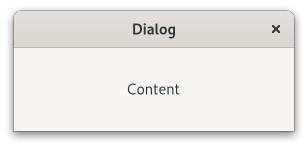
Typical uses are to display a message, ask a question, or anything else that does not require extensive effort on the user’s part.
The main area of a GtkDialog is called the "content area", and is yours
to populate with widgets such a GtkLabel or GtkEntry, to present
your information, questions, or tasks to the user.
In addition, dialogs allow you to add "action widgets". Most commonly,
action widgets are buttons. Depending on the platform, action widgets may
be presented in the header bar at the top of the window, or at the bottom
of the window. To add action widgets, create your GtkDialog using
withButtons(java.lang.String, org.gnome.gtk.Window, java.util.Set<org.gnome.gtk.DialogFlags>, java.lang.String, java.lang.Object...), or use
addButton(java.lang.String, int), addButtons(java.lang.String, java.lang.Object...),
or addActionWidget(org.gnome.gtk.Widget, int).
GtkDialogs uses some heuristics to decide whether to add a close
button to the window decorations. If any of the action buttons use
the response ID ResponseType.CLOSE or ResponseType.CANCEL, the
close button is omitted.
Clicking a button that was added as an action widget will emit the
Gtk.Dialog::response signal with a response ID that you specified.
GTK will never assign a meaning to positive response IDs; these are
entirely user-defined. But for convenience, you can use the response
IDs in the Gtk.ResponseType enumeration (these all have values
less than zero). If a dialog receives a delete event, the
Gtk.Dialog::response signal will be emitted with the
ResponseType.DELETE_EVENT response ID.
Dialogs are created with a call to Dialog() or
withButtons(java.lang.String, org.gnome.gtk.Window, java.util.Set<org.gnome.gtk.DialogFlags>, java.lang.String, java.lang.Object...). The latter is recommended; it allows
you to set the dialog title, some convenient flags, and add buttons.
A “modal” dialog (that is, one which freezes the rest of the application
from user input), can be created by calling Window.setModal(boolean)
on the dialog. When using withButtons(java.lang.String, org.gnome.gtk.Window, java.util.Set<org.gnome.gtk.DialogFlags>, java.lang.String, java.lang.Object...), you can also
pass the DialogFlags.MODAL flag to make a dialog modal.
For the simple dialog in the following example, a MessageDialog
would save some effort. But you’d need to create the dialog contents manually
if you had more than a simple message in the dialog.
An example for simple GtkDialog usage:
// Function to open a dialog box with a message
 void
 quick_message (GtkWindow *parent, char *message)
 {
  GtkWidget *dialog, *label, *content_area;
  GtkDialogFlags flags;

  // Create the widgets
  flags = GTK_DIALOG_DESTROY_WITH_PARENT;
  dialog = gtk_dialog_new_with_buttons ("Message",
                                        parent,
                                        flags,
                                        _("_OK"),
                                        GTK_RESPONSE_NONE,
                                        NULL);
  content_area = gtk_dialog_get_content_area (GTK_DIALOG (dialog));
  label = gtk_label_new (message);

  // Ensure that the dialog box is destroyed when the user responds

  g_signal_connect_swapped (dialog,
                            "response",
                            G_CALLBACK (gtk_window_destroy),
                            dialog);

  // Add the label, and show everything we’ve added

  gtk_box_append (GTK_BOX (content_area), label);
  gtk_widget_show (dialog);
 }
GtkDialog as GtkBuildable
The GtkDialog implementation of the GtkBuildable interface exposes the
contentArea as an internal child with the name “content_area”.
GtkDialog supports a custom <action-widgets> element, which can contain
multiple <action-widget> elements. The “response” attribute specifies a
numeric response, and the content of the element is the id of widget
(which should be a child of the dialogs actionArea). To mark a response
as default, set the “default” attribute of the <action-widget> element
to true.
GtkDialog supports adding action widgets by specifying “action” as
the “type” attribute of a <child> element. The widget will be added
either to the action area or the headerbar of the dialog, depending
on the “use-header-bar” property. The response id has to be associated
with the action widget using the <action-widgets> element.
An example of a GtkDialog UI definition fragment:
<object class="GtkDialog" id="dialog1">
   <child type="action">
     <object class="GtkButton" id="button_cancel"/>
   </child>
   <child type="action">
     <object class="GtkButton" id="button_ok">
     </object>
   </child>
   <action-widgets>
     <action-widget response="cancel">button_cancel</action-widget>
     <action-widget response="ok" default="true">button_ok</action-widget>
   </action-widgets>
 </object>
Accessibility
GtkDialog uses the AccessibleRole.DIALOG role.
-
Nested Class Summary
Nested ClassesModifier and TypeClassDescriptionstatic classDialog.Builder<B extends Dialog.Builder<B>>Deprecated.Inner class implementing a builder pattern to construct a GObject with properties.static interfaceDeprecated.static classDeprecated.static interfaceDeprecated.Nested classes/interfaces inherited from class org.gnome.gtk.Window
Window.ActivateDefaultCallback, Window.ActivateFocusCallback, Window.CloseRequestCallback, Window.EnableDebuggingCallback, Window.KeysChangedCallback, Window.WindowClassNested classes/interfaces inherited from class org.gnome.gtk.Widget
Widget.DestroyCallback, Widget.DirectionChangedCallback, Widget.HideCallback, Widget.KeynavFailedCallback, Widget.MapCallback, Widget.MnemonicActivateCallback, Widget.MoveFocusCallback, Widget.QueryTooltipCallback, Widget.RealizeCallback, Widget.ShowCallback, Widget.StateFlagsChangedCallback, Widget.UnmapCallback, Widget.UnrealizeCallback, Widget.Widget$Impl, Widget.WidgetClassNested classes/interfaces inherited from class org.gnome.gobject.InitiallyUnowned
InitiallyUnowned.InitiallyUnownedClassNested classes/interfaces inherited from class org.gnome.gobject.GObject
GObject.NotifyCallback, GObject.ObjectClassNested classes/interfaces inherited from interface org.gnome.gtk.Accessible
Accessible.Accessible$Impl, Accessible.AccessibleInterfaceNested classes/interfaces inherited from interface org.gnome.gtk.Buildable
Buildable.Buildable$Impl, Buildable.BuildableIfaceNested classes/interfaces inherited from interface org.gnome.gtk.ConstraintTarget
ConstraintTarget.ConstraintTarget$Impl, ConstraintTarget.ConstraintTargetInterfaceNested classes/interfaces inherited from interface org.gnome.gtk.Native
Native.Native$Impl, Native.NativeInterfaceNested classes/interfaces inherited from interface org.gnome.gtk.Root
Root.Root$Impl, Root.RootInterfaceNested classes/interfaces inherited from interface org.gnome.gtk.ShortcutManager
ShortcutManager.ShortcutManager$Impl, ShortcutManager.ShortcutManagerInterface -
Constructor Summary
ConstructorsConstructorDescriptionDialog()Deprecated.Creates a new Dialog.Dialog(MemorySegment address) Deprecated.Create a Dialog proxy instance for the provided memory address. -
Method Summary
Modifier and TypeMethodDescriptionvoidaddActionWidget(Widget child, int responseId) Deprecated.UseWindowinsteadDeprecated.UseWindowinsteadvoidaddButtons(String firstButtonText, Object... varargs) Deprecated.UseWindowinsteadprotected DialogasParent()Deprecated.Returns this instance as if it were its parent type.static Dialog.Builder<? extends Dialog.Builder> builder()Deprecated.ADialog.Builderobject constructs aDialogwith the specified properties.voidclose()Deprecated.Signal emitted when the user uses a keybinding to close the dialog.voidDeprecated.voidemitResponse(int responseId) Deprecated.Deprecated.UseWindowinsteadDeprecated.UseWindowinsteadstatic MemoryLayoutDeprecated.The memory layout of the native struct.intgetResponseForWidget(Widget widget) Deprecated.UseWindowinsteadstatic @Nullable TypegetType()Deprecated.Get the GType of the Dialog class@Nullable WidgetgetWidgetForResponse(int responseId) Deprecated.UseWindowinsteadonClose(Dialog.CloseCallback handler) Deprecated.UseWindowinsteadonResponse(Dialog.ResponseCallback handler) Deprecated.UseWindowinsteadvoidresponse(int responseId) Deprecated.UseWindowinsteadvoidsetDefaultResponse(int responseId) Deprecated.UseWindowinsteadvoidsetResponseSensitive(int responseId, boolean setting) Deprecated.UseWindowinsteadstatic DialogwithButtons(@Nullable String title, @Nullable Window parent, Set<DialogFlags> flags, @Nullable String firstButtonText, Object... varargs) Deprecated.UseWindowinsteadstatic DialogwithButtons(@Nullable String title, @Nullable Window parent, DialogFlags flags, @Nullable String firstButtonText, Object... varargs) Deprecated.UseWindowinsteadMethods inherited from class org.gnome.gtk.Window
activateDefault, activateFocus, closeRequest, destroy, emitActivateDefault, emitActivateFocus, emitCloseRequest, emitEnableDebugging, emitKeysChanged, enableDebugging, fullscreen, fullscreenOnMonitor, getApplication, getChild, getDecorated, getDefaultIconName, getDefaultSize, getDefaultWidget, getDeletable, getDestroyWithParent, getFocus, getFocusVisible, getGravity, getGroup, getHandleMenubarAccel, getHideOnClose, getIconName, getMnemonicsVisible, getModal, getResizable, getTitle, getTitlebar, getToplevels, getTransientFor, hasGroup, isActive, isFullscreen, isMaximized, isSuspended, keysChanged, listToplevels, maximize, minimize, onActivateDefault, onActivateFocus, onCloseRequest, onEnableDebugging, onKeysChanged, present, presentWithTime, setApplication, setAutoStartupNotification, setChild, setDecorated, setDefaultIconName, setDefaultSize, setDefaultWidget, setDeletable, setDestroyWithParent, setDisplay, setFocus, setFocusVisible, setGravity, setHandleMenubarAccel, setHideOnClose, setIconName, setInteractiveDebugging, setMnemonicsVisible, setModal, setResizable, setStartupId, setTitle, setTitlebar, setTransientFor, unfullscreen, unmaximize, unminimizeMethods inherited from class org.gnome.gtk.Widget
actionSetEnabled, activateActionIfExists, activateWidget, addController, addCssClass, addMnemonicLabel, addTickCallback, allocate, childFocus, computeBounds, computeExpand, computeExpand, computePoint, computeTransform, contains, createPangoContext, createPangoLayout, cssChanged, directionChanged, disposeTemplate, dragCheckThreshold, emitDestroy, emitDirectionChanged, emitHide, emitKeynavFailed, emitMap, emitMnemonicActivate, emitMoveFocus, emitQueryTooltip, emitRealize, emitShow, emitStateFlagsChanged, emitUnmap, emitUnrealize, errorBell, focus, getAllocatedBaseline, getAllocatedHeight, getAllocatedWidth, getAllocation, getAncestor, getBaseline, getCanFocus, getCanTarget, getChildVisible, getClipboard, getColor, getCssClasses, getCssName, getCursor, getDefaultDirection, getDirection, getDisplay, getFirstChild, getFocusable, getFocusChild, getFocusOnClick, getFontMap, getFontOptions, getFrameClock, getHalign, getHasTooltip, getHeight, getHexpand, getHexpandSet, getLastChild, getLayoutManager, getLimitEvents, getMapped, getMarginBottom, getMarginEnd, getMarginStart, getMarginTop, getName, getNative, getNextSibling, getOpacity, getOverflow, getPangoContext, getParent, getPreferredSize, getPrevSibling, getPrimaryClipboard, getRealized, getReceivesDefault, getRequestMode, getRoot, getScaleFactor, getSensitive, getSettings, getSize, getSizeRequest, getStateFlags, getStyleContext, getTemplateChild, getTooltipMarkup, getTooltipText, getValign, getVexpand, getVexpandSet, getVisible, getWidth, grabFocus, hasCssClass, hasDefault, hasFocus, hasVisibleFocus, hide, inDestruction, initTemplate, insertActionGroup, insertAfter, insertBefore, isAncestor, isDrawable, isFocus, isSensitive, isVisible, keynavFailed, listMnemonicLabels, map, measure, mnemonicActivate, moveFocus, observeChildren, observeControllers, onDestroy, onDirectionChanged, onHide, onKeynavFailed, onMap, onMnemonicActivate, onMoveFocus, onQueryTooltip, onRealize, onShow, onStateFlagsChanged, onUnmap, onUnrealize, pick, pick, queryTooltip, queueAllocate, queueDraw, queueResize, realize, removeController, removeCssClass, removeMnemonicLabel, removeTickCallback, root, setCanFocus, setCanTarget, setChildVisible, setCssClasses, setCursor, setCursorFromName, setDefaultDirection, setDirection, setFocusable, setFocusChild, setFocusOnClick, setFontMap, setFontOptions, setHalign, setHasTooltip, setHexpand, setHexpandSet, setLayoutManager, setLimitEvents, setMarginBottom, setMarginEnd, setMarginStart, setMarginTop, setName, setOpacity, setOverflow, setParent, setReceivesDefault, setSensitive, setSizeRequest, setStateFlags, setStateFlags, setTooltipMarkup, setTooltipText, setValign, setVexpand, setVexpandSet, setVisible, shouldLayout, show, sizeAllocate, sizeAllocate, snapshot, snapshotChild, stateFlagsChanged, systemSettingChanged, translateCoordinates, triggerTooltipQuery, unmap, unparent, unrealize, unroot, unsetStateFlags, unsetStateFlagsMethods inherited from class org.gnome.gobject.GObject
addToggleRef, addWeakPointer, bindProperty, bindProperty, bindProperty, bindPropertyFull, bindPropertyFull, bindPropertyWithClosures, bindPropertyWithClosures, compatControl, connect, connect, connect, constructed, disconnect, dispatchPropertiesChanged, dispose, dupData, dupQdata, emit, emitNotify, finalize_, forceFloating, freezeNotify, get, getData, getProperty, getProperty, getProperty, getQdata, getv, interfaceFindProperty, interfaceInstallProperty, interfaceListProperties, isFloating, newInstance, newInstance, newv, notify, notify, notifyByPspec, onNotify, ref, refSink, removeToggleRef, removeWeakPointer, replaceData, replaceQdata, runDispose, set, setData, setDataFull, setProperty, setProperty, setProperty, setQdata, setQdataFull, setv, stealData, stealQdata, takeRef, thawNotify, unref, watchClosure, weakRef, weakUnref, withPropertiesMethods inherited from class org.gnome.gobject.TypeInstance
callParent, callParent, cast, getPrivate, readGClass, writeGClassMethods inherited from class org.javagi.base.ProxyInstance
equals, handle, hashCodeMethods inherited from class java.lang.Object
clone, finalize, getClass, notify, notifyAll, toString, wait, wait, waitMethods inherited from interface org.gnome.gtk.Accessible
announce, getAccessibleParent, getAccessibleRole, getAtContext, getBounds, getFirstAccessibleChild, getNextAccessibleSibling, getPlatformState, resetProperty, resetRelation, resetState, setAccessibleParent, updateNextAccessibleSibling, updatePlatformState, updateProperty, updateRelation, updateStateMethods inherited from interface org.gnome.gtk.Buildable
getBuildableIdMethods inherited from interface org.gnome.gtk.Native
getRenderer, getSurface, getSurfaceTransform, realize, unrealizeMethods inherited from interface org.gnome.gtk.Root
getDisplay, getFocus, setFocus
-
Constructor Details
-
Dialog
Deprecated.Create a Dialog proxy instance for the provided memory address.- Parameters:
address- the memory address of the native object
-
Dialog
public Dialog()Deprecated.Creates a new Dialog.
-
-
Method Details
-
getType
Deprecated.Get the GType of the Dialog class- Returns:
- the GType
-
getMemoryLayout
Deprecated.The memory layout of the native struct.- Returns:
- the memory layout
-
asParent
Deprecated.Returns this instance as if it were its parent type. This is mostly synonymous to the Javasuperkeyword, but will set the native typeclass function pointers to the parent type. When overriding a native virtual method in Java, "chaining up" withsuper.methodName()doesn't work, because it invokes the overridden function pointer again. To chain up, callasParent().methodName(). This will call the native function pointer of this virtual method in the typeclass of the parent type. -
withButtons
@Deprecated public static Dialog withButtons(@Nullable String title, @Nullable Window parent, Set<DialogFlags> flags, @Nullable String firstButtonText, Object... varargs) Deprecated.UseWindowinsteadCreates a newGtkDialogwith the given title and transient parent.The
flagsargument can be used to make the dialog modal, have it destroyed along with its transient parent, or make it use a headerbar.Button text/response ID pairs should be listed in pairs, with a
nullpointer ending the list. Button text can be arbitrary text. A response ID can be any positive number, or one of the values in theGtk.ResponseTypeenumeration. If the user clicks one of these buttons,GtkDialogwill emit theGtk.Dialog::responsesignal with the corresponding response ID.If a
GtkDialogreceives a delete event, it will emit ::response with a response ID ofResponseType.DELETE_EVENT.However, destroying a dialog does not emit the ::response signal; so be careful relying on ::response when using the
DialogFlags.DESTROY_WITH_PARENTflag.Here’s a simple example:
GtkWindow *main_app_window; // Window the dialog should show up on GtkWidget *dialog; GtkDialogFlags flags = GTK_DIALOG_MODAL | GTK_DIALOG_DESTROY_WITH_PARENT; dialog = gtk_dialog_new_with_buttons ("My dialog", main_app_window, flags, _("_OK"), GTK_RESPONSE_ACCEPT, _("_Cancel"), GTK_RESPONSE_REJECT, NULL);- Parameters:
title- Title of the dialogparent- Transient parent of the dialogflags- fromGtkDialogFlagsfirstButtonText- text to go in first buttonvarargs- response ID for first button, then additional buttons, ending withnull- Returns:
- a new
GtkDialog
-
withButtons
@Deprecated public static Dialog withButtons(@Nullable String title, @Nullable Window parent, DialogFlags flags, @Nullable String firstButtonText, Object... varargs) Deprecated.UseWindowinsteadCreates a newGtkDialogwith the given title and transient parent.The
flagsargument can be used to make the dialog modal, have it destroyed along with its transient parent, or make it use a headerbar.Button text/response ID pairs should be listed in pairs, with a
nullpointer ending the list. Button text can be arbitrary text. A response ID can be any positive number, or one of the values in theGtk.ResponseTypeenumeration. If the user clicks one of these buttons,GtkDialogwill emit theGtk.Dialog::responsesignal with the corresponding response ID.If a
GtkDialogreceives a delete event, it will emit ::response with a response ID ofResponseType.DELETE_EVENT.However, destroying a dialog does not emit the ::response signal; so be careful relying on ::response when using the
DialogFlags.DESTROY_WITH_PARENTflag.Here’s a simple example:
GtkWindow *main_app_window; // Window the dialog should show up on GtkWidget *dialog; GtkDialogFlags flags = GTK_DIALOG_MODAL | GTK_DIALOG_DESTROY_WITH_PARENT; dialog = gtk_dialog_new_with_buttons ("My dialog", main_app_window, flags, _("_OK"), GTK_RESPONSE_ACCEPT, _("_Cancel"), GTK_RESPONSE_REJECT, NULL);- Parameters:
title- Title of the dialogparent- Transient parent of the dialogflags- fromGtkDialogFlagsfirstButtonText- text to go in first buttonvarargs- response ID for first button, then additional buttons, ending withnull- Returns:
- a new
GtkDialog
-
addActionWidget
Deprecated.UseWindowinsteadAdds an activatable widget to the action area of aGtkDialog.GTK connects a signal handler that will emit the
Gtk.Dialog::responsesignal on the dialog when the widget is activated. The widget is appended to the end of the dialog’s action area.If you want to add a non-activatable widget, simply pack it into the
actionAreafield of theGtkDialogstruct.- Parameters:
child- an activatable widgetresponseId- response ID forchild
-
addButton
Deprecated.UseWindowinsteadAdds a button with the given text.GTK arranges things so that clicking the button will emit the
Gtk.Dialog::responsesignal with the givenresponseId.The button is appended to the end of the dialog’s action area. The button widget is returned, but usually you don’t need it.- Parameters:
buttonText- text of buttonresponseId- response ID for the button- Returns:
- the
GtkButtonwidget that was added
-
addButtons
Deprecated.UseWindowinsteadAdds multiple buttons.This is the same as calling
addButton(java.lang.String, int)repeatedly. The variable argument list should benull-terminated as withwithButtons(java.lang.String, org.gnome.gtk.Window, java.util.Set<org.gnome.gtk.DialogFlags>, java.lang.String, java.lang.Object...). Each button must have both text and response ID.- Parameters:
firstButtonText- button textvarargs- response ID for first button, then more text-response_id pairs
-
getContentArea
Deprecated.UseWindowinsteadReturns the content area ofdialog.- Returns:
- the content area
GtkBox.
-
getHeaderBar
Deprecated.UseWindowinsteadReturns the header bar ofdialog.Note that the headerbar is only used by the dialog if the
Gtk.Dialog:use-header-barproperty istrue.- Returns:
- the header bar
-
getResponseForWidget
Deprecated.UseWindowinsteadGets the response id of a widget in the action area of a dialog.- Parameters:
widget- a widget in the action area of this Dialog- Returns:
- the response id of
widget,orResponseType.NONEifwidgetdoesn’t have a response id set.
-
getWidgetForResponse
Deprecated.UseWindowinsteadGets the widget button that uses the given response ID in the action area of a dialog.- Parameters:
responseId- the response ID used by the this Dialog widget- Returns:
- the
widgetbutton that uses the givenresponseId
-
response
Deprecated.UseWindowinsteadEmits the ::response signal with the given response ID.Used to indicate that the user has responded to the dialog in some way.
- Parameters:
responseId- response ID
-
setDefaultResponse
Deprecated.UseWindowinsteadSets the default widget for the dialog based on the response ID.Pressing “Enter” normally activates the default widget.
- Parameters:
responseId- a response ID
-
setResponseSensitive
Deprecated.UseWindowinsteadA convenient way to sensitize/desensitize dialog buttons.Calls
gtk_widget_set_sensitive (widget, @setting)for each widget in the dialog’s action area with the givenresponseId.- Parameters:
responseId- a response IDsetting-truefor sensitive
-
close
-
onClose
Deprecated.UseWindowinsteadEmitted when the user uses a keybinding to close the dialog.This is a keybinding signal.
The default binding for this signal is the Escape key.
- Parameters:
handler- the signal handler- Returns:
- a signal handler ID to keep track of the signal connection
- See Also:
-
emitClose
Deprecated.Emits the "close" signal. SeeonClose(org.gnome.gtk.Dialog.CloseCallback). -
onResponse
@Deprecated public SignalConnection<Dialog.ResponseCallback> onResponse(Dialog.ResponseCallback handler) Deprecated.UseWindowinsteadEmitted when an action widget is clicked.The signal is also emitted when the dialog receives a delete event, and when
response(int)is called. On a delete event, the response ID isResponseType.DELETE_EVENT. Otherwise, it depends on which action widget was clicked.- Parameters:
handler- the signal handler- Returns:
- a signal handler ID to keep track of the signal connection
- See Also:
-
emitResponse
Deprecated.Emits the "response" signal. SeeonResponse(org.gnome.gtk.Dialog.ResponseCallback). -
builder
Deprecated.ADialog.Builderobject constructs aDialogwith the specified properties. Use the variousset...()methods to set properties, and finish construction withDialog.Builder.build().- Returns:
- the builder object
-
Windowinstead