Class TextView
- All Implemented Interfaces:
Accessible,AccessibleText,Buildable,ConstraintTarget,Scrollable,Proxy
- Direct Known Subclasses:
View
TextBuffer.
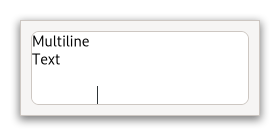
You may wish to begin by reading the conceptual overview, which gives an overview of all the objects and data types related to the text widget and how they work together.
Shortcuts and Gestures
GtkTextView supports the following keyboard shortcuts:
Shift+F10orMenuopens the context menu.Ctrl+Zundoes the last modification.Ctrl+YorCtrl+Shift+Zredoes the last undone modification.Clearclears the content.
Additionally, the following signals have default keybindings:
Gtk.TextView::backspaceGtk.TextView::copy-clipboardGtk.TextView::cut-clipboardGtk.TextView::delete-from-cursorGtk.TextView::insert-emojiGtk.TextView::move-cursorGtk.TextView::paste-clipboardGtk.TextView::select-allGtk.TextView::toggle-cursor-visibleGtk.TextView::toggle-overwrite
Actions
GtkTextView defines a set of built-in actions:
clipboard.copycopies the contents to the clipboard.clipboard.cutcopies the contents to the clipboard and deletes it from the widget.clipboard.pasteinserts the contents of the clipboard into the widget.menu.popupopens the context menu.misc.insert-emojiopens the Emoji chooser.selection.deletedeletes the current selection.selection.select-allselects all of the widgets content.text.redoredoes the last change to the contents.text.undoundoes the last change to the contents.text.clearclears the content.
CSS nodes
 textview.view
 ├── border.top
 ├── border.left
 ├── text
 │   ╰── [selection]
 ├── border.right
 ├── border.bottom
 ╰── [window.popup]
GtkTextView has a main css node with name textview and style class .view,
and subnodes for each of the border windows, and the main text area,
with names border and text, respectively. The border nodes each get
one of the style classes .left, .right, .top or .bottom.
A node representing the selection will appear below the text node.
If a context menu is opened, the window node will appear as a subnode of the main node.
Accessibility
GtkTextView uses the Gtk.AccessibleRole.text_box role.
-
Nested Class Summary
Nested ClassesModifier and TypeClassDescriptionstatic interfaceFunctional interface declaration of theBackspaceCallbackcallback.static classTextView.Builder<B extends TextView.Builder<B>>Inner class implementing a builder pattern to construct a GObject with properties.static interfaceFunctional interface declaration of theCopyClipboardCallbackcallback.static interfaceFunctional interface declaration of theCutClipboardCallbackcallback.static interfaceFunctional interface declaration of theDeleteFromCursorCallbackcallback.static interfaceFunctional interface declaration of theExtendSelectionCallbackcallback.static interfaceFunctional interface declaration of theInsertAtCursorCallbackcallback.static interfaceFunctional interface declaration of theInsertEmojiCallbackcallback.static interfaceFunctional interface declaration of theMoveCursorCallbackcallback.static interfaceFunctional interface declaration of theMoveViewportCallbackcallback.static interfaceFunctional interface declaration of thePasteClipboardCallbackcallback.static interfaceFunctional interface declaration of thePreeditChangedCallbackcallback.static interfaceFunctional interface declaration of theSelectAllCallbackcallback.static interfaceFunctional interface declaration of theSetAnchorCallbackcallback.static classstatic interfaceFunctional interface declaration of theToggleCursorVisibleCallbackcallback.static interfaceFunctional interface declaration of theToggleOverwriteCallbackcallback.Nested classes/interfaces inherited from class org.gnome.gtk.Widget
Widget.DestroyCallback, Widget.DirectionChangedCallback, Widget.HideCallback, Widget.KeynavFailedCallback, Widget.MapCallback, Widget.MnemonicActivateCallback, Widget.MoveFocusCallback, Widget.QueryTooltipCallback, Widget.RealizeCallback, Widget.ShowCallback, Widget.StateFlagsChangedCallback, Widget.UnmapCallback, Widget.UnrealizeCallback, Widget.Widget$Impl, Widget.WidgetClassNested classes/interfaces inherited from class org.gnome.gobject.InitiallyUnowned
InitiallyUnowned.InitiallyUnownedClassNested classes/interfaces inherited from class org.gnome.gobject.GObject
GObject.NotifyCallback, GObject.ObjectClassNested classes/interfaces inherited from interface org.gnome.gtk.Accessible
Accessible.Accessible$Impl, Accessible.AccessibleInterfaceNested classes/interfaces inherited from interface org.gnome.gtk.AccessibleText
AccessibleText.AccessibleText$Impl, AccessibleText.AccessibleTextInterfaceNested classes/interfaces inherited from interface org.gnome.gtk.Buildable
Buildable.Buildable$Impl, Buildable.BuildableIfaceNested classes/interfaces inherited from interface org.gnome.gtk.ConstraintTarget
ConstraintTarget.ConstraintTarget$Impl, ConstraintTarget.ConstraintTargetInterfaceNested classes/interfaces inherited from interface org.gnome.gtk.Scrollable
Scrollable.Scrollable$Impl, Scrollable.ScrollableInterface -
Constructor Summary
ConstructorsConstructorDescriptionTextView()Creates a new TextView.TextView(MemorySegment address) Create a TextView proxy instance for the provided memory address. -
Method Summary
Modifier and TypeMethodDescriptionvoidaddChildAtAnchor(Widget child, TextChildAnchor anchor) Adds a child widget in the text buffer, at the givenanchor.voidaddOverlay(Widget child, int xpos, int ypos) Addschildat a fixed coordinate in theGtkTextView's text window.protected TextViewasParent()Returns this instance as if it were its parent type.protected voidThe class handler for theGtkTextView::backspacekeybinding signal.booleanbackwardDisplayLine(TextIter iter) Moves the giveniterbackward by one display (wrapped) line.booleanMoves the giveniterbackward to the next display line start.voidbufferToWindowCoords(TextWindowType win, int bufferX, int bufferY, @Nullable Out<Integer> windowX, @Nullable Out<Integer> windowY) Converts buffer coordinates to window coordinates.static TextView.Builder<? extends TextView.Builder> builder()ATextView.Builderobject constructs aTextViewwith the specified properties.protected voidThe class handler for theGtkTextView::copy-clipboardkeybinding signal.protected TextBufferThe create_buffer vfunc is called to create aGtkTextBufferfor the text view.protected voidThe class handler for theGtkTextView::cut-clipboardkeybinding signalprotected voiddeleteFromCursor(DeleteType type, int count) The class handler for theGtkTextView::delete-from-cursorkeybinding signal.voidEmits the "backspace" signal.voidEmits the "copy-clipboard" signal.voidEmits the "cut-clipboard" signal.voidemitDeleteFromCursor(DeleteType type, int count) Emits the "delete-from-cursor" signal.booleanemitExtendSelection(TextExtendSelection granularity, @Nullable TextIter location, @Nullable TextIter start, @Nullable TextIter end) Emits the "extend-selection" signal.voidemitInsertAtCursor(String string) Emits the "insert-at-cursor" signal.voidEmits the "insert-emoji" signal.voidemitMoveCursor(MovementStep step, int count, boolean extendSelection) Emits the "move-cursor" signal.voidemitMoveViewport(ScrollStep step, int count) Emits the "move-viewport" signal.voidEmits the "paste-clipboard" signal.voidemitPreeditChanged(String preedit) Emits the "preedit-changed" signal.voidemitSelectAll(boolean select) Emits the "select-all" signal.voidEmits the "set-anchor" signal.voidEmits the "toggle-cursor-visible" signal.voidEmits the "toggle-overwrite" signal.protected booleanextendSelection(TextExtendSelection granularity, TextIter location, TextIter start, TextIter end) The class handler for theGtkTextView::extend-selectionsignal.booleanforwardDisplayLine(TextIter iter) Moves the giveniterforward by one display (wrapped) line.booleanMoves the giveniterforward to the next display line end.booleanReturns whether pressing theTabkey inserts a tab characters.intGets the bottom margin for text in thetextView.Returns theGtkTextBufferbeing displayed by this text view.voidgetCursorLocations(@Nullable TextIter iter, @Nullable Rectangle strong, @Nullable Rectangle weak) Determine the positions of the strong and weak cursors if the insertion point is atiter.booleanFind out whether the cursor should be displayed.booleanReturns the default editability of theGtkTextView.Gets the menu model that gets added to the context menu ornullif none has been set.@Nullable WidgetgetGutter(TextWindowType win) Gets aGtkWidgetthat has previously been set as gutter.intGets the default indentation of paragraphs intextView.Gets theinput-hintsof theGtkTextView.Gets theinput-purposeof theGtkTextView.booleangetIterAtLocation(TextIter iter, int x, int y) Retrieves the iterator at buffer coordinatesxandy.booleangetIterAtPosition(TextIter iter, @Nullable Out<Integer> trailing, int x, int y) Retrieves the iterator pointing to the character at buffer coordinatesxandy.voidgetIterLocation(TextIter iter, Rectangle location) Gets a rectangle which roughly contains the character atiter.Gets the default justification of paragraphs intextView.intGets the default left margin size of paragraphs in thetextView.voidgetLineAtY(TextIter targetIter, int y, Out<Integer> lineTop) Gets theGtkTextIterat the start of the line containing the coordinatey.voidGets the y coordinate of the top of the line containingiter,and the height of the line.Gets thePangoContextthat is used for rendering LTR directed text layouts.static MemoryLayoutThe memory layout of the native struct.booleanGets whether theGtkTextViewuses monospace styling.booleanReturns whether theGtkTextViewis in overwrite mode or not.intGets the default number of pixels to put above paragraphs.intGets the default number of pixels to put below paragraphs.intGets the default number of pixels to put between wrapped lines inside a paragraph.intGets the default right margin for text intextView.Gets thePangoContextthat is used for rendering RTL directed text layouts.@Nullable TabArraygetTabs()Gets the default tabs fortextView.intGets the top margin for text in thetextView.static @Nullable TypegetType()Get the GType of the TextView classvoidgetVisibleOffset(@Nullable Out<Double> xOffset, @Nullable Out<Double> yOffset) Gets the X,Y offset in buffer coordinates of the top-left corner of the textview's text contents.voidgetVisibleRect(Rectangle visibleRect) FillsvisibleRectwith the currently-visible region of the buffer, in buffer coordinates.Gets the line wrapping for the view.booleanimContextFilterKeypress(Event event) Allow theGtkTextViewinput method to internally handle key press and release events.protected voidinsertAtCursor(String str) The class handler for theGtkTextView::insert-at-cursorkeybinding signal.protected voidThe class handler for theGtkTextView::insert-emojisignal.protected voidmoveCursor(MovementStep step, int count, boolean extendSelection) The class handler for theGtkTextView::move-cursorkeybinding signal.booleanmoveMarkOnscreen(TextMark mark) Moves a mark within the buffer so that it's located within the currently-visible text area.voidmoveOverlay(Widget child, int xpos, int ypos) Updates the position of a child.booleanmoveVisually(TextIter iter, int count) Move the iterator a given number of characters visually, treating it as the strong cursor position.onBackspace(TextView.BackspaceCallback handler) Gets emitted when the user asks for it.Gets emitted to copy the selection to the clipboard.Gets emitted to cut the selection to the clipboard.Gets emitted when the user initiates a text deletion.Emitted when the selection needs to be extended atlocation.Gets emitted when the user initiates the insertion of a fixed string at the cursor.Gets emitted to present the Emoji chooser for thetextView.onMoveCursor(TextView.MoveCursorCallback handler) Gets emitted when the user initiates a cursor movement.Gets emitted to move the viewport.Gets emitted to paste the contents of the clipboard into the text view.Emitted when preedit text of the active IM changes.onSelectAll(TextView.SelectAllCallback handler) Gets emitted to select or unselect the complete contents of the text view.onSetAnchor(TextView.SetAnchorCallback handler) Gets emitted when the user initiates settings the "anchor" mark.Gets emitted to toggle thecursor-visibleproperty.Gets emitted to toggle the overwrite mode of the text view.protected voidThe class handler for theGtkTextView::paste-clipboardkeybinding signal.booleanMoves the cursor to the currently visible region of the buffer.voidRemoves a child widget fromtextView.voidEnsures that the cursor is shown.voidReset the input method context of the text view if needed.voidscrollMarkOnscreen(TextMark mark) Scrolls this TextView the minimum distance such thatmarkis contained within the visible area of the widget.booleanscrollToIter(TextIter iter, double withinMargin, boolean useAlign, double xalign, double yalign) Scrolls this TextView so thatiteris on the screen in the position indicated byxalignandyalign.voidscrollToMark(TextMark mark, double withinMargin, boolean useAlign, double xalign, double yalign) Scrolls this TextView so thatmarkis on the screen in the position indicated byxalignandyalign.voidsetAcceptsTab(boolean acceptsTab) Sets the behavior of the text widget when theTabkey is pressed.protected voidThe class handler for theGtkTextView::set-anchorkeybinding signal.voidsetBottomMargin(int bottomMargin) Sets the bottom margin for text intextView.voidsetBuffer(@Nullable TextBuffer buffer) Setsbufferas the buffer being displayed bytextView.voidsetCursorVisible(boolean setting) Toggles whether the insertion point should be displayed.voidsetEditable(boolean setting) Sets the default editability of theGtkTextView.voidsetExtraMenu(@Nullable MenuModel model) Sets a menu model to add when constructing the context menu fortextView.voidsetGutter(TextWindowType win, @Nullable Widget widget) Placeswidgetinto the gutter specified bywin.voidsetIndent(int indent) Sets the default indentation for paragraphs intextView.voidsetInputHints(Set<InputHints> hints) Sets theinput-hintsof theGtkTextView.voidsetInputHints(InputHints... hints) Sets theinput-hintsof theGtkTextView.voidsetInputPurpose(InputPurpose purpose) Sets theinput-purposeof theGtkTextView.voidsetJustification(Justification justification) Sets the default justification of text intextView.voidsetLeftMargin(int leftMargin) Sets the default left margin for text intextView.voidsetMonospace(boolean monospace) Sets whether theGtkTextViewshould display text in monospace styling.voidsetOverwrite(boolean overwrite) Changes theGtkTextViewoverwrite mode.voidsetPixelsAboveLines(int pixelsAboveLines) Sets the default number of blank pixels above paragraphs intextView.voidsetPixelsBelowLines(int pixelsBelowLines) Sets the default number of pixels of blank space to put below paragraphs intextView.voidsetPixelsInsideWrap(int pixelsInsideWrap) Sets the default number of pixels of blank space to leave between display/wrapped lines within a paragraph.voidsetRightMargin(int rightMargin) Sets the default right margin for text in the text view.voidSets the default tab stops for paragraphs intextView.voidsetTopMargin(int topMargin) Sets the top margin for text intextView.voidsetWrapMode(WrapMode wrapMode) Sets the line wrapping for the view.protected voidsnapshotLayer(TextViewLayer layer, Snapshot snapshot) The snapshot_layer vfunc is called before and after the text view is drawing its own text.booleanstartsDisplayLine(TextIter iter) Determines whetheriteris at the start of a display line.protected voidThe class handler for theGtkTextView::toggle-overwritekeybinding signal.voidwindowToBufferCoords(TextWindowType win, int windowX, int windowY, @Nullable Out<Integer> bufferX, @Nullable Out<Integer> bufferY) Converts coordinates on the window identified bywinto buffer coordinates.static TextViewwithBuffer(TextBuffer buffer) Creates a newGtkTextViewwidget displaying the bufferbuffer.Methods inherited from class org.gnome.gtk.Widget
actionSetEnabled, activateActionIfExists, activateDefault, activateWidget, addController, addCssClass, addMnemonicLabel, addTickCallback, allocate, childFocus, computeBounds, computeExpand, computeExpand, computePoint, computeTransform, contains, createPangoContext, createPangoLayout, cssChanged, directionChanged, disposeTemplate, dragCheckThreshold, emitDestroy, emitDirectionChanged, emitHide, emitKeynavFailed, emitMap, emitMnemonicActivate, emitMoveFocus, emitQueryTooltip, emitRealize, emitShow, emitStateFlagsChanged, emitUnmap, emitUnrealize, errorBell, focus, getAllocatedBaseline, getAllocatedHeight, getAllocatedWidth, getAllocation, getAncestor, getBaseline, getCanFocus, getCanTarget, getChildVisible, getClipboard, getColor, getCssClasses, getCssName, getCursor, getDefaultDirection, getDirection, getDisplay, getFirstChild, getFocusable, getFocusChild, getFocusOnClick, getFontMap, getFontOptions, getFrameClock, getHalign, getHasTooltip, getHeight, getHexpand, getHexpandSet, getLastChild, getLayoutManager, getLimitEvents, getMapped, getMarginBottom, getMarginEnd, getMarginStart, getMarginTop, getName, getNative, getNextSibling, getOpacity, getOverflow, getPangoContext, getParent, getPreferredSize, getPrevSibling, getPrimaryClipboard, getRealized, getReceivesDefault, getRequestMode, getRoot, getScaleFactor, getSensitive, getSettings, getSize, getSizeRequest, getStateFlags, getStyleContext, getTemplateChild, getTooltipMarkup, getTooltipText, getValign, getVexpand, getVexpandSet, getVisible, getWidth, grabFocus, hasCssClass, hasDefault, hasFocus, hasVisibleFocus, hide, inDestruction, initTemplate, insertActionGroup, insertAfter, insertBefore, isAncestor, isDrawable, isFocus, isSensitive, isVisible, keynavFailed, listMnemonicLabels, map, measure, mnemonicActivate, moveFocus, observeChildren, observeControllers, onDestroy, onDirectionChanged, onHide, onKeynavFailed, onMap, onMnemonicActivate, onMoveFocus, onQueryTooltip, onRealize, onShow, onStateFlagsChanged, onUnmap, onUnrealize, pick, pick, queryTooltip, queueAllocate, queueDraw, queueResize, realize, removeController, removeCssClass, removeMnemonicLabel, removeTickCallback, root, setCanFocus, setCanTarget, setChildVisible, setCssClasses, setCursor, setCursorFromName, setDefaultDirection, setDirection, setFocusable, setFocusChild, setFocusOnClick, setFontMap, setFontOptions, setHalign, setHasTooltip, setHexpand, setHexpandSet, setLayoutManager, setLimitEvents, setMarginBottom, setMarginEnd, setMarginStart, setMarginTop, setName, setOpacity, setOverflow, setParent, setReceivesDefault, setSensitive, setSizeRequest, setStateFlags, setStateFlags, setTooltipMarkup, setTooltipText, setValign, setVexpand, setVexpandSet, setVisible, shouldLayout, show, sizeAllocate, sizeAllocate, snapshot, snapshotChild, stateFlagsChanged, systemSettingChanged, translateCoordinates, triggerTooltipQuery, unmap, unparent, unrealize, unroot, unsetStateFlags, unsetStateFlagsMethods inherited from class org.gnome.gobject.GObject
addToggleRef, addWeakPointer, bindProperty, bindProperty, bindProperty, bindPropertyFull, bindPropertyFull, bindPropertyWithClosures, bindPropertyWithClosures, compatControl, connect, connect, connect, constructed, disconnect, dispatchPropertiesChanged, dispose, dupData, dupQdata, emit, emitNotify, finalize_, forceFloating, freezeNotify, get, getData, getProperty, getProperty, getProperty, getQdata, getv, interfaceFindProperty, interfaceInstallProperty, interfaceListProperties, isFloating, newInstance, newInstance, newv, notify, notify, notifyByPspec, onNotify, ref, refSink, removeToggleRef, removeWeakPointer, replaceData, replaceQdata, runDispose, set, setData, setDataFull, setProperty, setProperty, setProperty, setQdata, setQdataFull, setv, stealData, stealQdata, takeRef, thawNotify, unref, watchClosure, weakRef, weakUnref, withPropertiesMethods inherited from class org.gnome.gobject.TypeInstance
callParent, callParent, cast, getPrivate, readGClass, writeGClassMethods inherited from class org.javagi.base.ProxyInstance
equals, handle, hashCodeMethods inherited from class java.lang.Object
clone, finalize, getClass, notify, notifyAll, toString, wait, wait, waitMethods inherited from interface org.gnome.gtk.Accessible
announce, getAccessibleParent, getAccessibleRole, getAtContext, getBounds, getFirstAccessibleChild, getNextAccessibleSibling, getPlatformState, resetProperty, resetRelation, resetState, setAccessibleParent, updateNextAccessibleSibling, updatePlatformState, updateProperty, updateRelation, updateStateMethods inherited from interface org.gnome.gtk.AccessibleText
updateCaretPosition, updateContents, updateSelectionBoundMethods inherited from interface org.gnome.gtk.Buildable
getBuildableIdMethods inherited from interface org.gnome.gtk.Scrollable
getBorder, getHadjustment, getHscrollPolicy, getVadjustment, getVscrollPolicy, setHadjustment, setHscrollPolicy, setVadjustment, setVscrollPolicy
-
Constructor Details
-
TextView
Create a TextView proxy instance for the provided memory address.- Parameters:
address- the memory address of the native object
-
TextView
public TextView()Creates a new TextView.
-
-
Method Details
-
getType
-
getMemoryLayout
The memory layout of the native struct.- Returns:
- the memory layout
-
asParent
Returns this instance as if it were its parent type. This is mostly synonymous to the Javasuperkeyword, but will set the native typeclass function pointers to the parent type. When overriding a native virtual method in Java, "chaining up" withsuper.methodName()doesn't work, because it invokes the overridden function pointer again. To chain up, callasParent().methodName(). This will call the native function pointer of this virtual method in the typeclass of the parent type. -
withBuffer
Creates a newGtkTextViewwidget displaying the bufferbuffer.One buffer can be shared among many widgets.
buffermay benullto create a default buffer, in which case this function is equivalent toTextView(). The text view adds its own reference count to the buffer; it does not take over an existing reference.- Parameters:
buffer- aGtkTextBuffer- Returns:
- a new
GtkTextView.
-
addChildAtAnchor
Adds a child widget in the text buffer, at the givenanchor.- Parameters:
child- aGtkWidgetanchor- aGtkTextChildAnchorin theGtkTextBufferfor this TextView
-
addOverlay
Addschildat a fixed coordinate in theGtkTextView's text window.The
xposandyposmust be in buffer coordinates (seegetIterLocation(org.gnome.gtk.TextIter, org.gnome.gdk.Rectangle)to convert to buffer coordinates).childwill scroll with the text view.If instead you want a widget that will not move with the
GtkTextViewcontents seeGtkOverlay.- Parameters:
child- aGtkWidgetxpos- X position of child in window coordinatesypos- Y position of child in window coordinates
-
backwardDisplayLine
Moves the giveniterbackward by one display (wrapped) line.A display line is different from a paragraph. Paragraphs are separated by newlines or other paragraph separator characters. Display lines are created by line-wrapping a paragraph. If wrapping is turned off, display lines and paragraphs will be the same. Display lines are divided differently for each view, since they depend on the view’s width; paragraphs are the same in all views, since they depend on the contents of the
GtkTextBuffer.- Parameters:
iter- aGtkTextIter- Returns:
trueifiterwas moved and is not on the end iterator
-
backwardDisplayLineStart
Moves the giveniterbackward to the next display line start.A display line is different from a paragraph. Paragraphs are separated by newlines or other paragraph separator characters. Display lines are created by line-wrapping a paragraph. If wrapping is turned off, display lines and paragraphs will be the same. Display lines are divided differently for each view, since they depend on the view’s width; paragraphs are the same in all views, since they depend on the contents of the
GtkTextBuffer.- Parameters:
iter- aGtkTextIter- Returns:
trueifiterwas moved and is not on the end iterator
-
bufferToWindowCoords
public void bufferToWindowCoords(TextWindowType win, int bufferX, int bufferY, @Nullable Out<Integer> windowX, @Nullable Out<Integer> windowY) Converts buffer coordinates to window coordinates.- Parameters:
win- aGtkTextWindowTypebufferX- buffer x coordinatebufferY- buffer y coordinatewindowX- window x coordinate return locationwindowY- window y coordinate return location
-
forwardDisplayLine
Moves the giveniterforward by one display (wrapped) line.A display line is different from a paragraph. Paragraphs are separated by newlines or other paragraph separator characters. Display lines are created by line-wrapping a paragraph. If wrapping is turned off, display lines and paragraphs will be the same. Display lines are divided differently for each view, since they depend on the view’s width; paragraphs are the same in all views, since they depend on the contents of the
GtkTextBuffer.- Parameters:
iter- aGtkTextIter- Returns:
trueifiterwas moved and is not on the end iterator
-
forwardDisplayLineEnd
Moves the giveniterforward to the next display line end.A display line is different from a paragraph. Paragraphs are separated by newlines or other paragraph separator characters. Display lines are created by line-wrapping a paragraph. If wrapping is turned off, display lines and paragraphs will be the same. Display lines are divided differently for each view, since they depend on the view’s width; paragraphs are the same in all views, since they depend on the contents of the
GtkTextBuffer.- Parameters:
iter- aGtkTextIter- Returns:
trueifiterwas moved and is not on the end iterator
-
getAcceptsTab
public boolean getAcceptsTab()Returns whether pressing theTabkey inserts a tab characters.- Returns:
trueif pressing the Tab key inserts a tab character,falseif pressing the Tab key moves the keyboard focus.
-
getBottomMargin
public int getBottomMargin()Gets the bottom margin for text in thetextView.- Returns:
- bottom margin in pixels
-
getBuffer
Returns theGtkTextBufferbeing displayed by this text view.The reference count on the buffer is not incremented; the caller of this function won’t own a new reference.
- Returns:
- a
GtkTextBuffer
-
getCursorLocations
public void getCursorLocations(@Nullable TextIter iter, @Nullable Rectangle strong, @Nullable Rectangle weak) Determine the positions of the strong and weak cursors if the insertion point is atiter.The position of each cursor is stored as a zero-width rectangle. The strong cursor location is the location where characters of the directionality equal to the base direction of the paragraph are inserted. The weak cursor location is the location where characters of the directionality opposite to the base direction of the paragraph are inserted.
If
iterisnull, the actual cursor position is used.Note that if
iterhappens to be the actual cursor position, and there is currently an IM preedit sequence being entered, the returned locations will be adjusted to account for the preedit cursor’s offset within the preedit sequence.The rectangle position is in buffer coordinates; use
bufferToWindowCoords(org.gnome.gtk.TextWindowType, int, int, org.javagi.base.Out<java.lang.Integer>, org.javagi.base.Out<java.lang.Integer>)to convert these coordinates to coordinates for one of the windows in the text view.- Parameters:
iter- aGtkTextIterstrong- location to store the strong cursor positionweak- location to store the weak cursor position
-
getCursorVisible
public boolean getCursorVisible()Find out whether the cursor should be displayed.- Returns:
- whether the insertion mark is visible
-
getEditable
public boolean getEditable()Returns the default editability of theGtkTextView.Tags in the buffer may override this setting for some ranges of text.
- Returns:
- whether text is editable by default
-
getExtraMenu
Gets the menu model that gets added to the context menu ornullif none has been set.- Returns:
- the menu model
-
getGutter
Gets aGtkWidgetthat has previously been set as gutter.See
setGutter(org.gnome.gtk.TextWindowType, org.gnome.gtk.Widget).winmust be one ofTextWindowType.LEFT,TextWindowType.RIGHT,TextWindowType.TOP, orTextWindowType.BOTTOM.- Parameters:
win- aGtkTextWindowType- Returns:
- a
GtkWidget
-
getIndent
public int getIndent()Gets the default indentation of paragraphs intextView.Tags in the view’s buffer may override the default. The indentation may be negative.
- Returns:
- number of pixels of indentation
-
getInputHints
Gets theinput-hintsof theGtkTextView.- Returns:
- the input hints
-
getInputPurpose
Gets theinput-purposeof theGtkTextView.- Returns:
- the input purpose
-
getIterAtLocation
Retrieves the iterator at buffer coordinatesxandy.Buffer coordinates are coordinates for the entire buffer, not just the currently-displayed portion. If you have coordinates from an event, you have to convert those to buffer coordinates with
windowToBufferCoords(org.gnome.gtk.TextWindowType, int, int, org.javagi.base.Out<java.lang.Integer>, org.javagi.base.Out<java.lang.Integer>).- Parameters:
iter- aGtkTextIterx- x position, in buffer coordinatesy- y position, in buffer coordinates- Returns:
trueif the position is over text
-
getIterAtPosition
Retrieves the iterator pointing to the character at buffer coordinatesxandy.Buffer coordinates are coordinates for the entire buffer, not just the currently-displayed portion. If you have coordinates from an event, you have to convert those to buffer coordinates with
windowToBufferCoords(org.gnome.gtk.TextWindowType, int, int, org.javagi.base.Out<java.lang.Integer>, org.javagi.base.Out<java.lang.Integer>).Note that this is different from
getIterAtLocation(org.gnome.gtk.TextIter, int, int), which returns cursor locations, i.e. positions between characters.- Parameters:
iter- aGtkTextItertrailing- if non-null, location to store an integer indicating where in the grapheme the user clicked. It will either be zero, or the number of characters in the grapheme. 0 represents the trailing edge of the grapheme.x- x position, in buffer coordinatesy- y position, in buffer coordinates- Returns:
trueif the position is over text
-
getIterLocation
Gets a rectangle which roughly contains the character atiter.The rectangle position is in buffer coordinates; use
bufferToWindowCoords(org.gnome.gtk.TextWindowType, int, int, org.javagi.base.Out<java.lang.Integer>, org.javagi.base.Out<java.lang.Integer>)to convert these coordinates to coordinates for one of the windows in the text view.- Parameters:
iter- aGtkTextIterlocation- bounds of the character atiter
-
getJustification
Gets the default justification of paragraphs intextView.Tags in the buffer may override the default.
- Returns:
- default justification
-
getLeftMargin
public int getLeftMargin()Gets the default left margin size of paragraphs in thetextView.Tags in the buffer may override the default.
- Returns:
- left margin in pixels
-
getLineAtY
Gets theGtkTextIterat the start of the line containing the coordinatey.yis in buffer coordinates, convert from window coordinates withwindowToBufferCoords(org.gnome.gtk.TextWindowType, int, int, org.javagi.base.Out<java.lang.Integer>, org.javagi.base.Out<java.lang.Integer>). If non-null,lineTopwill be filled with the coordinate of the top edge of the line.- Parameters:
targetIter- aGtkTextItery- a y coordinatelineTop- return location for top coordinate of the line
-
getLineYrange
Gets the y coordinate of the top of the line containingiter,and the height of the line.The coordinate is a buffer coordinate; convert to window coordinates with
bufferToWindowCoords(org.gnome.gtk.TextWindowType, int, int, org.javagi.base.Out<java.lang.Integer>, org.javagi.base.Out<java.lang.Integer>).- Parameters:
iter- aGtkTextItery- return location for a y coordinateheight- return location for a height
-
getLtrContext
Gets thePangoContextthat is used for rendering LTR directed text layouts.The context may be replaced when CSS changes occur.
- Returns:
- a
PangoContext - Since:
- 4.4
-
getMonospace
public boolean getMonospace()Gets whether theGtkTextViewuses monospace styling.- Returns:
trueif monospace fonts are desired
-
getOverwrite
public boolean getOverwrite()Returns whether theGtkTextViewis in overwrite mode or not.- Returns:
- whether this TextView is in overwrite mode or not.
-
getPixelsAboveLines
public int getPixelsAboveLines()Gets the default number of pixels to put above paragraphs.Adding this function with
getPixelsBelowLines()is equal to the line space between each paragraph.- Returns:
- default number of pixels above paragraphs
-
getPixelsBelowLines
public int getPixelsBelowLines()Gets the default number of pixels to put below paragraphs.The line space is the sum of the value returned by this function and the value returned by
getPixelsAboveLines().- Returns:
- default number of blank pixels below paragraphs
-
getPixelsInsideWrap
public int getPixelsInsideWrap()Gets the default number of pixels to put between wrapped lines inside a paragraph.- Returns:
- default number of pixels of blank space between wrapped lines
-
getRightMargin
public int getRightMargin()Gets the default right margin for text intextView.Tags in the buffer may override the default.
- Returns:
- right margin in pixels
-
getRtlContext
Gets thePangoContextthat is used for rendering RTL directed text layouts.The context may be replaced when CSS changes occur.
- Returns:
- a
PangoContext - Since:
- 4.4
-
getTabs
Gets the default tabs fortextView.Tags in the buffer may override the defaults. The returned array will be
nullif “standard” (8-space) tabs are used. Free the return value withTabArray.free().- Returns:
- copy of default tab array,
or
nullif standard tabs are used; must be freed withTabArray.free().
-
getTopMargin
public int getTopMargin()Gets the top margin for text in thetextView.- Returns:
- top margin in pixels
-
getVisibleOffset
Gets the X,Y offset in buffer coordinates of the top-left corner of the textview's text contents.This allows for more-precise positioning than what is provided by
getVisibleRect(org.gnome.gdk.Rectangle)as you can discover what device pixel is being quantized for text positioning.You might want this when making ulterior widgets align with quantized device pixels of the textview contents such as line numbers.
- Parameters:
xOffset- a location for the X offsetyOffset- a location for the Y offset- Since:
- 4.18
-
getVisibleRect
FillsvisibleRectwith the currently-visible region of the buffer, in buffer coordinates.Convert to window coordinates with
bufferToWindowCoords(org.gnome.gtk.TextWindowType, int, int, org.javagi.base.Out<java.lang.Integer>, org.javagi.base.Out<java.lang.Integer>).- Parameters:
visibleRect- rectangle to fill
-
getWrapMode
-
imContextFilterKeypress
Allow theGtkTextViewinput method to internally handle key press and release events.If this function returns
true, then no further processing should be done for this key event. SeeIMContext.filterKeypress(org.gnome.gdk.Event).Note that you are expected to call this function from your handler when overriding key event handling. This is needed in the case when you need to insert your own key handling between the input method and the default key event handling of the
GtkTextView.static gboolean gtk_foo_bar_key_press_event (GtkWidget *widget, GdkEvent *event) { guint keyval; gdk_event_get_keyval ((GdkEvent*)event, &keyval); if (keyval == GDK_KEY_Return || keyval == GDK_KEY_KP_Enter) { if (gtk_text_view_im_context_filter_keypress (GTK_TEXT_VIEW (widget), event)) return TRUE; } // Do some stuff return GTK_WIDGET_CLASS (gtk_foo_bar_parent_class)->key_press_event (widget, event); }- Parameters:
event- the key event- Returns:
trueif the input method handled the key event.
-
moveMarkOnscreen
Moves a mark within the buffer so that it's located within the currently-visible text area.- Parameters:
mark- aGtkTextMark- Returns:
trueif the mark moved (wasn’t already onscreen)
-
moveOverlay
Updates the position of a child.- Parameters:
child- a widget already added withaddOverlay(org.gnome.gtk.Widget, int, int)xpos- new X position in buffer coordinatesypos- new Y position in buffer coordinates
-
moveVisually
Move the iterator a given number of characters visually, treating it as the strong cursor position.If
countis positive, then the new strong cursor position will becountpositions to the right of the old cursor position. Ifcountis negative then the new strong cursor position will becountpositions to the left of the old cursor position.In the presence of bi-directional text, the correspondence between logical and visual order will depend on the direction of the current run, and there may be jumps when the cursor is moved off of the end of a run.
- Parameters:
iter- aGtkTextItercount- number of characters to move (negative moves left, positive moves right)- Returns:
trueifitermoved and is not on the end iterator
-
placeCursorOnscreen
public boolean placeCursorOnscreen()Moves the cursor to the currently visible region of the buffer.- Returns:
trueif the cursor had to be moved.
-
remove
Removes a child widget fromtextView.- Parameters:
child- the child to remove
-
resetCursorBlink
public void resetCursorBlink()Ensures that the cursor is shown.This also resets the time that it will stay blinking (or visible, in case blinking is disabled).
This function should be called in response to user input (e.g. from derived classes that override the textview's event handlers).
-
resetImContext
public void resetImContext()Reset the input method context of the text view if needed.This can be necessary in the case where modifying the buffer would confuse on-going input method behavior.
-
scrollMarkOnscreen
Scrolls this TextView the minimum distance such thatmarkis contained within the visible area of the widget.- Parameters:
mark- a mark in the buffer for this TextView
-
scrollToIter
public boolean scrollToIter(TextIter iter, double withinMargin, boolean useAlign, double xalign, double yalign) Scrolls this TextView so thatiteris on the screen in the position indicated byxalignandyalign.An alignment of 0.0 indicates left or top, 1.0 indicates right or bottom, 0.5 means center. If
useAlignisfalse, the text scrolls the minimal distance to get the mark onscreen, possibly not scrolling at all. The effective screen for purposes of this function is reduced by a margin of sizewithinMargin.Note that this function uses the currently-computed height of the lines in the text buffer. Line heights are computed in an idle handler; so this function may not have the desired effect if it’s called before the height computations. To avoid oddness, consider using
scrollToMark(org.gnome.gtk.TextMark, double, boolean, double, double)which saves a point to be scrolled to after line validation.- Parameters:
iter- aGtkTextIterwithinMargin- margin as a [0.0,0.5) fraction of screen sizeuseAlign- whether to use alignment arguments (iffalse, just get the mark onscreen)xalign- horizontal alignment of mark within visible areayalign- vertical alignment of mark within visible area- Returns:
trueif scrolling occurred
-
scrollToMark
public void scrollToMark(TextMark mark, double withinMargin, boolean useAlign, double xalign, double yalign) Scrolls this TextView so thatmarkis on the screen in the position indicated byxalignandyalign.An alignment of 0.0 indicates left or top, 1.0 indicates right or bottom, 0.5 means center. If
useAlignisfalse, the text scrolls the minimal distance to get the mark onscreen, possibly not scrolling at all. The effective screen for purposes of this function is reduced by a margin of sizewithinMargin.- Parameters:
mark- aGtkTextMarkwithinMargin- margin as a [0.0,0.5) fraction of screen sizeuseAlign- whether to use alignment arguments (iffalse, just get the mark onscreen)xalign- horizontal alignment of mark within visible areayalign- vertical alignment of mark within visible area
-
setAcceptsTab
public void setAcceptsTab(boolean acceptsTab) Sets the behavior of the text widget when theTabkey is pressed.If
acceptsTabistrue, a tab character is inserted. IfacceptsTabisfalsethe keyboard focus is moved to the next widget in the focus chain.Focus can always be moved using
Ctrl+Tab.- Parameters:
acceptsTab-trueif pressing the Tab key should insert a tab character,false, if pressing the Tab key should move the keyboard focus.
-
setBottomMargin
public void setBottomMargin(int bottomMargin) Sets the bottom margin for text intextView.Note that this function is confusingly named. In CSS terms, the value set here is padding.
- Parameters:
bottomMargin- bottom margin in pixels
-
setBuffer
Setsbufferas the buffer being displayed bytextView.The previous buffer displayed by the text view is unreferenced, and a reference is added to
buffer.If you owned a reference tobufferbefore passing it to this function, you must remove that reference yourself;GtkTextViewwill not “adopt” it.- Parameters:
buffer- aGtkTextBuffer
-
setCursorVisible
public void setCursorVisible(boolean setting) Toggles whether the insertion point should be displayed.A buffer with no editable text probably shouldn’t have a visible cursor, so you may want to turn the cursor off.
Note that this property may be overridden by the
Gtk.Settings:gtk-keynav-use-caretsetting.- Parameters:
setting- whether to show the insertion cursor
-
setEditable
public void setEditable(boolean setting) Sets the default editability of theGtkTextView.You can override this default setting with tags in the buffer, using the “editable” attribute of tags.
- Parameters:
setting- whether it’s editable
-
setExtraMenu
Sets a menu model to add when constructing the context menu fortextView.You can pass
nullto remove a previously set extra menu.- Parameters:
model- aGMenuModel
-
setGutter
Placeswidgetinto the gutter specified bywin.winmust be one ofTextWindowType.LEFT,TextWindowType.RIGHT,TextWindowType.TOP, orTextWindowType.BOTTOM.- Parameters:
win- aGtkTextWindowTypewidget- aGtkWidget
-
setIndent
public void setIndent(int indent) Sets the default indentation for paragraphs intextView.Tags in the buffer may override the default.
- Parameters:
indent- indentation in pixels
-
setInputHints
Sets theinput-hintsof theGtkTextView.The
input-hintsallow input methods to fine-tune their behaviour.- Parameters:
hints- the hints
-
setInputHints
Sets theinput-hintsof theGtkTextView.The
input-hintsallow input methods to fine-tune their behaviour.- Parameters:
hints- the hints
-
setInputPurpose
Sets theinput-purposeof theGtkTextView.The
input-purposecan be used by on-screen keyboards and other input methods to adjust their behaviour.- Parameters:
purpose- the purpose
-
setJustification
Sets the default justification of text intextView.Tags in the view’s buffer may override the default.
- Parameters:
justification- justification
-
setLeftMargin
public void setLeftMargin(int leftMargin) Sets the default left margin for text intextView.Tags in the buffer may override the default.
Note that this function is confusingly named. In CSS terms, the value set here is padding.
- Parameters:
leftMargin- left margin in pixels
-
setMonospace
public void setMonospace(boolean monospace) Sets whether theGtkTextViewshould display text in monospace styling.- Parameters:
monospace-trueto request monospace styling
-
setOverwrite
public void setOverwrite(boolean overwrite) Changes theGtkTextViewoverwrite mode.- Parameters:
overwrite-trueto turn on overwrite mode,falseto turn it off
-
setPixelsAboveLines
public void setPixelsAboveLines(int pixelsAboveLines) Sets the default number of blank pixels above paragraphs intextView.Tags in the buffer for this TextView may override the defaults.
- Parameters:
pixelsAboveLines- pixels above paragraphs
-
setPixelsBelowLines
public void setPixelsBelowLines(int pixelsBelowLines) Sets the default number of pixels of blank space to put below paragraphs intextView.May be overridden by tags applied to
textView’sbuffer.- Parameters:
pixelsBelowLines- pixels below paragraphs
-
setPixelsInsideWrap
public void setPixelsInsideWrap(int pixelsInsideWrap) Sets the default number of pixels of blank space to leave between display/wrapped lines within a paragraph.May be overridden by tags in
textView’sbuffer.- Parameters:
pixelsInsideWrap- default number of pixels between wrapped lines
-
setRightMargin
public void setRightMargin(int rightMargin) Sets the default right margin for text in the text view.Tags in the buffer may override the default.
Note that this function is confusingly named. In CSS terms, the value set here is padding.
- Parameters:
rightMargin- right margin in pixels
-
setTabs
Sets the default tab stops for paragraphs intextView.Tags in the buffer may override the default.
- Parameters:
tabs- tabs as aPangoTabArray
-
setTopMargin
public void setTopMargin(int topMargin) Sets the top margin for text intextView.Note that this function is confusingly named. In CSS terms, the value set here is padding.
- Parameters:
topMargin- top margin in pixels
-
setWrapMode
Sets the line wrapping for the view.- Parameters:
wrapMode- aGtkWrapMode
-
startsDisplayLine
Determines whetheriteris at the start of a display line.See
forwardDisplayLine(org.gnome.gtk.TextIter)for an explanation of display lines vs. paragraphs.- Parameters:
iter- aGtkTextIter- Returns:
trueifiterbegins a wrapped line
-
windowToBufferCoords
public void windowToBufferCoords(TextWindowType win, int windowX, int windowY, @Nullable Out<Integer> bufferX, @Nullable Out<Integer> bufferY) Converts coordinates on the window identified bywinto buffer coordinates.- Parameters:
win- aGtkTextWindowTypewindowX- window x coordinatewindowY- window y coordinatebufferX- buffer x coordinate return locationbufferY- buffer y coordinate return location
-
backspace
protected void backspace()The class handler for theGtkTextView::backspacekeybinding signal. -
copyClipboard
protected void copyClipboard()The class handler for theGtkTextView::copy-clipboardkeybinding signal. -
createBuffer
The create_buffer vfunc is called to create aGtkTextBufferfor the text view. The default implementation is to just call gtk_text_buffer_new(). -
cutClipboard
protected void cutClipboard()The class handler for theGtkTextView::cut-clipboardkeybinding signal -
deleteFromCursor
The class handler for theGtkTextView::delete-from-cursorkeybinding signal. -
extendSelection
protected boolean extendSelection(TextExtendSelection granularity, TextIter location, TextIter start, TextIter end) The class handler for theGtkTextView::extend-selectionsignal. -
insertAtCursor
The class handler for theGtkTextView::insert-at-cursorkeybinding signal. -
insertEmoji
protected void insertEmoji()The class handler for theGtkTextView::insert-emojisignal. -
moveCursor
The class handler for theGtkTextView::move-cursorkeybinding signal. -
pasteClipboard
protected void pasteClipboard()The class handler for theGtkTextView::paste-clipboardkeybinding signal. -
setAnchor
protected void setAnchor()The class handler for theGtkTextView::set-anchorkeybinding signal. -
snapshotLayer
The snapshot_layer vfunc is called before and after the text view is drawing its own text. Applications can override this vfunc in a subclass to draw customized content underneath or above the text. In theTextViewLayer.BELOW_TEXTandTextViewLayer.ABOVE_TEXTlayers the drawing is done in the buffer coordinate space. -
toggleOverwrite
protected void toggleOverwrite()The class handler for theGtkTextView::toggle-overwritekeybinding signal. -
onBackspace
Gets emitted when the user asks for it.The ::backspace signal is a keybinding signal.
The default bindings for this signal are
BackspaceandShift+Backspace.- Parameters:
handler- the signal handler- Returns:
- a signal handler ID to keep track of the signal connection
- See Also:
-
emitBackspace
public void emitBackspace()Emits the "backspace" signal. SeeonBackspace(org.gnome.gtk.TextView.BackspaceCallback). -
onCopyClipboard
public SignalConnection<TextView.CopyClipboardCallback> onCopyClipboard(TextView.CopyClipboardCallback handler) Gets emitted to copy the selection to the clipboard.The ::copy-clipboard signal is a keybinding signal.
The default bindings for this signal are
Ctrl+candCtrl+Insert.- Parameters:
handler- the signal handler- Returns:
- a signal handler ID to keep track of the signal connection
- See Also:
-
emitCopyClipboard
public void emitCopyClipboard()Emits the "copy-clipboard" signal. SeeonCopyClipboard(org.gnome.gtk.TextView.CopyClipboardCallback). -
onCutClipboard
public SignalConnection<TextView.CutClipboardCallback> onCutClipboard(TextView.CutClipboardCallback handler) Gets emitted to cut the selection to the clipboard.The ::cut-clipboard signal is a keybinding signal.
The default bindings for this signal are
Ctrl+xandShift+Delete.- Parameters:
handler- the signal handler- Returns:
- a signal handler ID to keep track of the signal connection
- See Also:
-
emitCutClipboard
public void emitCutClipboard()Emits the "cut-clipboard" signal. SeeonCutClipboard(org.gnome.gtk.TextView.CutClipboardCallback). -
onDeleteFromCursor
public SignalConnection<TextView.DeleteFromCursorCallback> onDeleteFromCursor(TextView.DeleteFromCursorCallback handler) Gets emitted when the user initiates a text deletion.The ::delete-from-cursor signal is a keybinding signal.
If the
typeisDeleteType.CHARS, GTK deletes the selection if there is one, otherwise it deletes the requested number of characters.The default bindings for this signal are
Deletefor deleting a character,Ctrl+Deletefor deleting a word andCtrl+Backspacefor deleting a word backwards.- Parameters:
handler- the signal handler- Returns:
- a signal handler ID to keep track of the signal connection
- See Also:
-
emitDeleteFromCursor
Emits the "delete-from-cursor" signal. SeeonDeleteFromCursor(org.gnome.gtk.TextView.DeleteFromCursorCallback). -
onExtendSelection
public SignalConnection<TextView.ExtendSelectionCallback> onExtendSelection(TextView.ExtendSelectionCallback handler) Emitted when the selection needs to be extended atlocation.- Parameters:
handler- the signal handler- Returns:
- a signal handler ID to keep track of the signal connection
- See Also:
-
emitExtendSelection
public boolean emitExtendSelection(TextExtendSelection granularity, @Nullable TextIter location, @Nullable TextIter start, @Nullable TextIter end) Emits the "extend-selection" signal. SeeonExtendSelection(org.gnome.gtk.TextView.ExtendSelectionCallback). -
onInsertAtCursor
public SignalConnection<TextView.InsertAtCursorCallback> onInsertAtCursor(TextView.InsertAtCursorCallback handler) Gets emitted when the user initiates the insertion of a fixed string at the cursor.The ::insert-at-cursor signal is a keybinding signal.
This signal has no default bindings.
- Parameters:
handler- the signal handler- Returns:
- a signal handler ID to keep track of the signal connection
- See Also:
-
emitInsertAtCursor
Emits the "insert-at-cursor" signal. SeeonInsertAtCursor(org.gnome.gtk.TextView.InsertAtCursorCallback). -
onInsertEmoji
public SignalConnection<TextView.InsertEmojiCallback> onInsertEmoji(TextView.InsertEmojiCallback handler) Gets emitted to present the Emoji chooser for thetextView.The ::insert-emoji signal is a keybinding signal.
The default bindings for this signal are
Ctrl+.andCtrl+;- Parameters:
handler- the signal handler- Returns:
- a signal handler ID to keep track of the signal connection
- See Also:
-
emitInsertEmoji
public void emitInsertEmoji()Emits the "insert-emoji" signal. SeeonInsertEmoji(org.gnome.gtk.TextView.InsertEmojiCallback). -
onMoveCursor
public SignalConnection<TextView.MoveCursorCallback> onMoveCursor(TextView.MoveCursorCallback handler) Gets emitted when the user initiates a cursor movement.The ::move-cursor signal is a keybinding signal. If the cursor is not visible in
textView,this signal causes the viewport to be moved instead.Applications should not connect to it, but may emit it with g_signal_emit_by_name() if they need to control the cursor programmatically.
The default bindings for this signal come in two variants, the variant with the
Shiftmodifier extends the selection, the variant without it does not. There are too many key combinations to list them all here.←,→,↑,↓move by individual characters/linesCtrl+←, etc. move by words/paragraphsHomeandEndmove to the ends of the bufferPgUpandPgDnmove vertically by pagesCtrl+PgUpandCtrl+PgDnmove horizontally by pages
- Parameters:
handler- the signal handler- Returns:
- a signal handler ID to keep track of the signal connection
- See Also:
-
emitMoveCursor
Emits the "move-cursor" signal. SeeonMoveCursor(org.gnome.gtk.TextView.MoveCursorCallback). -
onMoveViewport
public SignalConnection<TextView.MoveViewportCallback> onMoveViewport(TextView.MoveViewportCallback handler) Gets emitted to move the viewport.The ::move-viewport signal is a keybinding signal, which can be bound to key combinations to allow the user to move the viewport, i.e. change what part of the text view is visible in a containing scrolled window.
There are no default bindings for this signal.
- Parameters:
handler- the signal handler- Returns:
- a signal handler ID to keep track of the signal connection
- See Also:
-
emitMoveViewport
Emits the "move-viewport" signal. SeeonMoveViewport(org.gnome.gtk.TextView.MoveViewportCallback). -
onPasteClipboard
public SignalConnection<TextView.PasteClipboardCallback> onPasteClipboard(TextView.PasteClipboardCallback handler) Gets emitted to paste the contents of the clipboard into the text view.The ::paste-clipboard signal is a keybinding signal.
The default bindings for this signal are
Ctrl+vandShift+Insert.- Parameters:
handler- the signal handler- Returns:
- a signal handler ID to keep track of the signal connection
- See Also:
-
emitPasteClipboard
public void emitPasteClipboard()Emits the "paste-clipboard" signal. SeeonPasteClipboard(org.gnome.gtk.TextView.PasteClipboardCallback). -
onPreeditChanged
public SignalConnection<TextView.PreeditChangedCallback> onPreeditChanged(TextView.PreeditChangedCallback handler) Emitted when preedit text of the active IM changes.If an input method is used, the typed text will not immediately be committed to the buffer. So if you are interested in the text, connect to this signal.
This signal is only emitted if the text at the given position is actually editable.
- Parameters:
handler- the signal handler- Returns:
- a signal handler ID to keep track of the signal connection
- See Also:
-
emitPreeditChanged
Emits the "preedit-changed" signal. SeeonPreeditChanged(org.gnome.gtk.TextView.PreeditChangedCallback). -
onSelectAll
Gets emitted to select or unselect the complete contents of the text view.The ::select-all signal is a keybinding signal.
The default bindings for this signal are
Ctrl+aandCtrl+/for selecting andShift+Ctrl+aandCtrl+\\for unselecting.- Parameters:
handler- the signal handler- Returns:
- a signal handler ID to keep track of the signal connection
- See Also:
-
emitSelectAll
public void emitSelectAll(boolean select) Emits the "select-all" signal. SeeonSelectAll(org.gnome.gtk.TextView.SelectAllCallback). -
onSetAnchor
Gets emitted when the user initiates settings the "anchor" mark.The ::set-anchor signal is a keybinding signal which gets emitted when the user initiates setting the "anchor" mark. The "anchor" mark gets placed at the same position as the "insert" mark.
This signal has no default bindings.
- Parameters:
handler- the signal handler- Returns:
- a signal handler ID to keep track of the signal connection
- See Also:
-
emitSetAnchor
public void emitSetAnchor()Emits the "set-anchor" signal. SeeonSetAnchor(org.gnome.gtk.TextView.SetAnchorCallback). -
onToggleCursorVisible
public SignalConnection<TextView.ToggleCursorVisibleCallback> onToggleCursorVisible(TextView.ToggleCursorVisibleCallback handler) Gets emitted to toggle thecursor-visibleproperty.The ::toggle-cursor-visible signal is a keybinding signal.
The default binding for this signal is
F7.- Parameters:
handler- the signal handler- Returns:
- a signal handler ID to keep track of the signal connection
- See Also:
-
emitToggleCursorVisible
public void emitToggleCursorVisible()Emits the "toggle-cursor-visible" signal. SeeonToggleCursorVisible(org.gnome.gtk.TextView.ToggleCursorVisibleCallback). -
onToggleOverwrite
public SignalConnection<TextView.ToggleOverwriteCallback> onToggleOverwrite(TextView.ToggleOverwriteCallback handler) Gets emitted to toggle the overwrite mode of the text view.The ::toggle-overwrite signal is a keybinding signal.
The default binding for this signal is
Insert.- Parameters:
handler- the signal handler- Returns:
- a signal handler ID to keep track of the signal connection
- See Also:
-
emitToggleOverwrite
public void emitToggleOverwrite()Emits the "toggle-overwrite" signal. SeeonToggleOverwrite(org.gnome.gtk.TextView.ToggleOverwriteCallback). -
builder
ATextView.Builderobject constructs aTextViewwith the specified properties. Use the variousset...()methods to set properties, and finish construction withTextView.Builder.build().- Returns:
- the builder object
-