Class InfoBar
- All Implemented Interfaces:
Accessible,Buildable,ConstraintTarget,Proxy
GtkInfoBar can be used to show messages to the user without a dialog.
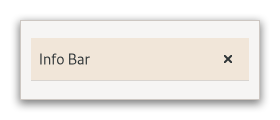
It is often temporarily shown at the top or bottom of a document.
In contrast to Dialog, which has an action area at the
bottom, GtkInfoBar has an action area at the side.
The API of GtkInfoBar is very similar to GtkDialog, allowing you
to add buttons to the action area with addButton(java.lang.String, int)
or withButtons(java.lang.String, java.lang.Object...). The sensitivity of action widgets
can be controlled with setResponseSensitive(int, boolean).
To add widgets to the main content area of a GtkInfoBar, use
addChild(org.gnome.gtk.Widget).
Similar to MessageDialog, the contents of a GtkInfoBar
can by classified as error message, warning, informational message, etc,
by using setMessageType(org.gnome.gtk.MessageType). GTK may use the message
type to determine how the message is displayed.
A simple example for using a GtkInfoBar:
GtkWidget *message_label;
 GtkWidget *widget;
 GtkWidget *grid;
 GtkInfoBar *bar;

 // set up info bar
 widget = gtk_info_bar_new ();
 bar = GTK_INFO_BAR (widget);
 grid = gtk_grid_new ();

 message_label = gtk_label_new ("");
 gtk_info_bar_add_child (bar, message_label);
 gtk_info_bar_add_button (bar,
                          _("_OK"),
                          GTK_RESPONSE_OK);
 g_signal_connect (bar,
                   "response",
                   G_CALLBACK (gtk_widget_hide),
                   NULL);
 gtk_grid_attach (GTK_GRID (grid),
                  widget,
                  0, 2, 1, 1);

 // ...

 // show an error message
 gtk_label_set_text (GTK_LABEL (message_label), "An error occurred!");
 gtk_info_bar_set_message_type (bar, GTK_MESSAGE_ERROR);
 gtk_widget_show (bar);
GtkInfoBar as GtkBuildable
GtkInfoBar supports a custom <action-widgets> element, which can contain
multiple <action-widget> elements. The “response” attribute specifies a
numeric response, and the content of the element is the id of widget
(which should be a child of the dialogs actionArea).
GtkInfoBar supports adding action widgets by specifying “action” as
the “type” attribute of a <child> element. The widget will be added
either to the action area. The response id has to be associated
with the action widget using the <action-widgets> element.
CSS nodes
GtkInfoBar has a single CSS node with name infobar. The node may get
one of the style classes .info, .warning, .error or .question, depending
on the message type.
If the info bar shows a close button, that button will have the .close
style class applied.
-
Nested Class Summary
Nested ClassesModifier and TypeClassDescriptionstatic classInfoBar.Builder<B extends InfoBar.Builder<B>>Deprecated.Inner class implementing a builder pattern to construct a GObject with properties.static interfaceDeprecated.Functional interface declaration of theCloseCallbackcallback.static interfaceDeprecated.Functional interface declaration of theResponseCallbackcallback.Nested classes/interfaces inherited from class org.gnome.gtk.Widget
Widget.DestroyCallback, Widget.DirectionChangedCallback, Widget.HideCallback, Widget.KeynavFailedCallback, Widget.MapCallback, Widget.MnemonicActivateCallback, Widget.MoveFocusCallback, Widget.QueryTooltipCallback, Widget.RealizeCallback, Widget.ShowCallback, Widget.StateFlagsChangedCallback, Widget.UnmapCallback, Widget.UnrealizeCallback, Widget.Widget$Impl, Widget.WidgetClassNested classes/interfaces inherited from class org.gnome.gobject.InitiallyUnowned
InitiallyUnowned.InitiallyUnownedClassNested classes/interfaces inherited from class org.gnome.gobject.GObject
GObject.NotifyCallback, GObject.ObjectClassNested classes/interfaces inherited from interface org.gnome.gtk.Accessible
Accessible.Accessible$Impl, Accessible.AccessibleInterfaceNested classes/interfaces inherited from interface org.gnome.gtk.Buildable
Buildable.Buildable$Impl, Buildable.BuildableIfaceNested classes/interfaces inherited from interface org.gnome.gtk.ConstraintTarget
ConstraintTarget.ConstraintTarget$Impl, ConstraintTarget.ConstraintTargetInterface -
Constructor Summary
ConstructorsConstructorDescriptionInfoBar()Deprecated.Creates a new InfoBar.InfoBar(MemorySegment address) Deprecated.Create a InfoBar proxy instance for the provided memory address. -
Method Summary
Modifier and TypeMethodDescriptionvoidaddActionWidget(Widget child, int responseId) Deprecated.Deprecated.voidaddButtons(String firstButtonText, Object... varargs) Deprecated.voidDeprecated.protected InfoBarasParent()Deprecated.Returns this instance as if it were its parent type.static InfoBar.Builder<? extends InfoBar.Builder> builder()Deprecated.AInfoBar.Builderobject constructs aInfoBarwith the specified properties.voidDeprecated.Emits the "close" signal.voidemitResponse(int responseId) Deprecated.Emits the "response" signal.static MemoryLayoutDeprecated.The memory layout of the native struct.Deprecated.booleanDeprecated.booleanDeprecated.static @Nullable TypegetType()Deprecated.Get the GType of the InfoBar classonClose(InfoBar.CloseCallback handler) Deprecated.Gets emitted when the user uses a keybinding to dismiss the info bar.onResponse(InfoBar.ResponseCallback handler) Deprecated.Emitted when an action widget is clicked.voidremoveActionWidget(Widget widget) Deprecated.voidremoveChild(Widget widget) Deprecated.voidresponse(int responseId) Deprecated.voidsetDefaultResponse(int responseId) Deprecated.voidsetMessageType(MessageType messageType) Deprecated.voidsetResponseSensitive(int responseId, boolean setting) Deprecated.voidsetRevealed(boolean revealed) Deprecated.voidsetShowCloseButton(boolean setting) Deprecated.static InfoBarwithButtons(@Nullable String firstButtonText, Object... varargs) Deprecated.Methods inherited from class org.gnome.gtk.Widget
actionSetEnabled, activateActionIfExists, activateDefault, activateWidget, addController, addCssClass, addMnemonicLabel, addTickCallback, allocate, childFocus, computeBounds, computeExpand, computeExpand, computePoint, computeTransform, contains, createPangoContext, createPangoLayout, cssChanged, directionChanged, disposeTemplate, dragCheckThreshold, emitDestroy, emitDirectionChanged, emitHide, emitKeynavFailed, emitMap, emitMnemonicActivate, emitMoveFocus, emitQueryTooltip, emitRealize, emitShow, emitStateFlagsChanged, emitUnmap, emitUnrealize, errorBell, focus, getAllocatedBaseline, getAllocatedHeight, getAllocatedWidth, getAllocation, getAncestor, getBaseline, getCanFocus, getCanTarget, getChildVisible, getClipboard, getColor, getCssClasses, getCssName, getCursor, getDefaultDirection, getDirection, getDisplay, getFirstChild, getFocusable, getFocusChild, getFocusOnClick, getFontMap, getFontOptions, getFrameClock, getHalign, getHasTooltip, getHeight, getHexpand, getHexpandSet, getLastChild, getLayoutManager, getLimitEvents, getMapped, getMarginBottom, getMarginEnd, getMarginStart, getMarginTop, getName, getNative, getNextSibling, getOpacity, getOverflow, getPangoContext, getParent, getPreferredSize, getPrevSibling, getPrimaryClipboard, getRealized, getReceivesDefault, getRequestMode, getRoot, getScaleFactor, getSensitive, getSettings, getSize, getSizeRequest, getStateFlags, getStyleContext, getTemplateChild, getTooltipMarkup, getTooltipText, getValign, getVexpand, getVexpandSet, getVisible, getWidth, grabFocus, hasCssClass, hasDefault, hasFocus, hasVisibleFocus, hide, inDestruction, initTemplate, insertActionGroup, insertAfter, insertBefore, isAncestor, isDrawable, isFocus, isSensitive, isVisible, keynavFailed, listMnemonicLabels, map, measure, mnemonicActivate, moveFocus, observeChildren, observeControllers, onDestroy, onDirectionChanged, onHide, onKeynavFailed, onMap, onMnemonicActivate, onMoveFocus, onQueryTooltip, onRealize, onShow, onStateFlagsChanged, onUnmap, onUnrealize, pick, pick, queryTooltip, queueAllocate, queueDraw, queueResize, realize, removeController, removeCssClass, removeMnemonicLabel, removeTickCallback, root, setCanFocus, setCanTarget, setChildVisible, setCssClasses, setCursor, setCursorFromName, setDefaultDirection, setDirection, setFocusable, setFocusChild, setFocusOnClick, setFontMap, setFontOptions, setHalign, setHasTooltip, setHexpand, setHexpandSet, setLayoutManager, setLimitEvents, setMarginBottom, setMarginEnd, setMarginStart, setMarginTop, setName, setOpacity, setOverflow, setParent, setReceivesDefault, setSensitive, setSizeRequest, setStateFlags, setStateFlags, setTooltipMarkup, setTooltipText, setValign, setVexpand, setVexpandSet, setVisible, shouldLayout, show, sizeAllocate, sizeAllocate, snapshot, snapshotChild, stateFlagsChanged, systemSettingChanged, translateCoordinates, triggerTooltipQuery, unmap, unparent, unrealize, unroot, unsetStateFlags, unsetStateFlagsMethods inherited from class org.gnome.gobject.GObject
addToggleRef, addWeakPointer, bindProperty, bindProperty, bindProperty, bindPropertyFull, bindPropertyFull, bindPropertyWithClosures, bindPropertyWithClosures, compatControl, connect, connect, connect, constructed, disconnect, dispatchPropertiesChanged, dispose, dupData, dupQdata, emit, emitNotify, finalize_, forceFloating, freezeNotify, get, getData, getProperty, getProperty, getProperty, getQdata, getv, interfaceFindProperty, interfaceInstallProperty, interfaceListProperties, isFloating, newInstance, newInstance, newv, notify, notify, notifyByPspec, onNotify, ref, refSink, removeToggleRef, removeWeakPointer, replaceData, replaceQdata, runDispose, set, setData, setDataFull, setProperty, setProperty, setProperty, setQdata, setQdataFull, setv, stealData, stealQdata, takeRef, thawNotify, unref, watchClosure, weakRef, weakUnref, withPropertiesMethods inherited from class org.gnome.gobject.TypeInstance
callParent, callParent, cast, getPrivate, readGClass, writeGClassMethods inherited from class org.javagi.base.ProxyInstance
equals, handle, hashCodeMethods inherited from class java.lang.Object
clone, finalize, getClass, notify, notifyAll, toString, wait, wait, waitMethods inherited from interface org.gnome.gtk.Accessible
announce, getAccessibleParent, getAccessibleRole, getAtContext, getBounds, getFirstAccessibleChild, getNextAccessibleSibling, getPlatformState, resetProperty, resetRelation, resetState, setAccessibleParent, updateNextAccessibleSibling, updatePlatformState, updateProperty, updateRelation, updateStateMethods inherited from interface org.gnome.gtk.Buildable
getBuildableId
-
Constructor Details
-
InfoBar
Deprecated.Create a InfoBar proxy instance for the provided memory address.- Parameters:
address- the memory address of the native object
-
InfoBar
public InfoBar()Deprecated.Creates a new InfoBar.
-
-
Method Details
-
getType
Deprecated.Get the GType of the InfoBar class- Returns:
- the GType
-
getMemoryLayout
Deprecated.The memory layout of the native struct.- Returns:
- the memory layout
-
asParent
Deprecated.Returns this instance as if it were its parent type. This is mostly synonymous to the Javasuperkeyword, but will set the native typeclass function pointers to the parent type. When overriding a native virtual method in Java, "chaining up" withsuper.methodName()doesn't work, because it invokes the overridden function pointer again. To chain up, callasParent().methodName(). This will call the native function pointer of this virtual method in the typeclass of the parent type. -
withButtons
Deprecated.Creates a newGtkInfoBarwith buttons.Button text/response ID pairs should be listed, with a
nullpointer ending the list. A response ID can be any positive number, or one of the values in theGtkResponseTypeenumeration. If the user clicks one of these dialog buttons, GtkInfoBar will emit theGtk.InfoBar::responsesignal with the corresponding response ID.- Parameters:
firstButtonText- ext to go in first buttonvarargs- response ID for first button, then additional buttons, ending withnull- Returns:
- a new
GtkInfoBar
-
addActionWidget
Deprecated.Add an activatable widget to the action area of aGtkInfoBar.This also connects a signal handler that will emit the
Gtk.InfoBar::responsesignal on the message area when the widget is activated. The widget is appended to the end of the message areas action area.- Parameters:
child- an activatable widgetresponseId- response ID forchild
-
addButton
Deprecated.Adds a button with the given text.Clicking the button will emit the
Gtk.InfoBar::responsesignal with the given response_id. The button is appended to the end of the info bar's action area. The button widget is returned, but usually you don't need it.- Parameters:
buttonText- text of buttonresponseId- response ID for the button- Returns:
- the
GtkButtonwidget that was added
-
addButtons
Deprecated.Adds multiple buttons.This is the same as calling
addButton(java.lang.String, int)repeatedly. The variable argument list should benull-terminated as withwithButtons(java.lang.String, java.lang.Object...). Each button must have both text and response ID.- Parameters:
firstButtonText- button textvarargs- response ID for first button, then more text-response_id pairs, ending withnull
-
addChild
Deprecated.Adds a widget to the content area of the info bar.- Parameters:
widget- the child to be added
-
getMessageType
Deprecated.Returns the message type of the message area.- Returns:
- the message type of the message area.
-
getRevealed
Deprecated.Returns whether the info bar is currently revealed.- Returns:
- the current value of the
Gtk.InfoBar:revealedproperty
-
getShowCloseButton
Deprecated.Returns whether the widget will display a standard close button.- Returns:
trueif the widget displays standard close button
-
removeActionWidget
Deprecated.Removes a widget from the action area ofinfoBar.The widget must have been put there by a call to
addActionWidget(org.gnome.gtk.Widget, int)oraddButton(java.lang.String, int).- Parameters:
widget- an action widget to remove
-
removeChild
Deprecated.Removes a widget from the content area of the info bar.- Parameters:
widget- a child that has been added to the content area
-
response
Deprecated.Emits the “response” signal with the givenresponseId.- Parameters:
responseId- a response ID
-
setDefaultResponse
Deprecated.Sets the last widget in the info bar’s action area with the given response_id as the default widget for the dialog.Pressing “Enter” normally activates the default widget.
Note that this function currently requires this InfoBar to be added to a widget hierarchy.
- Parameters:
responseId- a response ID
-
setMessageType
Deprecated.Sets the message type of the message area.GTK uses this type to determine how the message is displayed.
- Parameters:
messageType- aGtkMessageType
-
setResponseSensitive
Deprecated.Sets the sensitivity of action widgets forresponseId.Calls
gtk_widget_set_sensitive (widget, setting)for each widget in the info bars’s action area with the givenresponseId.A convenient way to sensitize/desensitize buttons.- Parameters:
responseId- a response IDsetting- TRUE for sensitive
-
setRevealed
Deprecated.Sets whether theGtkInfoBaris revealed.Changing this will make this InfoBar reveal or conceal itself via a sliding transition.
Note: this does not show or hide this InfoBar in the
Gtk.Widget:visiblesense, so revealing has no effect ifGtk.Widget:visibleisfalse.- Parameters:
revealed- The new value of the property
-
setShowCloseButton
Deprecated.If true, a standard close button is shown.When clicked it emits the response
ResponseType.CLOSE.- Parameters:
setting-trueto include a close button
-
onClose
Deprecated.Gets emitted when the user uses a keybinding to dismiss the info bar.The ::close signal is a keybinding signal.
The default binding for this signal is the Escape key.
- Parameters:
handler- the signal handler- Returns:
- a signal handler ID to keep track of the signal connection
- See Also:
-
emitClose
public void emitClose()Deprecated.Emits the "close" signal. SeeonClose(org.gnome.gtk.InfoBar.CloseCallback). -
onResponse
Deprecated.Emitted when an action widget is clicked.The signal is also emitted when the application programmer calls
response(int). TheresponseIddepends on which action widget was clicked.- Parameters:
handler- the signal handler- Returns:
- a signal handler ID to keep track of the signal connection
- See Also:
-
emitResponse
public void emitResponse(int responseId) Deprecated.Emits the "response" signal. SeeonResponse(org.gnome.gtk.InfoBar.ResponseCallback). -
builder
Deprecated.AInfoBar.Builderobject constructs aInfoBarwith the specified properties. Use the variousset...()methods to set properties, and finish construction withInfoBar.Builder.build().- Returns:
- the builder object
-
Revealerwith aBoxcontaining aLabeland an optionalButton, according to your application's design.